What OpenClaw is and how we give it memory with cognee
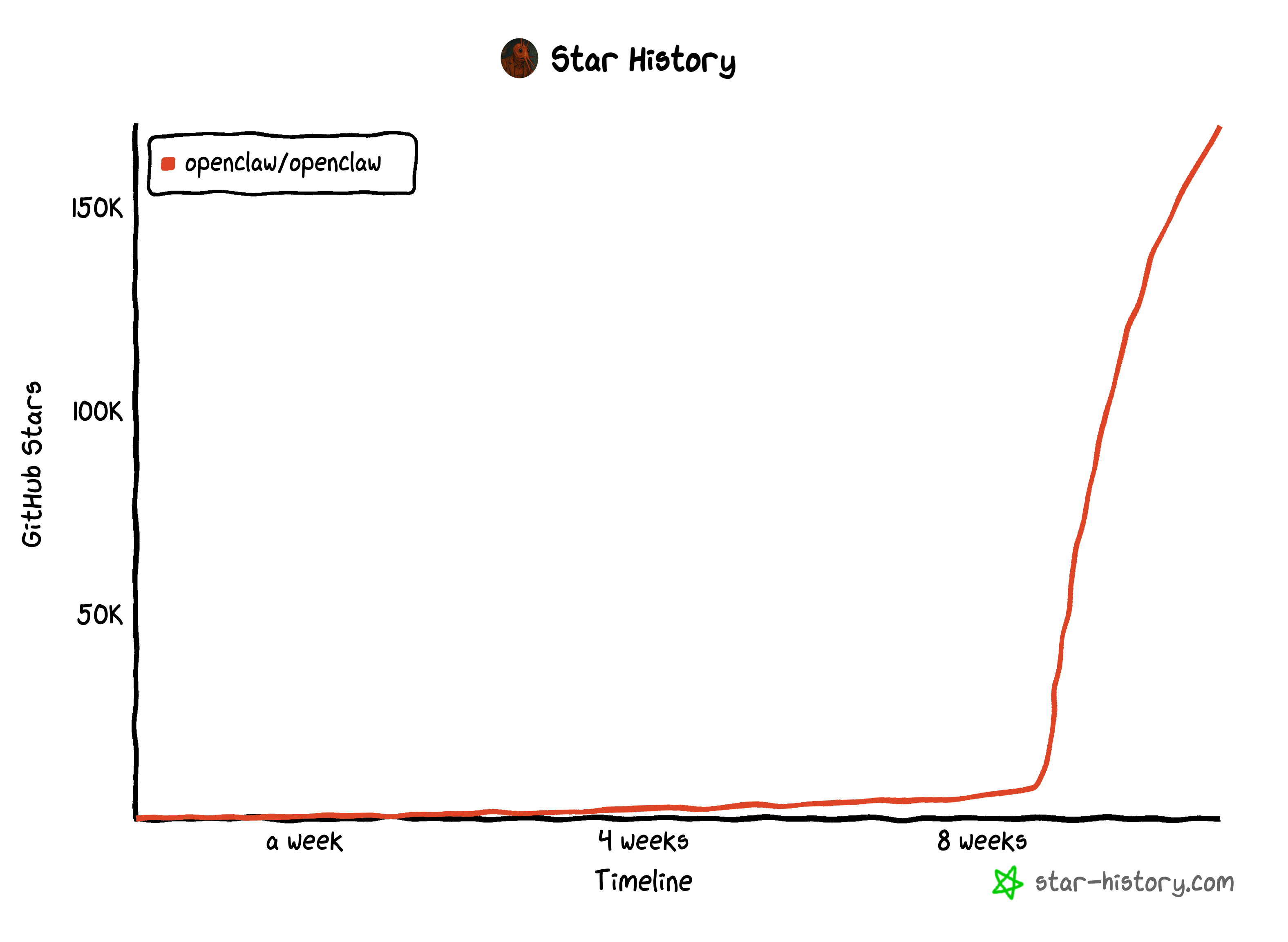
From Weekend Project to 170K GitHub Stars: The OpenClaw Phenomenon
If you've been anywhere near the AI developer community in the past month, you've probably heard of OpenClaw. What started as Peter Steinberger's weekend project has exploded into one of the fastest-growing open-source projects in history — going from 9,000 to over 60,000 GitHub stars in just a few days, now sitting at over 170,000 stars.
Peter, the Austrian software engineer behind PSPDFKit, "retired" after the company received a €100M investment from Insight Partners in 2021. Apparently, retirement for Peter means building viral AI tools.
The Name Game
The project has had quite the identity journey: Clawdbot → Moltbot → OpenClaw
Yes, Anthropic sent a trademark complaint because "Clawdbot" was phonetically too close to their mascot. The lobster theme stuck though — "molting" symbolizes growth, which feels appropriate for a project that's been shedding names faster than users can update their configs - including me.
ClawCon: When a Side Project Gets Its Own Conference
This week, over 700 developers gathered in San Francisco for the first ever ClawCon — a "Show & Tell" where builders shared their OpenClaw workflows. All of this happened within roughly a month of the project going viral. That's insane. Watch the ClawCon video recording here.
Understanding OpenClaw's Built-in Memory
Before I explain why we built a Cognee plugin, let me break down how OpenClaw's native agent memory works — because understanding the limitations is what motivated this project.
How OpenClaw Remembers Things
OpenClaw's memory is beautifully simple: plain Markdown files.
The agent reads these files, and when it learns something worth remembering, it writes to them. That's it. No magic, no hidden databases — just files you can read and edit yourself.
Under the hood, OpenClaw does some clever things:
- Semantic search over ~400 token chunks with 80-token overlap
- Vector embeddings stored in SQLite via the sqlite-vec extension
- Full-text search using SQLite's FTS5
You can read the official docs here.
The Limitations I Ran Into
After using OpenClaw, I noticed some pain points:
- Context compaction issues — During long sessions, memory can get "forgotten" when context is compressed.
- Cross-project noise — When working across multiple projects, searches sometimes return irrelevant results from other contexts.
- Limited ingestion — Can I ingest more than chats (files/URLs/repos) without building a bespoke pipeline?
- No relationships — Plain Markdown doesn't capture semantic connections between concepts.
- No provenance — Can I keep provenance + auditability so answers are traceable?
- No isolation — Can I isolate memory per user / dataset so things don't bleed across?
- No feedback loop — Can memory improve from real feedback instead of prompt whack-a-mole?
This is where Cognee comes in.
What is Cognee?
Cognee is an open-source memory engine that builds knowledge graphs from your data. Instead of just storing text chunks, it:
1- Extracts entities and relationships — Understands that "Alice" is a person who "manages" the "Auth team"
2- Builds a graph — Creates navigable connections between concepts
3- Enables better retrieval — Can answer questions by traversing relationships, backed by vector similarity, not just matching keywords
Why Cognee + OpenClaw?
OpenClaw's Markdown-based memory is great for simplicity and transparency. But for complex, long-running projects where relationships matter, having a knowledge graph layer adds real value.
Our plugin doesn't replace OpenClaw's native memory — it augments it. The memory files stay in Markdown (you can still read and edit them), but they also get indexed into Cognee's graph for smarter retrieval.
Building the Plugin: A Developer's Guide
Here's how we built the Cognee plugin, step by step. If you want to build your own OpenClaw plugin, this should help. You can check the source code and use as you need here.
Step 1: Project Structure
An OpenClaw plugin needs three things:
Step 2: package.json
Key points:
- The openclaw.extensions field tells OpenClaw where to find your plugin code
- Use peerDependencies for the openclaw SDK
- Build to dist/ and include it in files
Step 3: openclaw.plugin.json
This manifest defines your plugin's metadata and configuration schema:
The configSchema uses JSON Schema. OpenClaw's UI will render a config form based on this.
Step 4: The Plugin Code
The plugin SDK provides these key APIs:
Step 5: The Sync Logic
The core of my plugin is a two-phase sync:
Phase 1: On Startup
Phase 2: After Each Agent Run
Step 6: The Recall Hook
Before each agent run, search Cognee and inject relevant memories:
The GRAPH_COMPLETION search type uses Cognee's knowledge graph to find relevant information — it can traverse relationships, not just match keywords.
Using the Plugin
Installation
Configuration
Add to ~/.openclaw/config.yaml:
Running Cognee
You can easily run cognee in Docker (using the docker compose file here):
CLI Commands
While the plugin auto-syncs in the background, you can also trigger indexing manually or check the current sync status:
Useful Links
- Plugin source: https://github.com/topoteretes/cognee-integrations/tree/main/integrations
- Cognee: https://github.com/topoteretes/cognee
- Cognee Docs: https://docs.cognee.ai/
- OpenClaw: https://github.com/openclaw/openclaw
- OpenClaw Memory Docs: https://docs.openclaw.ai/concepts/memory
Final Thoughts
Building this plugin taught me a lot about OpenClaw's architecture. The plugin system is well-designed — hooks for agent lifecycle, CLI registration, background services — it's all there. Hopefully this post helps you use cognee plugin and get started if you plan to build your own plugin.
And if you have questions about building OpenClaw plugins, join our Discord community and feel free to ask any questions.
Happy building! 🦞