< BlogDeep DivesAug 15, 2025Updated September 3, 20267 minutes read
Aug 15, 2025Updated September 3, 20267 minutes read
Pluggable Observability for Semantic Workflows: cognee × Keywords AI
Hande KafkasGrowth Engineer
We love building graph-native, data-aware AI systems. But when you stitch together multiple async tasks, agents, and data pipelines, your system can become a black box, with behavior that’s hard to trace, measure, and debug.
You need span‑level visibility across workflows—without littering your code with tracing boilerplate or getting locked into a tool.
That’s why we’ve designed cognee / Memory for AI agents to run on modular, scalable pipelines. Our workflows load data, create semantic graph nodes, and trigger downstream tasks. We wanted clean, consistent tracing across all of it—and Respan (formerly Keywords AI — the package names, imports, and environment variables below still use the old keywordsai naming), via its lightweight keywordsai-tracing SDK, gives us exactly that, with a single decorator: @observe.
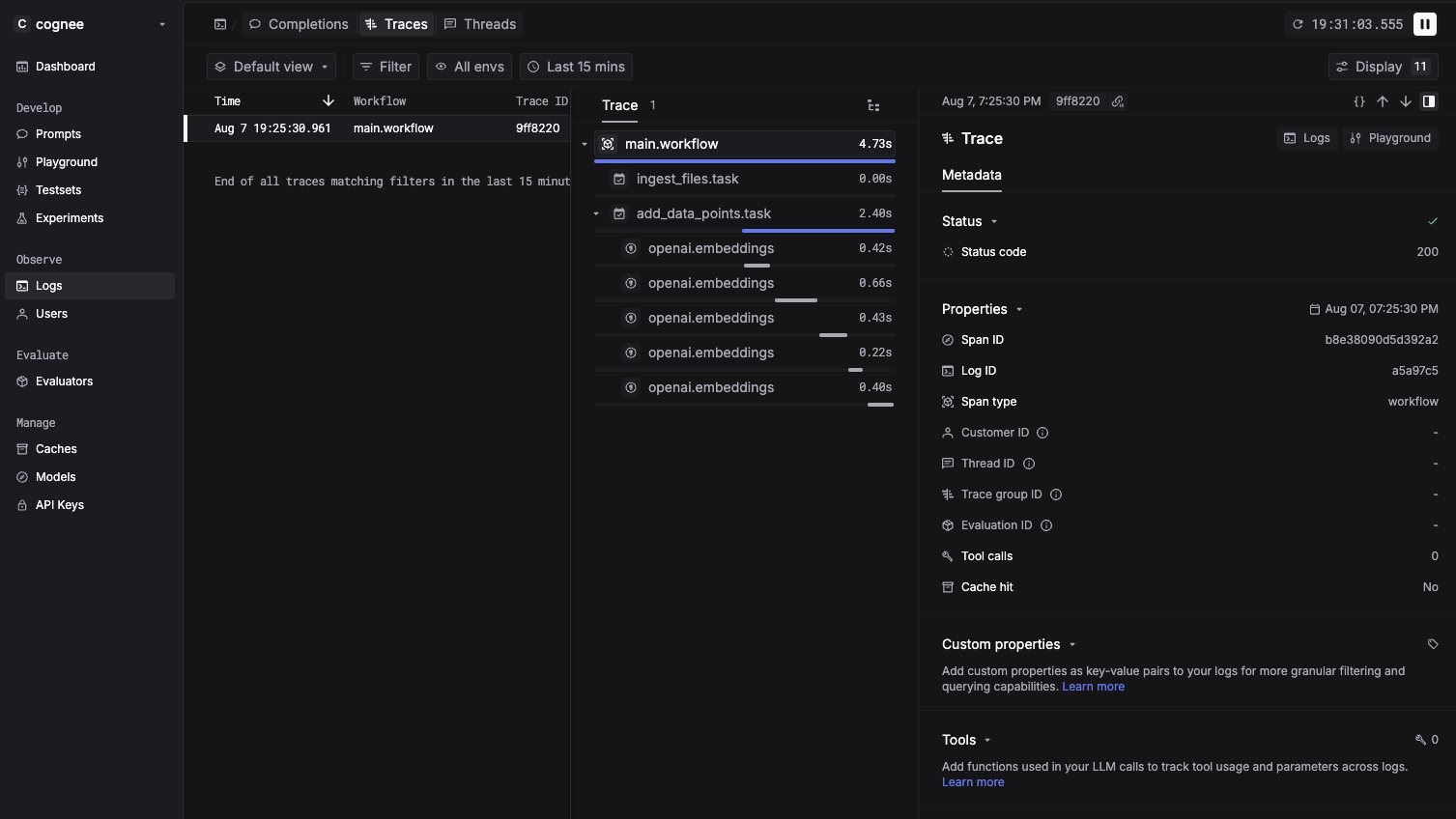
Respan / LLM observability for AI teams provides real‑time traces, logs, and metrics across LLM calls and agent runs: task/workflow spans, token and latency stats, and error visibility. Wrapping our async pipelines with @observe gives every span a meaningful name and stable ID—so when something veers off course, we can debug fast, and with zero changes to our business logic.
In this article, we’ll cover how cognee standardizes AI observability, how the Respan adapter works, and give you a practical example you can run by yourself locally.
Who This Is For:
ML/agent teams who need to see every tool call and model hop.
Platform/SRE folks who want consistent tracing across services.
Developers who want observability without vendor lock‑in or heavy integration work.
Outcome: Name every span. Follow every hop. Fix issues faster.
One Decorator, Many Backends: cognee’s Pluggable Observability
cognee is an open source memory engine with a semantic graph at its core. You use tasks and workflows via its Python SDK to manipulate DataPoint models based on your data and to connect them into a knowledge graph. For observability, cognee exposes a single surface: @observe.
Unified abstraction: Decorate tasks with @observe; decorate workflows with @observe(workflow=True).
Pluggable backends: Choose your monitoring tool via config or environment variables.
Zero vendor lock-in: The interface remains the same regardless of the telemetry provider.
Integrating Respan: Spanning with a Single Import
cognee-community is our extension hub. Adapters for third‑party tools and databases, pipelines, and community‑contributed tasks live here. Hosting integrations in this repo gives you:
Community license and independent evolution: Adapters can iterate at their own pace, independently of core releases.
Slim, targeted installs: Pull in only what you need, avoiding heavyweight drivers for users who don’t need them.
Seamless interoperability with core: A small registration shim wires the package into cognee’s abstraction layer.
Predictable layout: Under *packages/**, each subfolder is a self‑contained provider implemented in the same pattern you’ll follow.
The Respan integration lives in the community repo as cognee-community-observability-keywordsai.
Note on the approach: The adapter intentionally monkey‑patches get_observe() at import time. This keeps the @observe surface stable while letting you swap backends via config.
Quick Start (3 Minutes)
Prerequisites:
Python 3.10+
Respan API key
LLM API key (e.g., OpenAI)
A clean virtual environment
1) Clone the community repo:
Get your Respan API key here and set the following environment variables:
Navigate to the Respan integration directory and install dependencies:
Prefer pip? Use your env’s installer to install this package and its extras.
The adapter patches cognee’s get_observe() at import time, so you get Respan spans with no code changes to your tasks:
The adapter’s get_keywordsai_observe() maps the cognee @observe surface to Respan’s @task and @workflow decorators:
Automatic telemetry bootstrap:KeywordsAITelemetry() initializes the SDK once.
Named spans: Use @observe(name="my_span") to override defaults.
Tip: Use @observe(name="ingest_files") to enforce consistent span naming.
Example: Trace Every Step in a cognee Pipeline
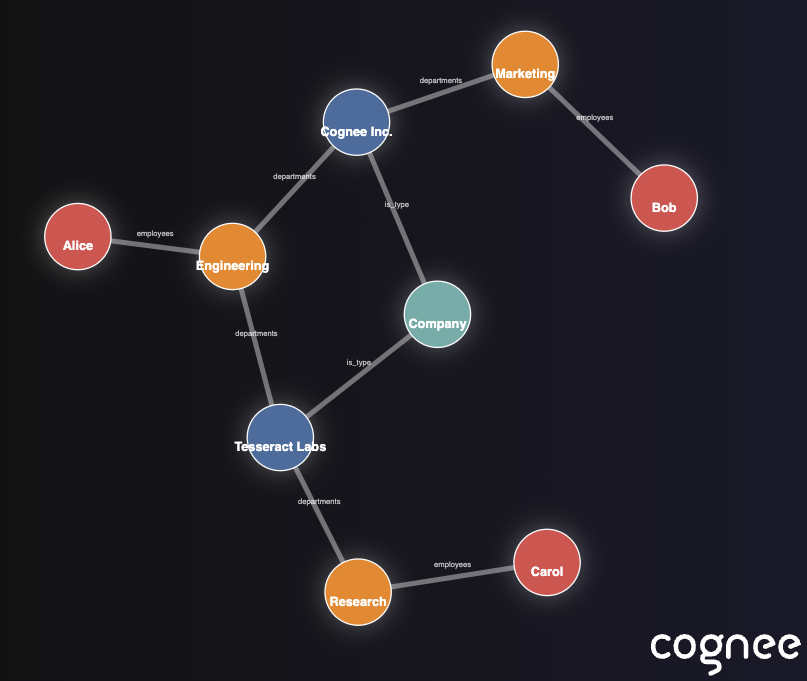
To demonstrate how Respan helps trace every step in cognee, we’ve created a simple, custom pipeline that shows how to build DataPoint nodes from JSON input files (like people.json or companies.json), ingest them, and render a graph—all while emitting task and workflow spans to Respan.
Key points:
Decorate tasks:@observe creates a Respan task span for ingest_files.
Decorate workflows:@observe(workflow=True) wraps the whole run as a workflow span.
Wrap existing functions:observe(_add_data_points) instruments an existing cognee task without changing its code.
What You Get in Respan
Workflow and task spans with consistent naming.
Timing, errors, and context tied back to your semantic pipeline.
No custom plumbing—instrumentation is a single decorator.
Step Into the Future: Measurable, Graph-Native AI Systems
Observability should help you move faster, not slow you down. With cognee’s unified @observe surface and Respan’s lightweight tracing, you get robust telemetry for complex, graph-driven pipelines—without holding development back.
Get started
Cognee is the fastest way to start building reliable Al agent memory.
A breakdown of Grok API pricing for 2026: per-model token rates, what happens when a prompt crosses 200K tokens, caching and tool costs, and how much a memory layer can cut off the bill.
A field guide to the AI podcasts worth an engineer's queue in 2026 — what each show actually covers, a recent episode to start with, and a clear reason to skip the ones that aren't for you.
AgentBench tests LLMs as agents across eight interactive environments, from operating systems to web shopping. See how its scoring works, what the original results found, and where memory evaluation picks up where AgentBench leaves off.
A breakdown of Grok API pricing for 2026: per-model token rates, what happens when a prompt crosses 200K tokens, caching and tool costs, and how much a memory layer can cut off the bill.
A field guide to the AI podcasts worth an engineer's queue in 2026 — what each show actually covers, a recent episode to start with, and a clear reason to skip the ones that aren't for you.
AgentBench tests LLMs as agents across eight interactive environments, from operating systems to web shopping. See how its scoring works, what the original results found, and where memory evaluation picks up where AgentBench leaves off.