AI Database Guide: Types, Retrieval, RAG, and Memory

AI database has become a polysemous concept: it can refer to vector databases built for embedding retrieval, PostgreSQL + pgvector setups, graph databases, search engines, analytical platforms, or database products that add AI-assisted querying and model integrations.
There is no ubiquitous blueprint for an AI database: the term now spans storage and retrieval infrastructure built around different data models and query patterns, with the definition having broadened as AI applications came to rely on more kinds of data access.
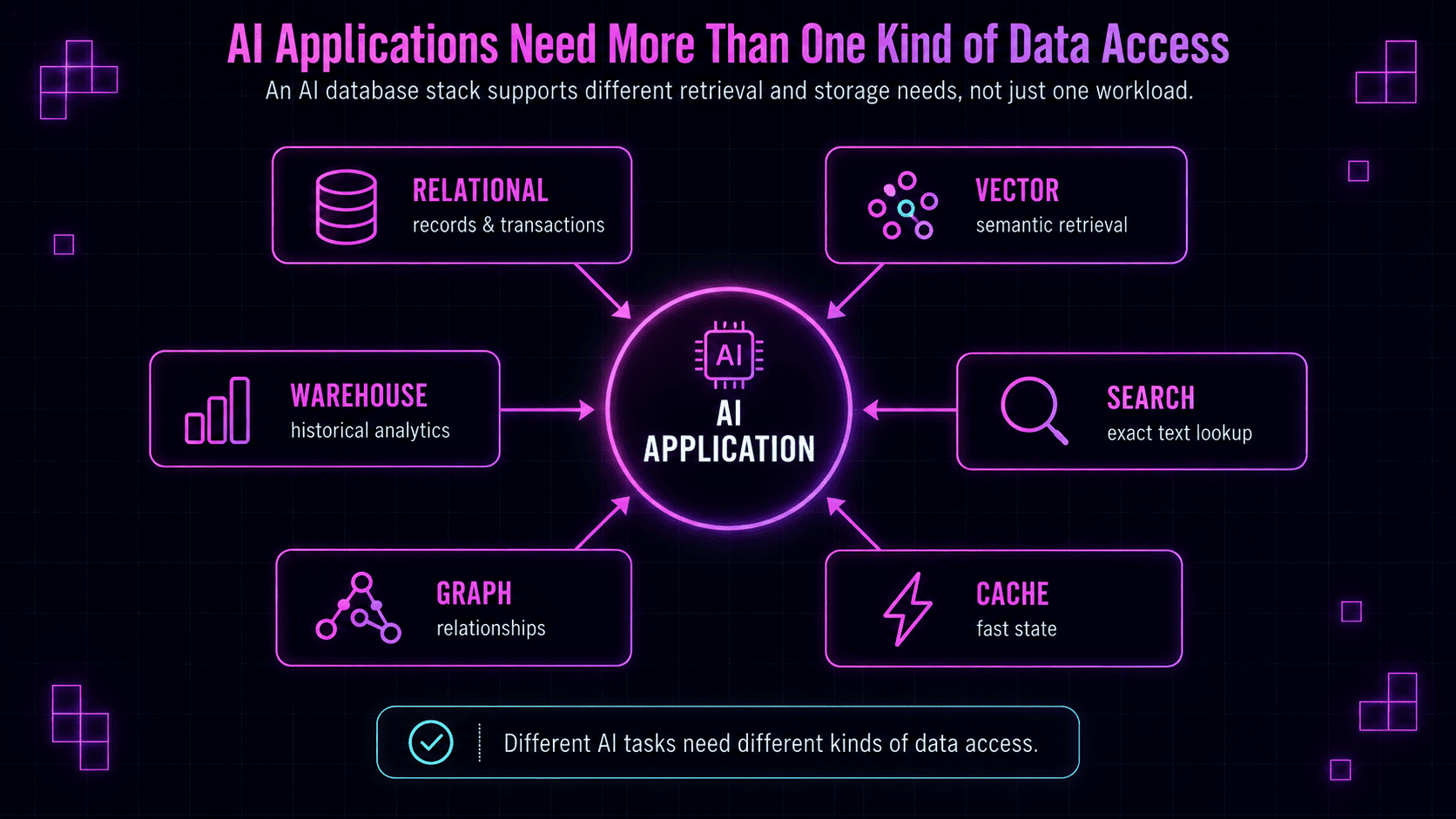
An application often needs transactional records and SQL joins, semantic retrieval over embeddings, exact text search, connected entities, fast session state, or years of analytical data. Some platforms combine several of these capabilities, while other workloads justify separate infrastructure.
For agent memory, there's another requirement: information discovered during one task can need to persist across sessions. Deciding what becomes durable, where it applies, how newer evidence changes it, and what should return later belongs to the memory layer above storage.
In this guide, we'll work through the major types of AI databases, how their capabilities overlap, representative technologies across the current stack, and how to choose infrastructure for RAG and other AI applications. We'll also clarify what knowledge database means and identify when database infrastructure alone no longer covers the full information lifecycle an AI system needs.
What is an AI database?
An AI database is an umbrella term for databases and data platforms built for AI workloads, extended with AI-oriented retrieval or processing capabilities, or enhanced with AI features for querying and administration. In modern application architecture, the term is often used for infrastructure that stores, searches, relates, and retrieves the data an AI system needs while it runs.
But unlike a relational, graph, document, or vector database, there's no standardized database model called an AI database. Two products described as AI databases can use very different data models and serve very different use cases — their common denominator is that they both participate in an AI workload, but the term itself doesn't make the way the data is represented or retrieved self-evident.
What all can "AI database" mean?
Before we go on, let's get an overview of the four broad and somewhat overlapping ways the term AI database is used:
| Meaning | What it describes | Typical examples |
|---|---|---|
| Database infrastructure for AI applications | Databases and retrieval systems used by RAG, AI agents, semantic search, recommendation systems, and other AI applications | Vector databases, graph databases, search engines, relational and document databases |
| Existing databases extended for AI workloads | General-purpose databases that add vector search, semantic retrieval, model integrations, or similar AI-oriented capabilities | PostgreSQL + pgvector, MongoDB Atlas, multimodel databases |
| Databases with built-in AI capabilities | Database platforms that use machine learning or generative AI for querying, analytics, administration, optimization, or development | Natural-language SQL, automated tuning, embedded ML |
| AI database software | Tools that let users create, query, organize, or analyze business data through AI interfaces | AI-enabled no-code and low-code database platforms |
A word on the overlap: the same platform can belong to more than one category, often by combining its existing data model with semantic search, embedded ML, or AI-assisted querying.
For the rest of this guide, we'll focus on the first two meanings: the databases and retrieval infrastructure used to build AI applications, including established database systems that have added AI-oriented retrieval capabilities.
This scope will include:
- relational databases with vector extensions;
- dedicated vector databases;
- graph databases;
- search engines;
- document databases;
- in-memory and low-latency stores;
- analytical warehouses and lakehouses;
- converged and multimodel databases.
Modern products often combine several of these access patterns, so in order to know whether a system belongs in the architecture, we need to look at the data the application already has, how that data is queried, and which workload places the strongest demands on the infrastructure.
That starts with the capabilities an AI application actually needs from its data layer.
What does an AI application need from a database?
Different applications expect their data layer to do different things. For example:
- A support agent might read account records from an operational database, retrieve documentation semantically, search an exact error code, follow dependencies between products, and keep current workflow state available between turns.
- A coding agent has a similar but distinct spread of needs: repository and permission records, semantic search over internal documentation, exact lookups for error codes or dependency names, and fast access to in-progress tool output.
Accordingly, below are some demands placed on the infrastructure.
Persistent records and transactions
Many AI applications still depend on ordinary application data: users, accounts, orders, permissions, subscriptions, inventory, and events.
If an agent can issue a refund, update an account, create a ticket, or check feature access, it needs the same reliable operational data as the rest of the application. That can require transactions, joins, constraints, structured filters, and an authoritative record that multiple services can update safely.
Relational databases like PostgreSQL can store conventional relational data while pgvector adds vector similarity search over embeddings.
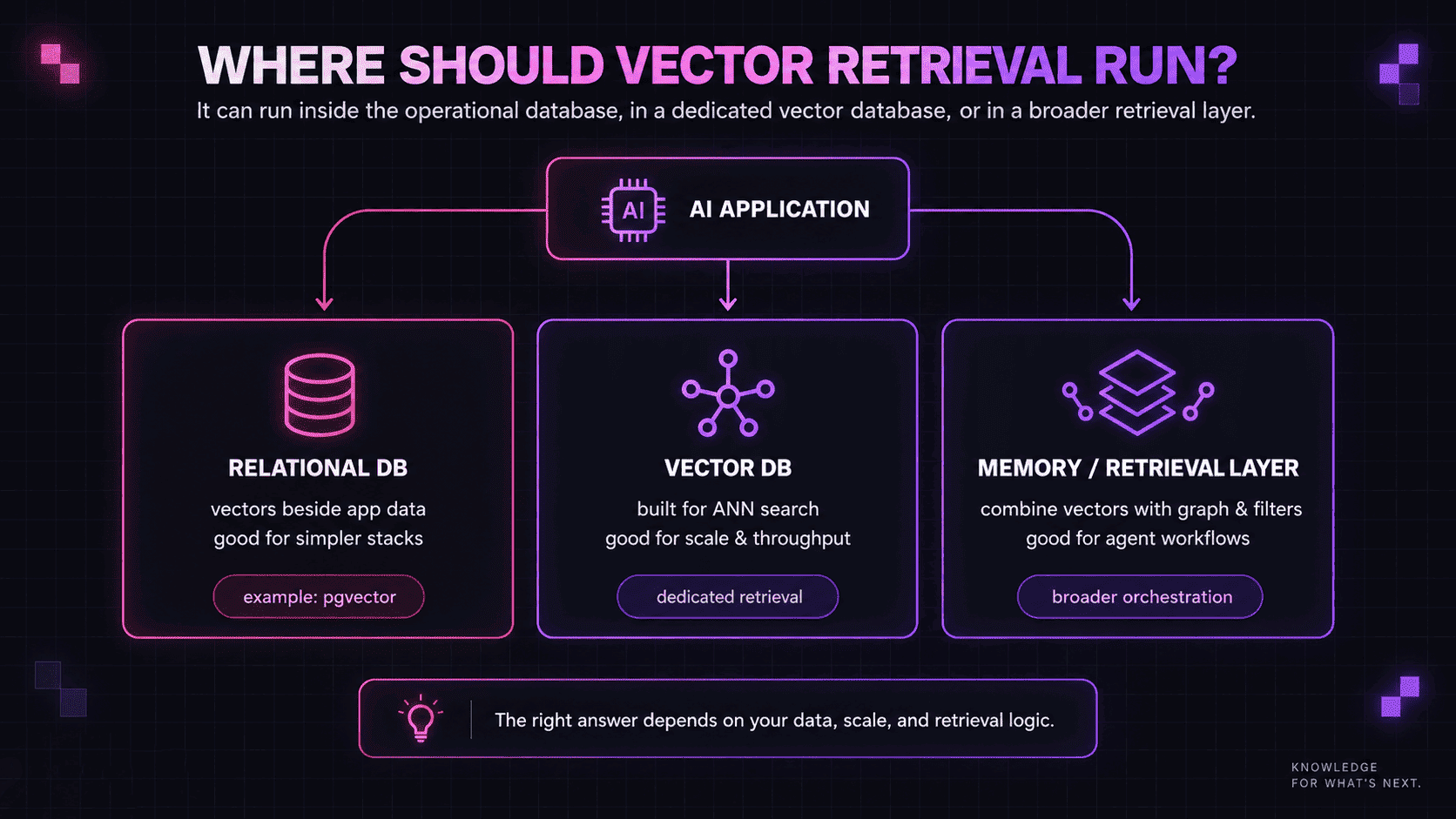
Then, the architectural question becomes whether AI retrieval belongs beside the operational data or in a separate system — a decision that turns on embedding volume, query latency targets, and how much concurrent traffic the vector workload adds on top of transactional load.
Semantic retrieval
Embedding models convert queries and stored content into vectors to enable retrieval by meaning rather than exact wording.
Vector databases specialize in this workload, but PostgreSQL, search engines, document databases, Redis, and analytical platforms can also index and retrieve vectors. Vector similarity is also often just part of the retrieval story once relationships between entities enter the picture.
The choice depends on collection size, query volume, filtering, latency, update frequency, and how closely the vectors relate to data stored elsewhere.
Lexical and hybrid retrieval
Semantic similarity isn't enough for every query. Error codes, API methods, model numbers, product names, legal clauses, and acronyms often depend on exact wording, and a semantically similar result can be wrong if it doesn't refer to the relevant identifier.
Search engines such as Elasticsearch and OpenSearch combine lexical relevance with vector retrieval, enabling hybrid search that ranks results using both lexical signals and semantic similarity. For technical documentation, enterprise search, legal corpora, and many RAG applications, this can outperform vector similarity alone.
Relationships and multi-hop retrieval
For queries that depend on relationships between facts, relational databases can represent those connections through keys and joins, which is often sufficient when paths are limited and known in advance.
Graph databases store those relationships as first-class edges, allowing queries to traverse connected records directly across multiple hops or when the path isn't known upfront — our multi-hop retrieval benchmarks show how that difference can affect retrieval performance at scale.
Fast state and intermediate data
Any AI agent workflow also generates information that needs fast access, including conversation state, workflow steps, cached retrieval results, recent tool output, and counters, with in-memory and low-latency systems such as Redis commonly used for this purpose.
Some data can expire after minutes or hours, while other information needs to persist across sessions. A current workflow step (application state) and a verified fact have different lifecycle requirements even when stored in the same system.
Analytical data
AI applications can also query information collected primarily for analysis rather than transactions, including customer activity, product telemetry, financial records, support events, or data consolidated across operational sources.
When the information an AI system needs already exists in a governed analytical environment, warehouses and lakehouse platforms such as Snowflake, BigQuery, and Databricks help with analytical queries across large historical datasets. They also increasingly support vector, lexical, and hybrid retrieval alongside SQL.
Governance and provenance
Whatever database architecture we choose, retrieved information needs to stay connected to its source and its access rules — who can see it, whether it's still valid, and where it came from. We'll expand on this later.
Types of AI databases
AI databases diverge according to the kind of workload they were originally designed for. The overlaps in the architectures' capabilities are increasing, but their underlying data models and operating assumptions still influence which applications they suit best.
Relational databases with vector extensions
Relational databases such as PostgreSQL already hold authoritative application data: users, accounts, permissions, transactions, documents, and other structured records. pgvector adds to that exact and approximate nearest-neighbor search capabilities through indexes such as HNSW and IVFFlat. Vector queries can still use SQL joins, conditions, and metadata filters.
The combination is simplest when embeddings stay close to relational records. In a support application, for example, document chunks and embeddings can be kept beside customer, subscription, product, language, permission, and publication data, allowing semantic retrieval to use the same filters as the rest of the application.
Keeping records, metadata, and embeddings in one database also avoids a separate synchronization boundary. Content changes can still require re-embedding, but the resulting vector stays managed alongside its source data.
Choose it when:
- the application already relies heavily on SQL;
- embeddings belong directly to existing records;
- joins and structured filters are important to retrieval;
- transactional consistency is required;
- vector search is one part of a more expansive application workload.
But: vector queries share compute and I/O with the relational workload, so heavy embedding traffic can compete with transactional queries running beside it.
Dedicated vector databases
Dedicated vector databases store embeddings and efficiently retrieve the nearest matches by meaning — they are behind semantic search, recommendations, multimodal retrieval, and many RAG pipelines. Systems such as Pinecone and its open-source alternatives like Qdrant, Milvus, and Weaviate specialize in this workload, although most now also include metadata filtering, sparse retrieval, and hybrid search.
At larger scales, approximate nearest-neighbor (ANN) indexes such as HNSW reduce the search space rather than comparing a query against every stored vector. Dedicated vector databases are designed around serving this kind of retrieval efficiently once embeddings become a substantial workload of their own.
If the same support application we used as an example in the relational databases section suddenly had to index millions of product documents across many customers, account records and permissions could still belong in PostgreSQL, but semantic retrieval over the document corpus would have become a high-volume service with its own scaling and latency requirements.
Separating that workload introduces a synchronization boundary between source records, permissions, metadata, and embeddings, while the vector service adds its own monitoring, backups, networking, and failure behavior.
Choose it when:
- vector retrieval is a major application workload;
- collections are large or query concurrency is high;
- latency targets require specialized indexing;
- retrieval needs to scale independently from operational data;
- indexing or distribution requirements exceed those of the primary database.
But: Keeping vectors in an existing relational or document database is often simpler when retrieval volume is moderate and embeddings stay closely connected to source records.
Graph databases
Graphs make connections between entities in ingested data first-class records, which is the central distinction when pitting vector databases vs. graph databases:
| Need | Vector database | Graph database |
|---|---|---|
| Semantic similarity | Strong | Secondary |
| Explicit relationships | Limited | Strong |
| Multi-hop traversal | Limited | Strong |
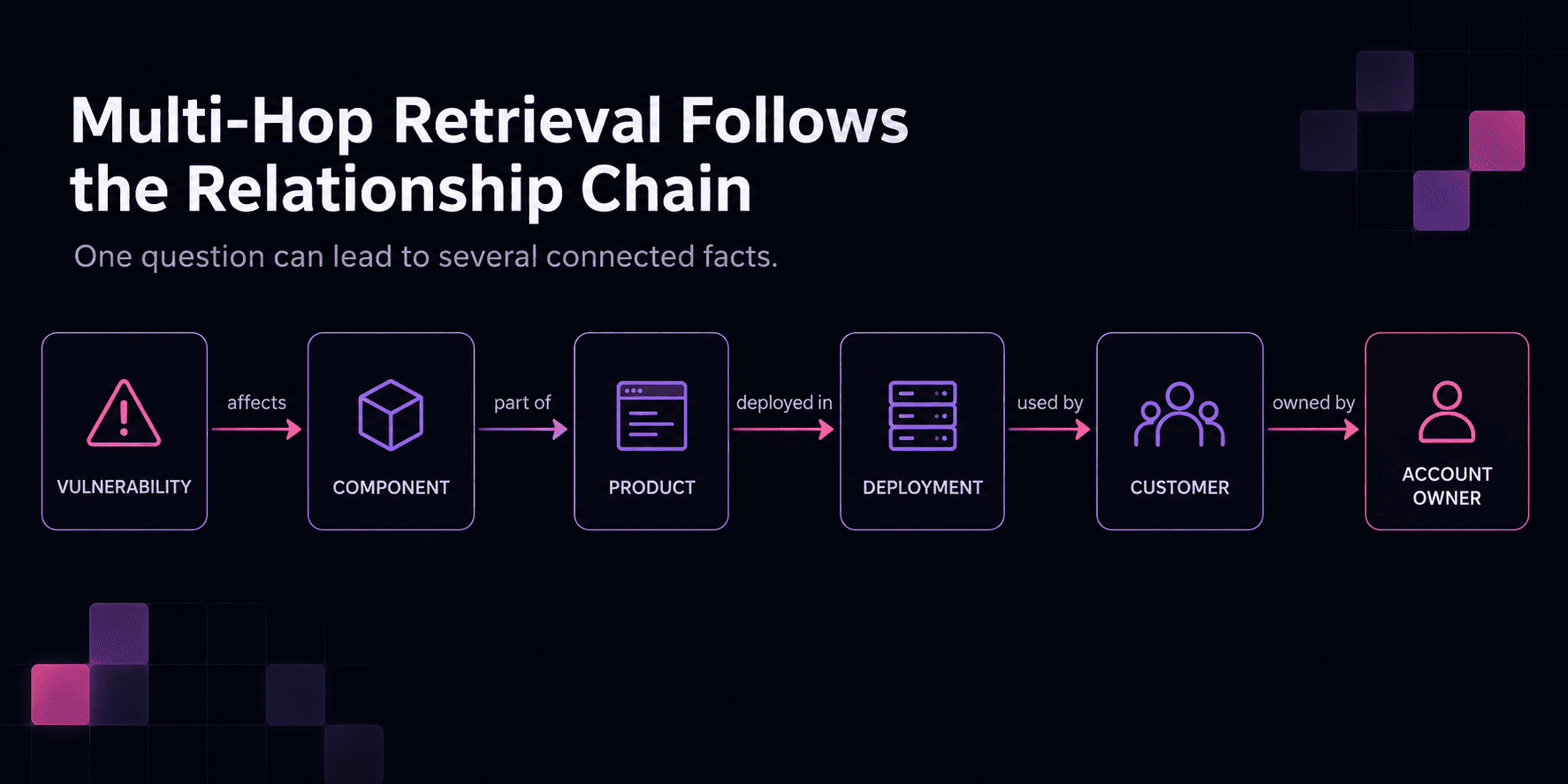
Here's an example — a question like:
Which enterprise customers use products affected by this authentication vulnerability, and who owns those accounts?
Requires traversing:
vulnerability → component → product → deployment → customer → account owner
Vector retrieval can identify documents or entities related to the vulnerability, but similarity alone doesn't encode the full chain; a graph query can follow those stored relationships directly. Vector and graph retrieval complement each other in this way, with semantic search identifying a relevant starting point and a graph traversing the connections.
Choose it when:
- retrieval depends on explicit relationships between entities;
- multi-hop traversal is frequent;
- paths, dependencies, or network structure contribute directly to answers;
- the application already maintains a knowledge graph or connected data model.
But: If queries mainly depend on semantic similarity, structured filters, or ordinary joins, maintaining a separate graph can add maintenance complexity without enough retrieval benefit.
Search engines
Search engines such as Elasticsearch and OpenSearch are designed to find and rank relevant documents across large text collections.
Their foundation is lexical (or full-text) search. Inverted indexes track where terms occur, while ranking methods like BM25 score documents using signals such as term frequency, rarity, and document length.
A request with an exact identifier such as:
What does error
AUTH-431mean after upgrading the Python SDK to version 10.4.0?
contains information that semantic similarity shouldn't dilute — the error code and SDK name and version can require exact matches even when the surrounding description differs from the documentation.
Elasticsearch and OpenSearch can retrieve results through hybrid search, which combines lexical and vector retrieval, while techniques such as Reciprocal Rank Fusion can combine their rankings without requiring lexical and vector scores to use the same scale. These engines can also do multi-stage retrieval, where, after first retrieving a broader candidate set, a more computationally expensive reranker reorders the strongest results before they enter model context.
Technical documentation, enterprise search, and legal material depend on this most, since product names, API methods, error codes, acronyms, and other specialized terms carry substantial weight in those corpora.
Search indexes are usually not the authoritative store for transactional application data, however. Documents often originate elsewhere and are indexed specifically for retrieval.
Choose it when:
- exact terminology is important alongside semantic meaning;
- lexical and vector retrieval need to work together;
- document ranking and reranking are central to answer quality;
- the corpus contains many identifiers, names, codes, or specialized terms;
- retrieval deserves a dedicated search layer.
But: A separate search engine can be unnecessary if the primary database already provides adequate lexical, vector, and filtering capabilities.
Document databases
Document databases store self-contained, JSON-like records that can include nested objects, arrays, metadata, and fields that vary between documents. They're used for support records, product catalogs, content-management data, user profiles, conversations, and other semi-structured application objects.
When an application already uses document-oriented data, a coding agent's task record might contain the repository, the diff under review, dependency findings, labels, timestamps, resolution status, and an embedding in the same record. Semantic retrieval can then find similar past tasks while structured fields filter by repository, language, status, or priority.
Keeping the source record, metadata, and vector representation together also allows you to avoid maintaining a separate copy in a specialized vector store. Changed content can still require re-embedding, but the updated vector stays with the document it represents.
Document flexibility doesn't eliminate schema controls either: applications can still enforce required fields and validation where needed.
Choose it when:
- application records are naturally nested or semi-structured;
- embeddings belong directly to those records;
- semantic retrieval needs access to the same metadata as the application;
- flexible document structures are preferable to normalized relational tables;
- keeping source content and vectors together reduces unnecessary infrastructure.
But: flexible schemas can drift — documents can accumulate inconsistent structures, and later field-format changes can break filters or retrieval logic; represented fields may also need re-embedding when their content changes.
In-memory and low-latency stores
Some AI workloads depend less on complex retrieval than on fast access to the current conversation state, recent tool output, cached retrieval results, or an active workflow step. These are often direct lookups rather than searches across a large corpus.
Redis is widely used for this kind of workload as its in-memory architecture supports fast access to strings, hashes, lists, sets, streams, and other frequently updated application data.
In-memory doesn't necessarily mean temporary — Redis can persist data to disk through snapshots, an append-only file, or both, while expiration policies let applications control how long different records are kept. This allows persistent state and temporary data such as tool responses, workflow state, and cached results to coexist in the same system.
Redis Search adds full-text search, vector retrieval, metadata filtering, geospatial queries, and aggregations over hash and JSON records. For AI applications, this enables patterns such as semantic caching, where query embeddings determine whether a similar cached response can be reused, as well as low-latency vector retrieval over focused embedding collections alongside session or application state.
Choose it when:
- fast access to frequently changing state is central to the application;
- caching and temporary data are common;
- session state and retrieval need low latency;
- vector search is closely connected to cached or operational state.
But: large or fast-growing memory-resident datasets can become expensive, and persistence, snapshotting, append-only files, and eviction policies need explicit tuning.
Session state also differs from long-term agent memory — a workflow step that expires after a task and a verified fact that should influence future sessions have different lifecycles even if Redis can store both.
Analytical warehouses and lakehouse platforms
AI applications can also retrieve from data collected primarily for analyses of customer activity, product telemetry, support history, financial records, and other datasets consolidated in a warehouse or lakehouse. If an AI system needs that information, another copy in a separate retrieval database isn't always necessary.
Platforms such as Snowflake, BigQuery, and Databricks increasingly combine analytical queries with semantic and hybrid retrieval.
Our support assistant, for example, might need to answer a question like:
Which authentication problems increased after the last three releases, and are enterprise customers and smaller accounts affected differently?
This can require years of data that may already be prepared and governed in an analytical platform.
Keeping retrieval close to analytical data
Keeping retrieval near analytical data can reduce synchronization and reuse existing governance and data-engineering infrastructure. Access control still needs explicit configuration because search indexes and source tables can follow different permission models.
As of publishing this guide, in September 2026:
- Snowflake Cortex Search provides low-latency hybrid retrieval over Snowflake data using vector search, keyword search, and semantic reranking.
- BigQuery supports embeddings, vector indexes, semantic search, and hybrid retrieval combining vector and lexical search.
- Databricks AI Search builds searchable indexes from Delta tables, with vector, keyword, and hybrid retrieval and incremental updates through Delta Sync.
Analytical and operational workloads aren't the same
Interactive parts of the same application — current account status, active workflow state, technical documentation lookups — are still better served by the operational and search databases already covering them; the analytical platform answers the questions that need historical or consolidated data instead.
Latency, update frequency, concurrency, and cost can also differ substantially from databases designed for interactive application traffic.
Choose it when:
- AI retrieval needs large historical or consolidated datasets;
- the source data already belongs in a governed warehouse or lakehouse;
- analytical queries and retrieval operate over the same information;
- avoiding another copy of the data reduces unnecessary synchronization.
But: interactive user-facing retrieval still needs benchmarking against the application's latency and concurrency targets because analytical platforms can have different serving characteristics from operational databases.
Converged and multimodel databases
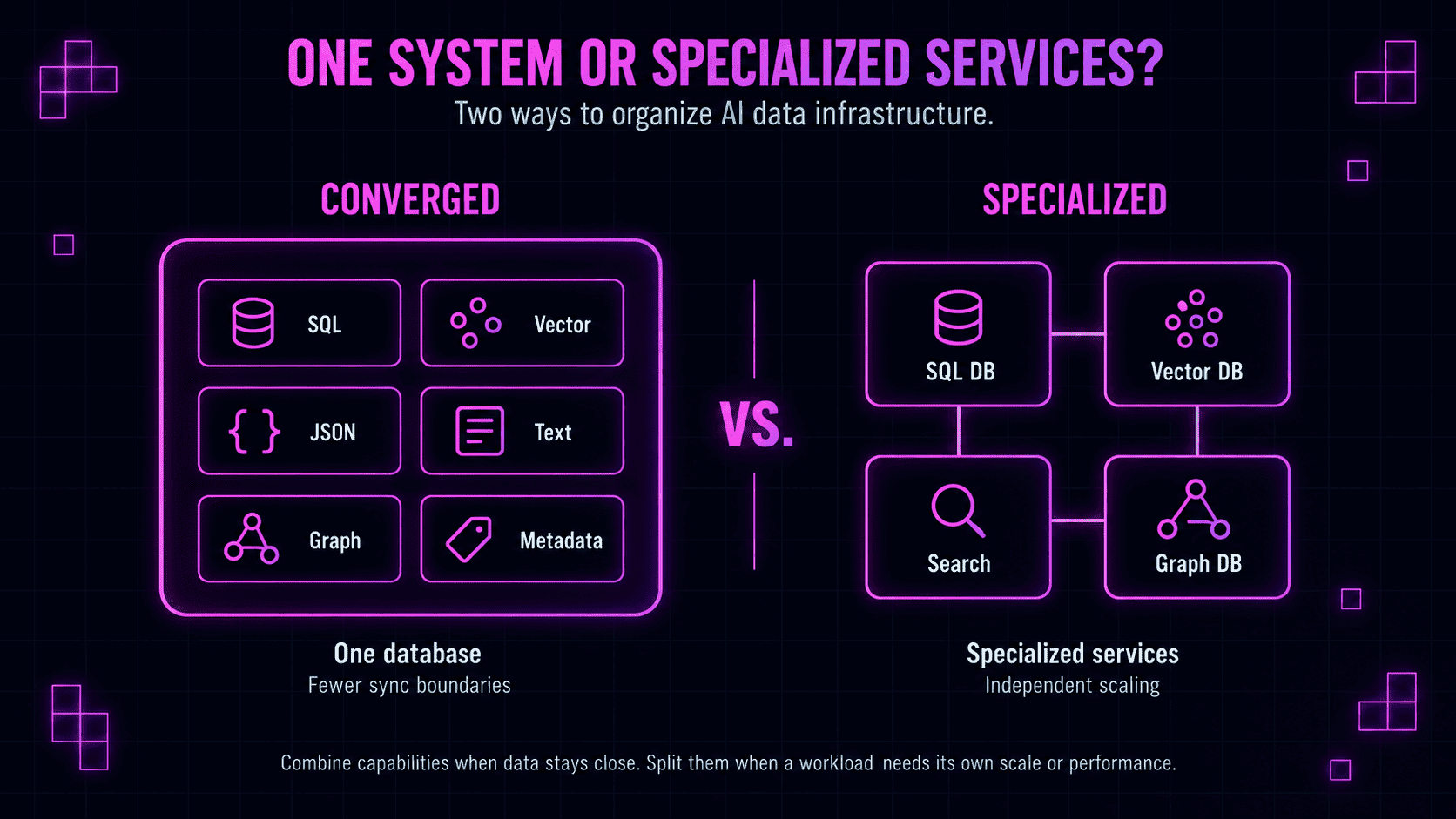
Rather than separating relational records, vectors, text search, JSON, graph queries, and other access patterns across multiple systems, a converged or multimodel database can apply several of them to closely related data.
With this method, a coding agent could retrieve past incidents semantically similar to a new dependency conflict, restrict the results to a specific repository, and check which service versions were affected — without moving the underlying data between separate systems.
Keeping related access patterns together can reduce duplicated records, synchronization pipelines, permission configurations, monitoring, and recovery processes. It also illustrates the very important idea that data model and retrieval method are separate decisions.
Specialized infrastructure can still be preferable when one retrieval workload becomes demanding enough to justify it: a vector database can serve large embedding workloads independently, a search engine can provide deeper document-ranking capabilities, and a graph database can handle traversal-heavy queries.
Choose it when:
- several retrieval methods operate over closely related data;
- keeping them in one database reduces duplication and synchronization;
- relational, vector, JSON, text, or graph operations frequently intersect;
- the broader platform can meet the workload's production requirements.
But: Supporting many capabilities in one system doesn't guarantee that each can meet the scale, latency, ranking, or traversal demands of a specialized workload.
AI database examples across the AI data stack (not a "best of" list)
The products grouped under the label AI database aren't interchangeable, so ranking them as a single "best AI database" list would obscure the architectural differences.
Instead, this section compares prominent platforms across different parts of the stack, including database engines, search and analytical platforms, and memory layers above storage. Capability is only one dimension; cost can also change which option is realistic for a project's budget and scale.
First, a brief overview:
| Primary role | 2026 pricing (starting point)* | |
|---|---|---|
| PostgreSQL + pgvector | Relational database + vector retrieval | $0 software; hosting/infrastructure extra (pgvector) |
| Pinecone | Dedicated vector database | Free; Builder $20/mo; Standard $50/mo minimum (pricing) |
| Neo4j | Graph database | AuraDB Free; Professional from $65/GB/mo (pricing) |
| Elasticsearch | Search engine | Cloud Hosted from $99/mo; Serverless Search from $0.09/VCU-hour plus ingest/storage (Hosted, Serverless) |
| MongoDB Atlas | Document database + AI retrieval | Free; Flex $8–30/mo; Dedicated from $56.94/mo (pricing) |
| Redis | Low-latency data store + retrieval | Free; Essentials from $5/mo; Pro $200/mo minimum (pricing) |
| Oracle AI Database | Converged database | Autonomous Transaction Processing about $0.44/ECPU-hour license-included ($0.106 BYOL) + storage (pricing) |
| Snowflake | Data warehouse + AI search | Standard on-demand from $2/credit in AWS US; Cortex Search adds serving, embedding, warehouse, and storage costs (credit pricing, Search costs) |
| Databricks | Lakehouse + AI search | Pay-as-you-go; AI Search bills for indexes and serving endpoints, with rates varying by cloud and region (cost guide) |
| cognee | AI memory layer | Free tier; Standard $2.50/1M tokens + $5/additional workspace; self-hosted open source $0 (pricing) |
*Pricing reflects public list prices as of September 2026 and isn't directly comparable across platforms. Costs can vary by cloud provider, region, capacity, storage, data transfer, support, and negotiated commitments.
1. PostgreSQL + pgvector
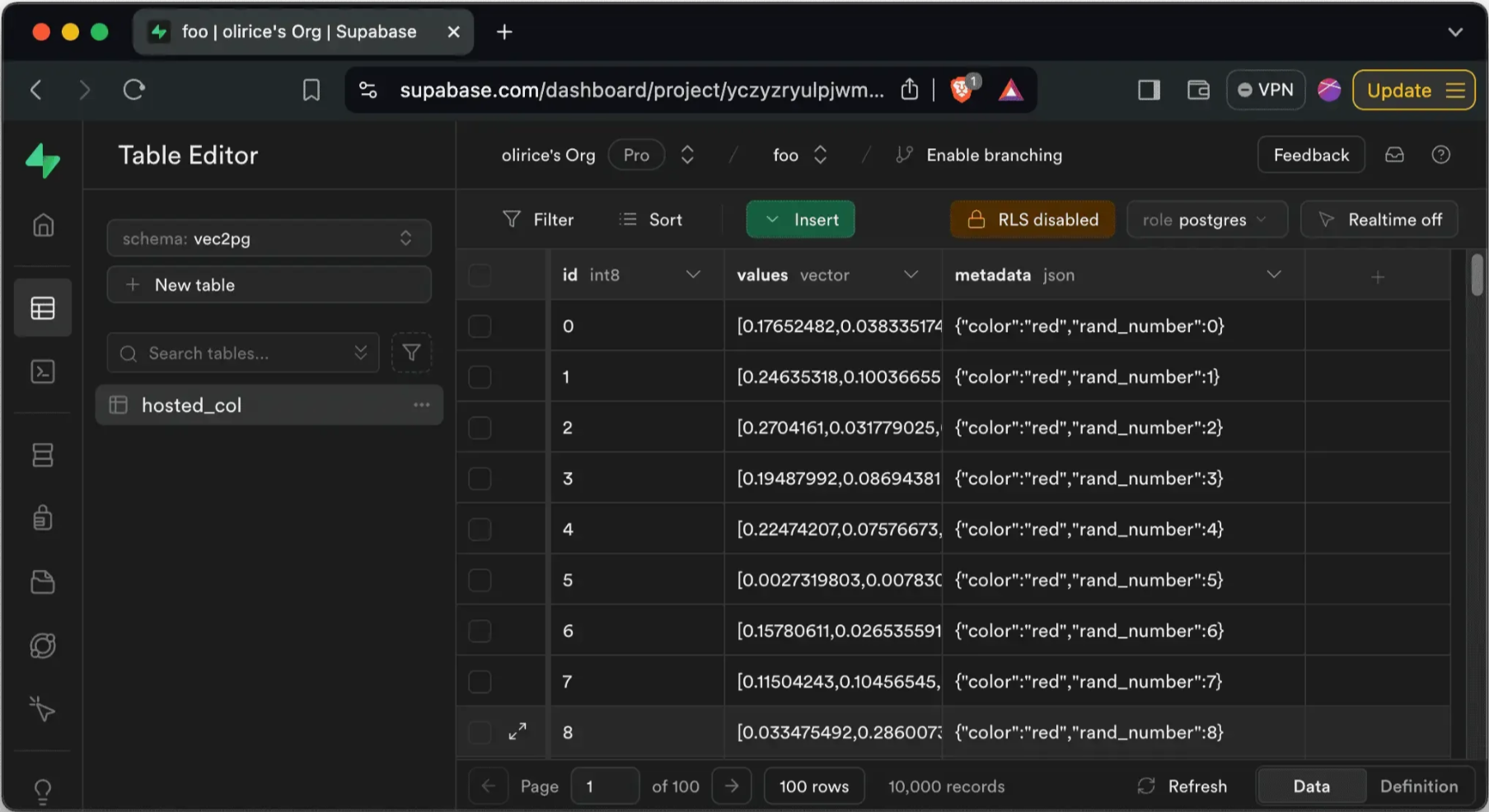
A pgvector similarity search run directly inside PostgreSQL.
pgvector adds vector storage and similarity search to a relational database that many applications already use for operational data — PostgreSQL.
pgvector supports exact search and approximate indexes including HNSW and IVFFlat. When embeddings describe records already stored relationally, queries can combine vector similarity with ordinary SQL filters, joins, and indexes as both representations stay in the same database without a separate synchronization step.
Use cases: SaaS products, internal admin tools, and billing systems where embeddings need to stay stored beside the same accounts, permissions, and records the rest of the application already queries.
2. Pinecone
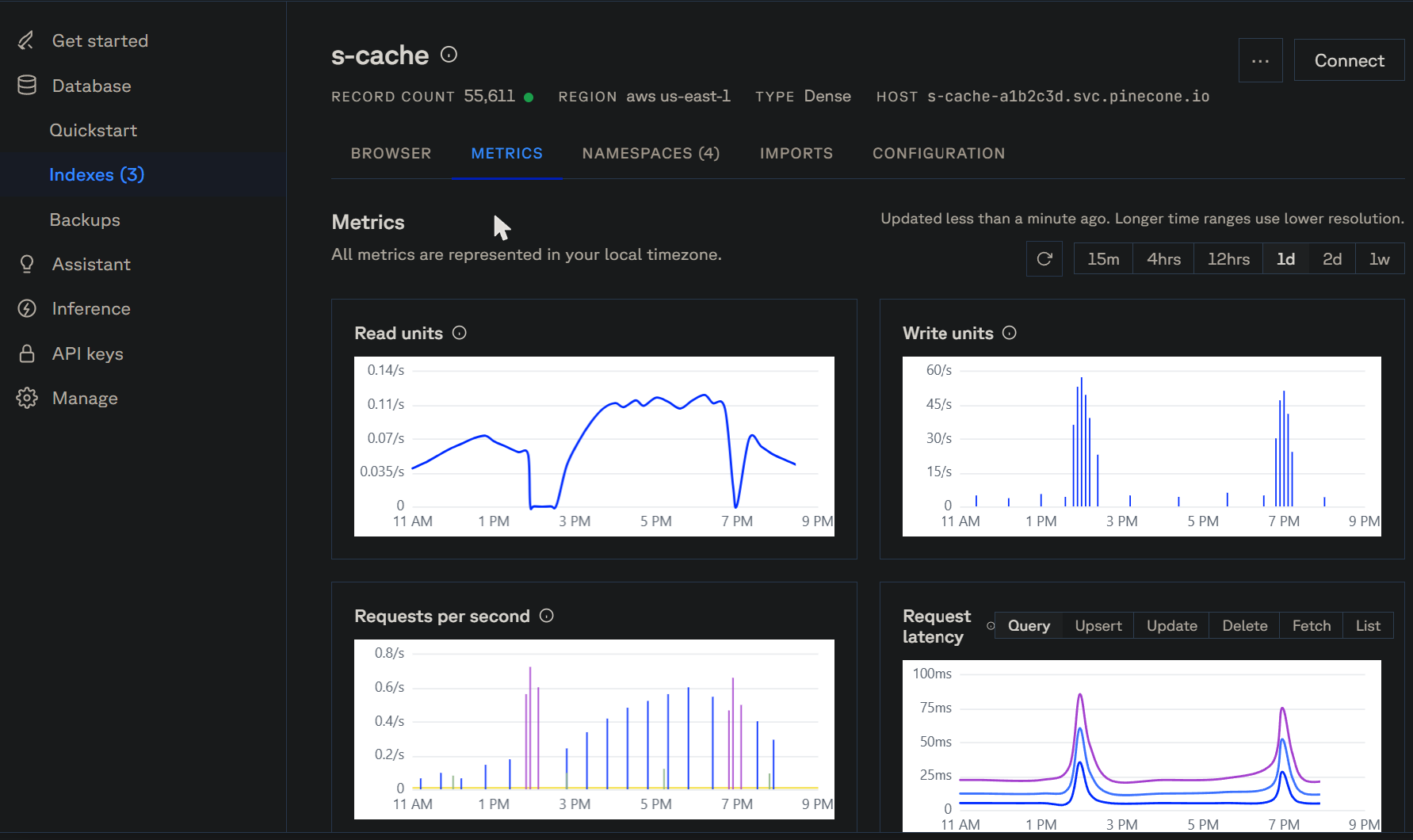
Index metrics for one Pinecone deployment.
Pinecone is a managed vector database built around indexing and serving embedding collections rather than extending an existing relational or document database.
It allows dense and sparse vector retrieval, metadata filtering, and hybrid retrieval patterns that combine semantic and lexical signals. That specialization comes with a second system to keep synchronized: the index still needs to track its source data and permissions as they change.
Use cases: large-scale product or media recommendation and semantic search — catalogs or content libraries large enough that indexing and serving need to scale independently from the rest of the application.
3. Neo4j
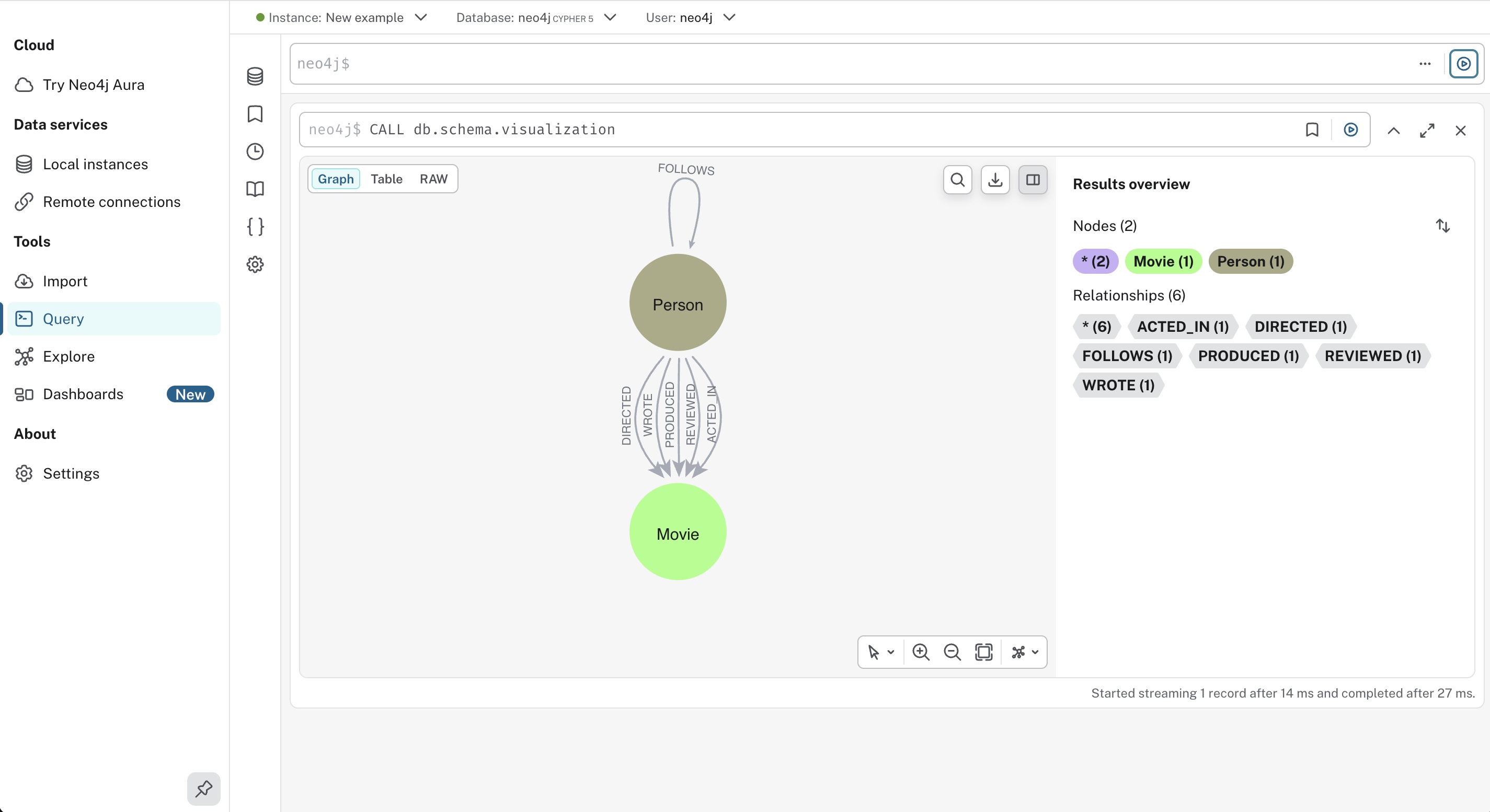
A Cypher query run against a property graph in Neo4j.
Neo4j stores entities and relationships as a property graph queried through Cypher. It also features vector indexes and tooling for GraphRAG, allowing semantic retrieval to identify a relevant entity or document before graph queries follow its explicit connections.
Use cases: fraud rings, dependency and impact analysis, identity networks, and GraphRAG workloads built around multi-hop relationships.
4. Elasticsearch
Hybrid full-text and vector search in Elasticsearch.
Elasticsearch combines mature full-text retrieval, which preserves exact terminology such as error codes, product names, API methods, and technical language, with vector search, which recovers conceptually related material expressed with different wording.
Hybrid retrieval can combine rankings, and additional reranking stages can refine the candidate set before evidence reaches the model.
Use cases: technical documentation, legal and compliance search, and other text-heavy RAG workloads where product names, error codes, and regulatory language need exact-match precision alongside semantic ranking.
5. MongoDB Atlas
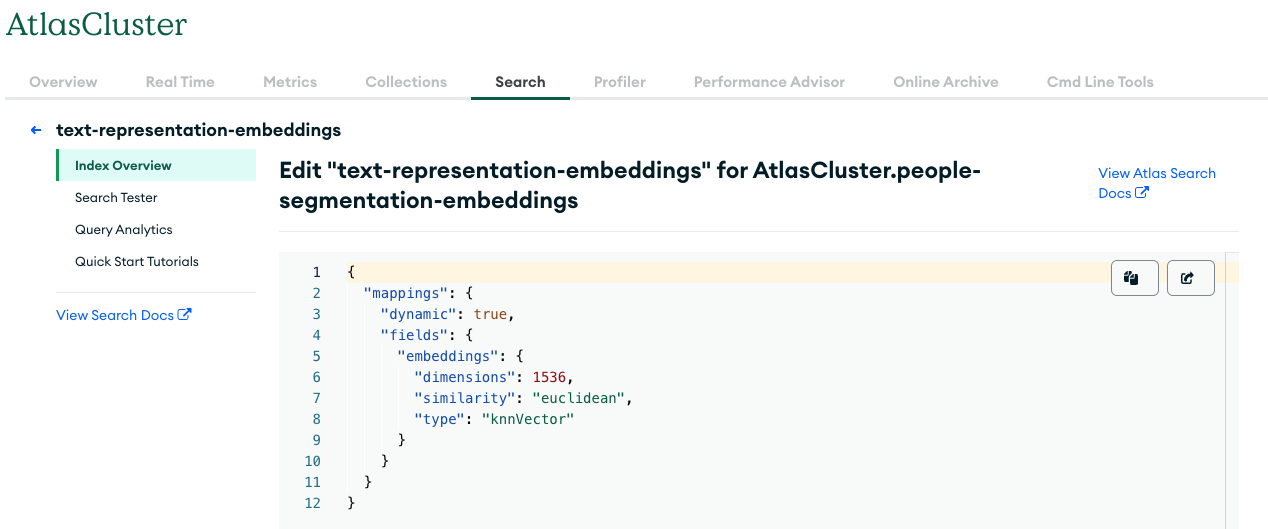
A vector search index defined inside MongoDB Atlas.
MongoDB Atlas adds vector and full-text retrieval to MongoDB's document model. Source content, nested metadata, operational fields, and embeddings can stay in the same collection, allowing semantic retrieval to run alongside structured filters without maintaining a separate vector copy.
Use cases: support tickets, product catalogs, and conversational logs already modeled as nested JSON documents, where semantic search needs to run alongside the same per-document metadata filters.
6. Redis
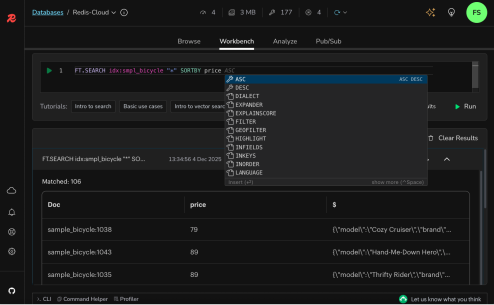
Full-text and vector search alongside fast key-value access in Redis.
Redis combines low-latency access to application state with full-text and vector search capabilities, letting an agent keep active workflow data, recent tool output, and a semantic cache in one fast-access layer instead of three.
Use cases: customer-support and coding-agent sessions — active troubleshooting steps, build or test output, and semantic caching where low latency is the binding constraint.
7. Oracle AI Database
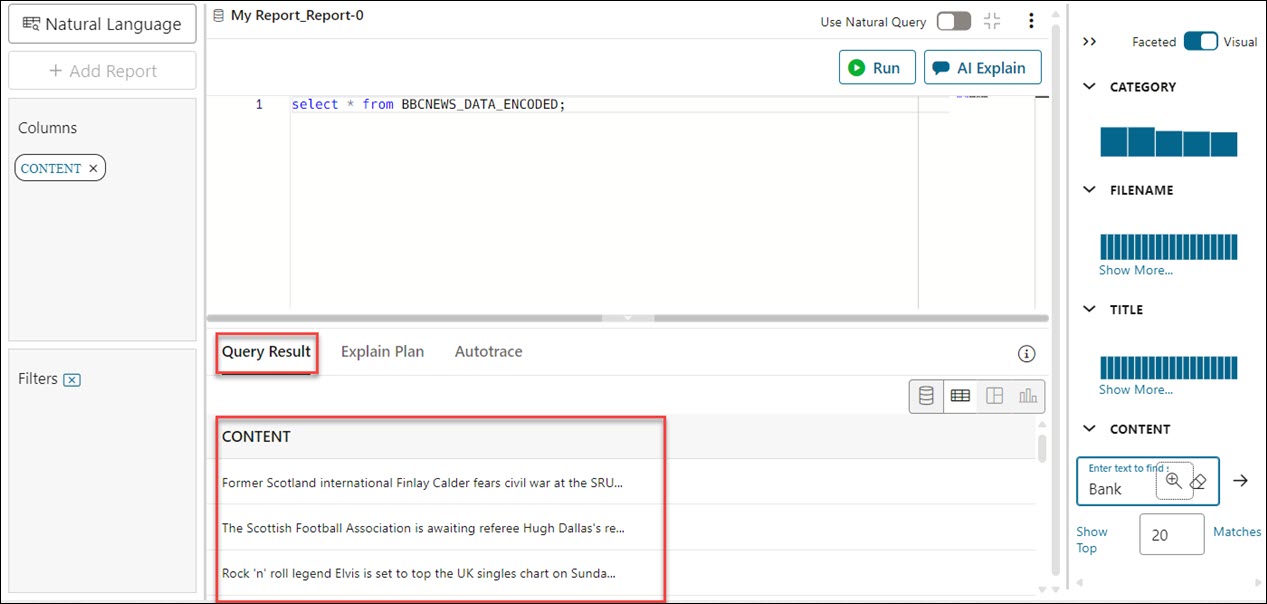
A natural-language query answered in Oracle AI Database.
Oracle AI Database 26ai extends relational data with native vectors, JSON, text search, property graphs, spatial data, and other database capabilities, enabling embeddings to stay beside ordinary business records and participate in SQL queries alongside structured predicates.
Use cases: large enterprise systems already running on Oracle, where relational records, vectors, JSON, text, and spatial data need to operate within one database environment for compliance or operational reasons.
8. Snowflake
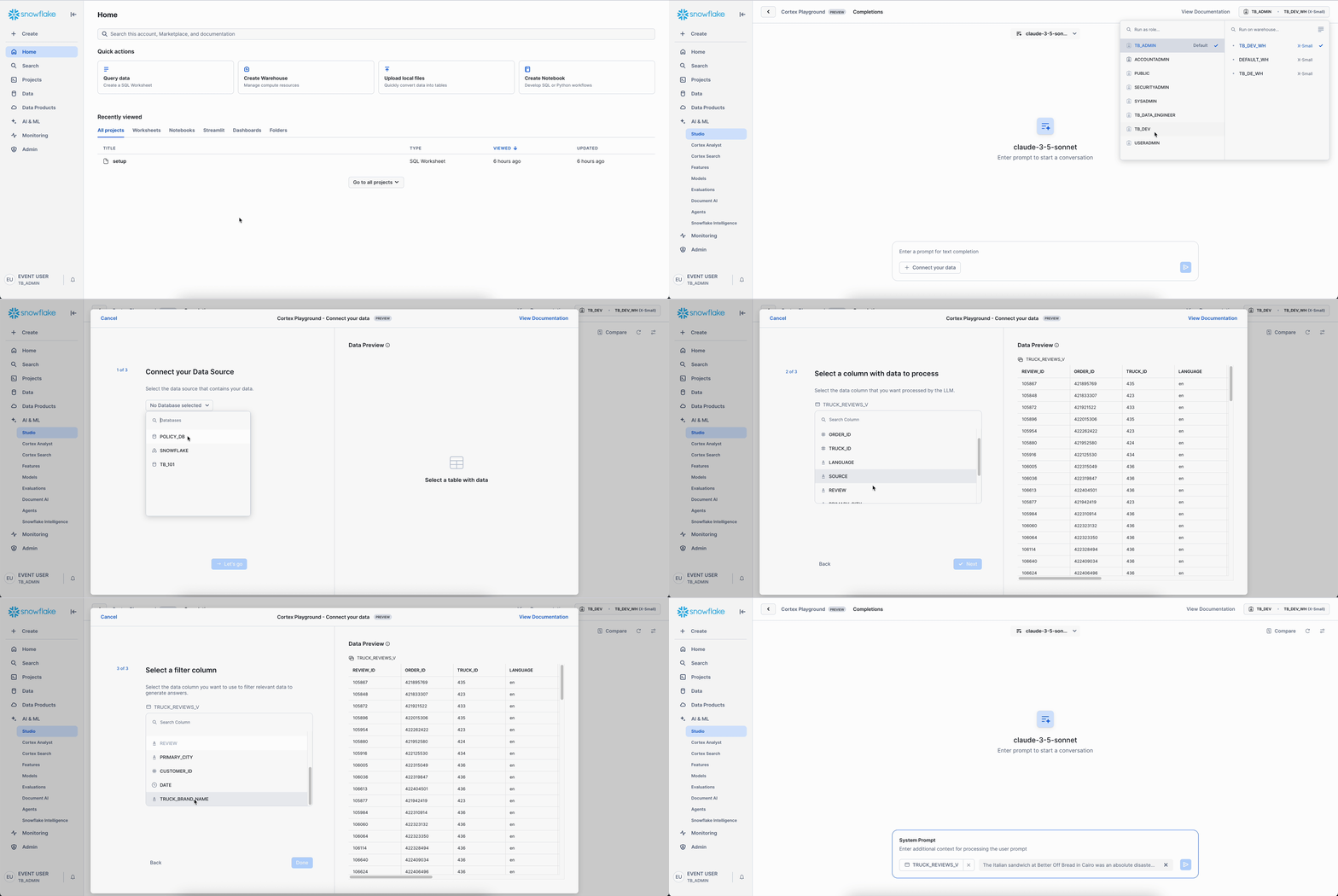
Hybrid search tested against data already stored in Snowflake.
Snowflake Cortex Search adds hybrid retrieval to data already stored in Snowflake. Customer history, support records, transactions, and other analytical datasets can stay in the warehouse while AI applications retrieve them through semantic and keyword search.
Use cases: retrieval over years of governed customer, financial, or support history that's already stored in a Snowflake warehouse and shouldn't need exporting into a second copy.
9. Databricks
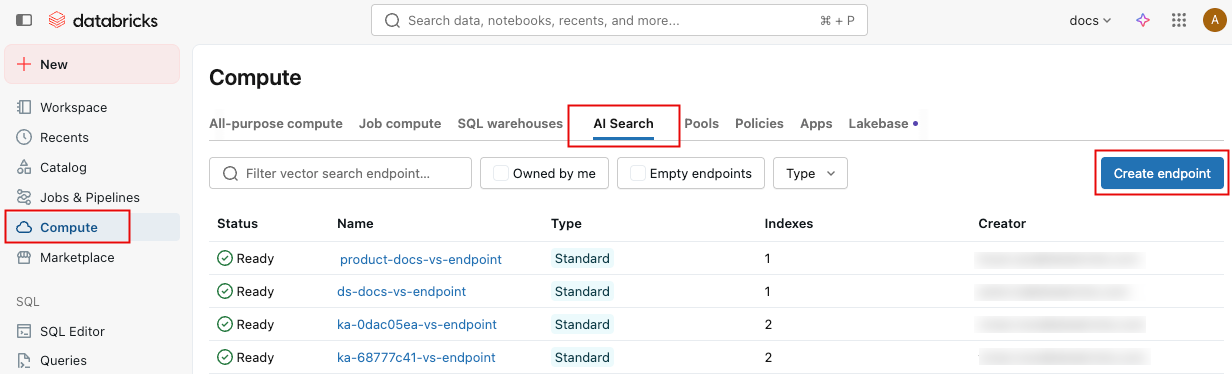
A search endpoint created directly over Delta tables in Databricks.
Databricks AI Search builds searchable indexes over Delta data with vector, keyword, and hybrid retrieval, filtering, and reranking. Delta Sync can update those indexes as source tables change, keeping retrieval connected to the data-engineering environment already preparing and governing the underlying information.
Use cases: RAG and knowledge retrieval built directly on Delta tables, for engineering organizations whose broader data pipelines and ML workflows already run on the lakehouse.
10. cognee
cognee operates at the AI memory layer above database infrastructure.
In cognee 1.0 and later, graph structure, vectors, sessions, usage data, and dataset metadata can all use a single Postgres instance, keeping the storage configuration compact while cognee manages graph-connected information across agent tasks and sessions.
Use cases: persistent agent memory, cross-session context, provenance-aware retrieval, and workflows where validated findings need to carry into later tasks.
cognee isn't a replacement for PostgreSQL, Pinecone, Neo4j, Elasticsearch, or Redis — those systems provide the storage and retrieval primitives underneath.
What database should you use for RAG?
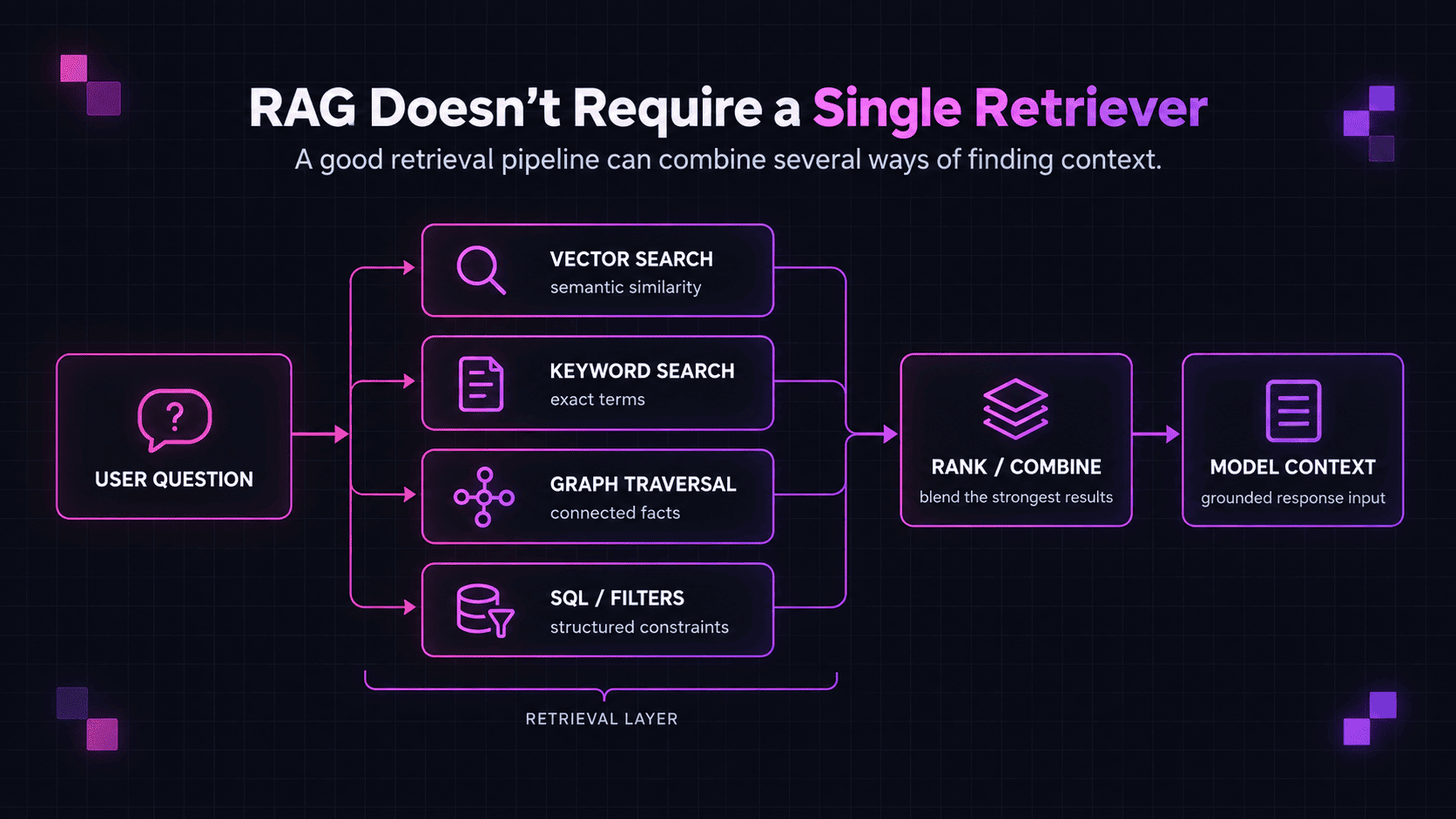
Retrieval-augmented generation (RAG) needs a reliable way to find external information before generation, but that retriever doesn't have to be a dedicated vector database. Depending on the corpus and query, RAG can rely on semantic similarity, exact terminology, structured metadata, explicit relationships, analytical context, or several of these signals together.
Match the retriever to the evidence you need
The database decision should start with the evidence the retriever needs to find.
While a simple support question might be served by semantic similarity search, a technical query can require lexical precision around exact identifiers, and a more complex impact-analysis scenario can depend on explicit relationships between entities.
For RAG, the key is to match the retrieval method to the evidence the generator actually needs. This means defining what adequate retrieval looks like for the application — in relevance, precision, coverage, and latency — before introducing a more specialized retrieval layer.
Keep retrieval close to source data — and derived indexes synchronized
For a RAG corpus already stored alongside relational records, PostgreSQL + pgvector can add semantic retrieval without separating it from the SQL filters, permissions, and metadata the application already uses. Similarly, technical content indexed in Elasticsearch can add semantic retrieval alongside lexical search, and analytical data housed in Snowflake, BigQuery, or Databricks can increasingly be searched without exporting another vector copy by default.
Keeping retrieval close to the source reduces cross-system coordination. Once retrieval depends on a derived representation elsewhere, that representation has to follow its source. Content changes can require new chunks or embeddings, deleted records should disappear from retrieval, and permission changes need to propagate before outdated access rules return restricted information.
Introduce a standalone retrieval system only when the existing datastore can't meet a measurable requirement such as vector scale, concurrency, latency, search relevance, or graph traversal.
Hybrid and graph retrieval cover ground that vector search doesn't
Technical, legal, scientific, and product content often contains identifiers, method names, regulations, model numbers, and acronyms whose exact form carries meaning. Lexical retrieval preserves those signals, while embeddings capture semantic similarity across different wording, so RAG systems dealing with both should test hybrid retrieval instead of relying on dense-vector similarity alone.
Relationship-heavy questions can benefit from GraphRAG, which uses semantic retrieval to locate a relevant entity or document, then follows explicit connections to recover evidence across multiple hops. However, maintaining that graph is worthwhile only when those relationship queries occur often enough to justify the entity, edge, and update pipeline behind them.
RAG can use several retrievers
A system doesn't need to force every source through the same retrieval method. In the example of a coding agent, it might pull:
- repository and permission state from PostgreSQL;
- internal documentation from Elasticsearch;
- dependency information through graph traversal;
- historical build or incident patterns from a warehouse.
Different questions can be routed to different retrievers, or evidence from several systems can be combined before generation. This preserves the structure each source already provides instead of routing every source through one retrieval model. A plural database architecture is entirely reasonable when every retriever has a defined job.
Database choice is only one part of RAG quality
Even perfectly executed database queries can produce weak RAG results if the surrounding retrieval pipeline is poorly constructed. Document parsing, chunking, embedding models, metadata, query rewriting, filtering, ranking, reranking, and the amount of context sent to the LLM all influence what reaches generation; bad chunks, for example, can undermine retrieval even when the database behaves exactly as configured.
RAG imposes requirements on retrieval quality, not on a particular database category. A strong architecture returns the evidence the model needs while meeting the application's scale, latency, filtering, permission, and update requirements.
What is a knowledge database?
A knowledge database — more commonly called a knowledge base — is a repository of information organized for retrieval and reuse by people or AI systems. The term describes the broader information system: what it contains, how that information is organized, and how applications retrieve it, while the underlying storage can vary.
An AI knowledge base is a knowledge base designed specifically for AI applications. It can combine relational records, search indexes, vectors, graph structures, or several of these to retrieve relevant information with enough context at the right time, reliably and at scale, often without human intervention.
Knowledge database vs knowledge graph
A knowledge graph is more specific than a knowledge database — it represents information through entities and explicit relationships between them. A graph database can provide the storage and query infrastructure for that representation, allowing an application to traverse connections and retrieve linked facts. The phrase knowledge database doesn't imply a graph model.
Here's a breakdown of the terminology:
| Term | What it describes |
|---|---|
| Database | Infrastructure that stores and queries data |
| Knowledge base | An organized repository of information intended for retrieval and reuse |
| Knowledge graph | Knowledge represented through entities and explicit relationships |
| Vector store | Infrastructure for storing and retrieving vector representations |
| Memory system | A layer that governs what an AI system retains and retrieves across its work |
A single knowledge base can use several of these components underneath it. Source documents might remain in object storage, metadata in PostgreSQL, embeddings in pgvector, and connected entities in a graph while the application presents them as one knowledge system.
In this context, knowledge database describes the repository's role rather than a particular database technology.
How to choose a database for an AI application
Once the access pattern has narrowed down the database category choice, it's time to decide how the remaining options behave under the actual workload. Scale, filtering, freshness, consistency, deployment requirements, resilience, and operating cost are where the viability of each architecture starts to diverge.
Test scale, filtering, and latency together
"Scale" by itself means very little. One application can have billions of transactional records while semantic retrieval covers a relatively small documentation corpus; another can have a modest operational database alongside hundreds of millions of indexed document chunks.
More relevant numbers thus include:
- source-data volume;
- indexed records or vectors;
- query rate and concurrency;
- write and update frequency;
- index growth;
- metadata-filter selectivity;
- latency targets.
Filtering merits closer attention because production retrieval rarely searches an unrestricted corpus. Queries can be constrained by customer, product, region, software version, permission group, publication period, or other metadata.
Aggressive filters can substantially narrow the candidate set and alter retrieval performance, so benchmarking an unrestricted nearest-neighbor query says little about production behavior if every real request applies tenant, permission, or other metadata constraints.
Latency should also be measured across the full retrieval path. A request might retrieve candidates, apply filters, expand graph relationships, rerank results, and only then pass evidence to the LLM. Measuring database-query latency alone can miss a significant part of the actual retrieval cost.
Define freshness, consistency, and access requirements
Production AI data changes continuously: documentation is revised, permissions are altered, tickets are closed, products are released, customer records are updated, and relationships evolve with the systems they describe. Any derived retrieval layer needs a defined synchronization window for creates, edits, deletions, and permission changes.
The key question is how far that representation can lag behind its source before the delay becomes unacceptable. A documentation assistant can often absorb a short indexing delay, whereas an agent updating inventory, financial records, account permissions, or other operational state can require much stronger consistency.
Access control needs equal scrutiny: a document a user can't open directly shouldn't become retrievable simply because its embedding or search index exists elsewhere.
Permissions, tenant boundaries, deletion behavior, auditability, and provenance belong in the database decision alongside retrieval performance.
Include deployment, resilience, and total operating cost
Database architecture also brings deployment and operational requirements. A system can be:
- managed or self-hosted;
- deployed in one region or several;
- subject to data-residency requirements;
- replicated for high availability;
- backed up and recoverable within defined targets.
For critical workloads, recovery time objective (RTO) and recovery point objective (RPO) — how long recovery can take and how much data a failure can lose — can be as important as query latency.
Each additional datastore adds another operational boundary for monitoring, backup and recovery, networking, security configuration, ingestion, and synchronization. Managed services can reduce that burden, but they don't remove the boundary itself.
AI retrieval can also require embedding generation, re-embedding, index construction, reranking, replicas, data transfer, and additional model tokens from retrieved context. Cost should be evaluated across the full architecture rather than from database pricing alone.
An existing datastore can be economical for a moderate retrieval workload because much of the supporting infrastructure is already in place. But specialized infrastructure can still lower total cost when it handles a demanding workload more efficiently or removes substantial engineering overhead.
Benchmark the production workload
Once the shortlist has narrowed to a few plausible options, benchmark them under production-like conditions. The test environment should resemble production closely enough to reveal the behaviors that actually affect the application:
- representative corpus size;
- realistic query distribution;
- expected metadata filters;
- normal concurrency;
- actual update frequency;
- intended index configuration;
- representative infrastructure or managed-service tier.
Retrieval quality needs to be measured alongside performance. Depending on the workload, relevant metrics include:
- recall;
- precision or ranking quality;
- downstream answer quality;
- p50 and p95 latency;
- ingestion throughput;
- update latency;
- index-build time;
- memory and storage consumption;
- behavior under concurrent load;
- total operating cost.
For RAG, downstream answer quality is especially important — faster retrieval has little value if the evidence entering the model is insufficiently relevant. The same principle applies to graph and search infrastructure.
The final benchmark should evaluate the application outcome, not only the database operation.
Database storage can become an AI memory problem
Database selection sorts out the storage and retrieval question, but AI agents introduce another problem when information discovered during one task needs to influence later work.
A coding agent might discover that an internal authentication library must stay on a particular version because a newer release breaks a downstream service. The agent can write that fact into PostgreSQL, a document store, or another database, but a memory layer still needs to determine whether it should be retained, which repository or project it applies to, what evidence supports it, whether later findings supersede it, and when it should return to the agent.
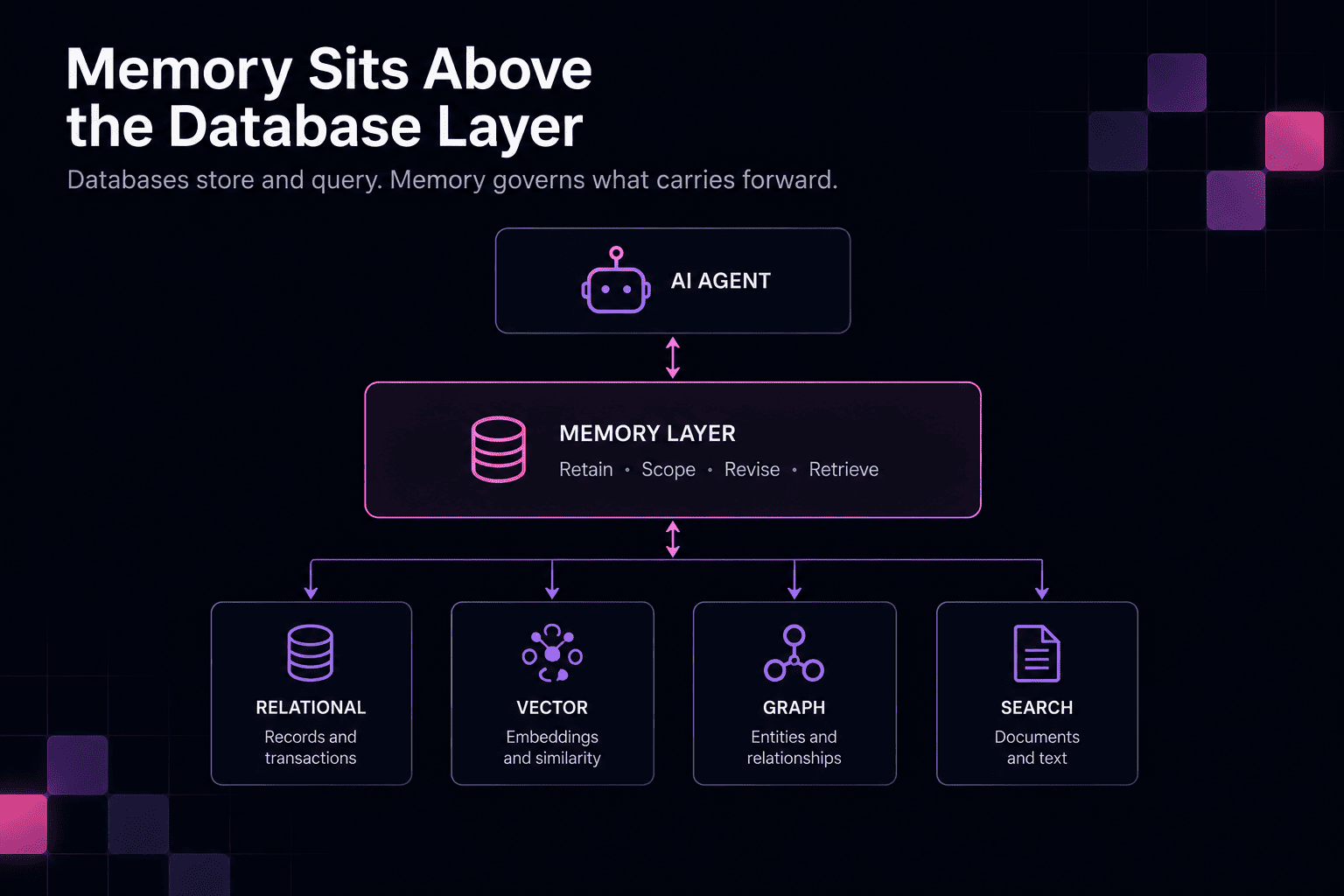
Memory adds decisions around stored information
An AI memory layer uses the primitives a database provides — records, indexes, transactions, vector search, graph queries, filters, and persistence — to manage information acquired during ongoing work.
Governing long-term AI memory adds several responsibilities, which can be implemented directly in application logic or delegated partly to a dedicated memory system:
- Retention and forgetting. Temporary workflow details can accumulate quickly, so the system needs criteria for what becomes durable and when stored information should later be removed because it has expired, been invalidated, lost relevance, or passed a retention cutoff.
- Scope. Retrieval needs scoping by user, agent, project, repository, customer, workflow, or organization so information from one context doesn't influence another accidentally.
- Provenance. Durable information should retain enough evidence to show where it came from.
- Revision. Later evidence can refine, invalidate, or limit the conditions under which an earlier memory applies. Persistent memory needs a way to connect those updates with what was stored previously.
- Retrieval. Stored information only helps an agent when the relevant subset returns during later work. Memory retrieval can combine semantic, lexical, graph, scope, recency, provenance, and other signals.
Session state and long-term memory have different lifecycles
During a support workflow, an agent might need the current troubleshooting step, recent tool output, and completed diagnostic checks. Redis or another low-latency store can keep that state available during the session, after which much of it can expire.
But a verified finding such as firmware version 4.8.2 causes authentication failures when feature X is enabled can influence later cases involving the same product and version.
Both kinds of information could be stored in Redis, PostgreSQL, a graph database, or another system. The difference is their lifecycle: session state supports the current task, while persistent memory carries selected information into future work.
Memory also needs write-back rules
Retrieval gets much of the attention in AI architecture, but persistent memory also needs a controlled write path.
If every model statement were stored automatically, speculative reasoning could become durable context and later retrieval could reinforce it as fact. Stronger memories should come from stronger evidence: completed tool operations, validated findings, or outcomes checked against an external source, with the threshold depending on the application and its risk level.
The responsibilities divide like this:
| Database responsibility | Memory responsibility |
|---|---|
| Persist records | Decide what should become durable |
| Index and query data | Decide what should return as context |
| Store vectors and graph structures | Combine retrieval signals around remembered information |
| Enforce database-level constraints | Apply memory scope and lifecycle rules |
| Update and delete records | Revise, supersede, or forget memories |
| Return query results | Preserve provenance and relevance for future work |
The database still provides persistence and query primitives underneath; the additional responsibility is governing how information moves through retention, retrieval, revision, and deletion.
cognee's place in the AI database stack
In cognee, that lifecycle is organized around four operations:
remember()stores new memory as permanent graph-backed or session memory;recall()retrieves stored information;improve()enriches existing memory and can bridge session memory into the permanent graph;forget()removes memory at the item, dataset, or user scope.
Applied to the authentication-library example from the last section, remember() could capture the validated version constraint together with the repository and evidence that supports it, while recall() can return that information when an agent later works on the same dependency.
cognee combines graph retrieval, vector search, BM25 lexical search, and Reciprocal Rank Fusion to recover semantically related findings, exact identifiers, and connected entities or dependencies from stored memory.
Graph structure, vectors, sessions, usage data, and dataset metadata can all run on a single PostgreSQL instance. Specialized backends remain available, including Neo4j and Neptune for graph storage and supported vector-store integrations.
| Memory component | PostgreSQL-based cognee configuration |
|---|---|
| Graph structure | cognee Postgres graph backend |
| Vector embeddings | pgvector |
| Sessions | SQL session storage |
| Usage data | PostgreSQL |
| Dataset metadata | PostgreSQL |
Sessions can be scoped to a user and session identifier and can store recent queries, responses, and context. recall() can search that session information and continue into persistent graph-backed memory when needed.
This gives agents access to recent context and information retained across earlier tasks through the same retrieval path.
Choosing an AI database starts with the workload
An AI database isn't one database architecture, and the boundaries between categories keep getting blurrier. Vector search, hybrid retrieval, structured filtering, and other AI-oriented capabilities now appear across relational, document, search, and analytical systems, making the workload more informative than the product label.
That pushes the architecture decision toward measurable constraints. Start with the data and systems already in place, then separate a workload only if the existing stack can't meet its requirements for retrieval quality, scale, latency, consistency, or operations.
Once storage and retrieval are covered, agents introduce a different architectural problem. Information gathered during their work can need to persist across tasks, retain its scope and provenance, change as new evidence arrives, and return at the right time later. Those requirements aren't solved by adding another retrieval feature; they belong to a memory lifecycle above the database layer.
FAQ
Answers to the most common questions from this guide.
Is an AI database the same as a vector database?
No. A vector database is one type of AI database, designed around storing embeddings and retrieving similar matches. Relational databases with vector extensions, graph databases, search engines, document databases, and converged systems can also provide infrastructure for AI applications.
The terms are often conflated because vector search became highly visible during the RAG boom, but many AI workloads don't require a dedicated vector database.
Does an AI database store the AI model itself?
Usually not. The database typically stores the information an AI application uses: source records, documents, embeddings, metadata, relationships, indexes, application state, or memory.
The model is generally loaded and served through separate inference infrastructure, although databases can store model metadata, configuration, evaluation results, or references to model artifacts.
Are AI databases used for model training or AI applications?
They can support both, but the requirements differ.
Training pipelines often use large datasets stored in object storage, warehouses, lakehouses, or distributed data platforms. AI applications typically need online access to operational records, documents, vectors, search indexes, relationships, or state during inference.
This guide focuses primarily on database and retrieval infrastructure used by running AI applications.
Do you need to regenerate embeddings when you change embedding models?
Usually, yes.
Embeddings produced by different models shouldn't be assumed to share a compatible vector space. They can also use different dimensions, making them unsuitable for direct comparison or storage in the same index without changes, since similarity calculations require vectors of equal length.
When an application switches embedding models, existing content normally needs to be embedded again. The migration can be gradual, with old and new indexes running in parallel while the corpus is reprocessed.
Is a vector index the same as a vector database?
No. A vector index is a data structure used to search vectors efficiently. HNSW and IVFFlat are examples.
A vector database is the broader system around that capability, providing functions such as vector storage, indexing, filtering, updates, persistence, replication, APIs, and scaling.
Vector indexes also exist inside PostgreSQL, search engines, document databases, and analytical platforms, so having one doesn't make a system a dedicated vector database.