Vector Databases Explained: A Smarter Way to Search by Meaning

A vector database is a database that stores data as vectors, also called embeddings, and retrieves items by how similar they are in meaning, using nearest-neighbor search instead of exact keyword matches. It's the storage and search layer behind semantic search, retrieval-augmented generation (RAG), recommendations, and image search.
Vector databases build on vector indexes such as FAISS and add what a full database provides: durable storage, updates and deletes, metadata filtering, access control, and scaling.
This guide explains what a vector database is, how it works, what it's used for, and which vector databases are widely used in 2026.
What Is a Vector Database?
Also referred to as a vector store, vector-based database, or vector search database, a vector database is a specialized system built to store and retrieve data represented as high-dimensional vectors. These vectors, often called embeddings, are numerical representations of complex data like text, images, or audio. A machine learning model generates them by turning raw input into points in a latent vector space, where similar content ends up close together.
When a user submits a query, such as a block of text or an image, the system compares the query's vector with the stored vectors and ranks the results by conceptual similarity, where an SQL equality check would look for exact matches. That's what makes semantic search possible: you can photograph something with your phone and find similar images even when no filename or file property matches.
Comparing vectors this way is computationally intensive at scale, and traditional relational databases and keyword search engines aren't designed for it. Vector databases use specialized indexing methods, such as k-nearest neighbor (k-NN) search with algorithms like HNSW (Hierarchical Navigable Small World graphs) or IVF (Inverted File Index), to keep similarity search fast across millions of vectors.
Vector databases also index each item's metadata, such as IDs, labels, timestamps, and tags. This enables hybrid search, which combines semantic similarity with traditional filtering: for example, finding documents similar to a query, but only those written in English or published after a certain date. The querying section below shows how the two indexes work together.
How Do Vector Databases Work?
The workflow is easiest to follow with a running example: a photo search application where users upload a photo and find similar images, even when no keywords or tags match. A vector database handles this in two workflows, ingestion and querying.
1. Ingesting Data: Turning Content into Vectors
Step 1: Creating Embeddings
An embedding model, usually a neural network, turns each photo into a vector. For images, this might be a pre-trained convolutional neural network (CNN) that outputs something like [0.02, -1.15, …, 0.47], a list of numbers that captures the photo's visual features.
Photos with similar content, like beaches, end up close together in the vector space, while cityscapes or forests land in other regions. Each photo's metadata, such as an ID, the file path, the date and location of the shot, and the photographer's name, is stored alongside its vector.
Step 2: Storing Vectors & Metadata
The vectors are stored together with each photo's metadata, so a later search can find similar photos and filter them by criteria such as location or date. Searching quickly also requires indexes.
Step 3: Indexing Vectors & Metadata
Without an index, every search would compare the query with every stored vector, which gets slow across millions of items. An index organizes the vectors so the system can find close neighbors without checking each one. Common indexing methods include:
- HNSW (Hierarchical Navigable Small World) graphs connect each vector to its nearest neighbors across several layers, so a search can move quickly toward the closest matches. It's one of the most widely used indexes, trading extra memory for fast and accurate search.
- IVF (Inverted File Index) groups vectors into clusters and searches only the clusters nearest the query. On very large datasets, that speeds up search at some cost in accuracy.
- Product Quantization (PQ) splits each vector into sub-vectors and compresses them, so large collections take less memory and distances take less time to compute.
- Locality-Sensitive Hashing (LSH) hashes similar vectors into the same buckets, and a search then compares the query only with vectors in matching buckets.
- Random projections reduce the number of dimensions with random matrices while roughly preserving the distances between vectors, which lowers the cost of every comparison.
After ingestion, the database holds two indexes:
- a vector index for finding conceptually similar items, and
- a metadata index for filtering by structured fields.
To handle large datasets, some systems keep recent or frequently accessed vectors in RAM and move the rest to disk. Others keep the index in memory and the raw vectors on disk or SSD. In both designs, the storage layer persists vectors and metadata so they survive crashes.
2. Querying Data: Finding Similar Items
A search runs in five steps.
Step 1: Formulating the Query (Data + Context)
If a user uploads a new photo and wants similar images from a specific location, the query has two parts:
- Content (the uploaded image itself)
- Metadata filters (like "location = beach")
Step 2: Embedding the Query
The uploaded photo goes through the same embedding model used during ingestion, which produces a query vector in the same space as the stored vectors.
Step 3: Performing Vector Similarity Search
The database uses its vector index to find the stored vectors closest to the query vector. Approximate Nearest Neighbor (ANN) search explores only the most promising regions of the vector space, so the database doesn't compare the query with every stored image.
Step 4: Applying Metadata Filtering
If the user specified metadata filters (like location), the database uses the metadata index to narrow down the results. There are two main ways to combine filtering with vector search, and each trades speed against completeness:
- Pre-filtering applies the filter before or during the similarity search, so every result matches the filter and you still get the number of results you asked for, but the search does more work as the filter gets more selective.
- Post-filtering runs the similarity search first and then drops the results that fail the filter. It's fast, but with a selective filter it can return fewer results than requested.
Many vector databases support both, or check the filter while traversing the index.
Step 5: Returning the Results
The database returns the most similar items that pass the filters. In the photo example, that's beach photos that look like the one the user uploaded.
Vector Database Use Cases
Vector databases are used wherever an application searches by meaning or similarity. The most common uses are:
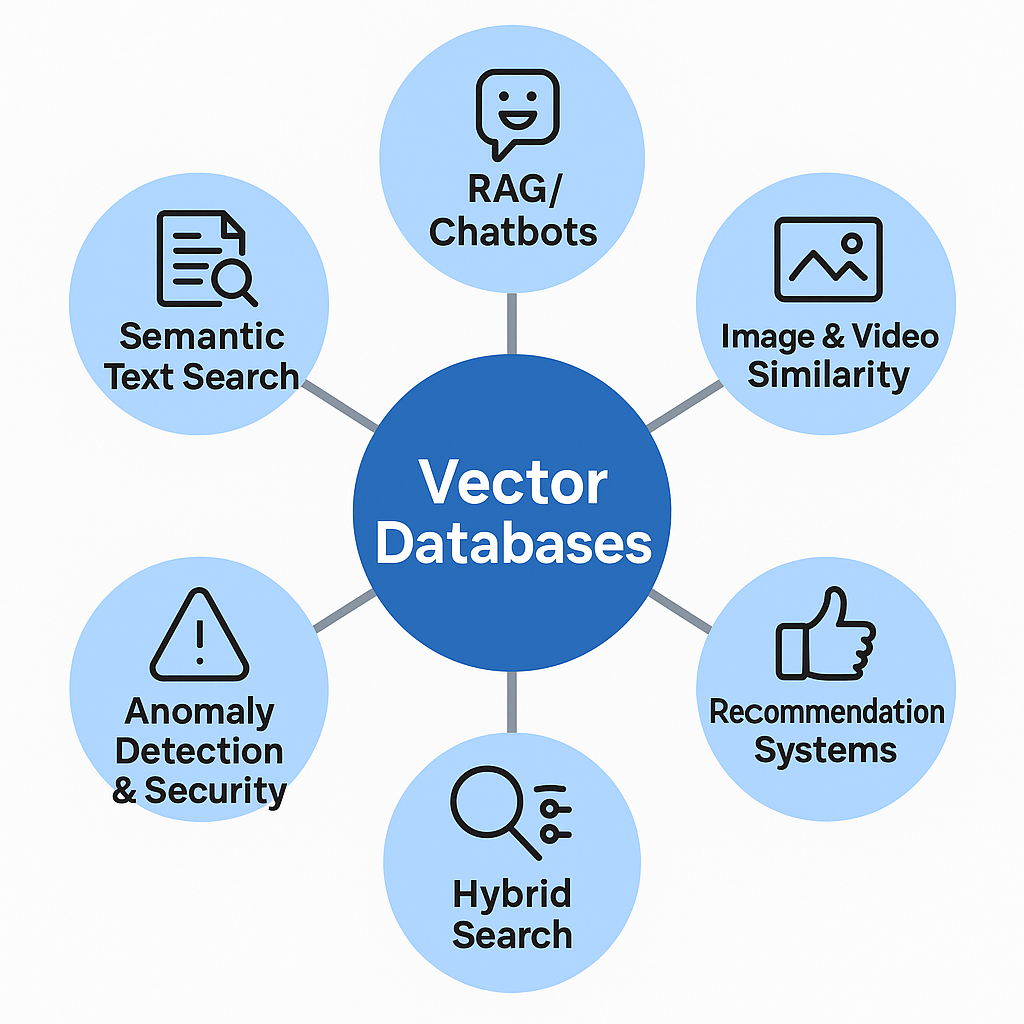
Six common uses for vector databases.
- Semantic text search: Embeddings let a search find text with the same meaning even when the words differ. A search of support tickets for "reset password issue" can return an article about being "unable to log in after forgetting passcode." Semantic search engines and enterprise document search work this way.
- Question answering and chatbots (RAG): In retrieval-augmented generation (RAG), reference documents are embedded and stored. When a question comes in, the system embeds it, retrieves the most relevant chunks, and passes them to an LLM to write the answer. Many AI assistants that answer from company documents are built on this pattern.
- Image and video similarity search: As in the photo example, vector search finds images by their content, which companies use for deduplication, content moderation, copyright detection, and visual recommendations. Audio and video work the same way, for queries like "find songs that sound like this clip."
- Recommendation systems: Many recommenders embed both users and items, based on viewing history, preferences, and item attributes, then use vector search to find the items closest to a user's embedding. The top N matches become personalized suggestions.
- Hybrid search (semantic + filters): A job portal can search for candidates whose resumes resemble an ideal profile while filtering by location or required credentials, combining vector similarity with structured metadata.
- Anomaly detection and security: Embedding sequences of user actions or log events lets a system flag vectors that fall far from any known cluster as possible anomalies, alongside dedicated fraud and anomaly detection tools.
Any application that searches by similarity can use a vector database. When the question is about how records connect to each other, a graph database is the better tool.
Popular Vector Database Solutions and Examples
Vector databases come as managed services, open-source databases, extensions to existing databases, and embedded libraries. Here are the most widely used vector databases in 2026 and what each one is known for:
| Database | Type | Open source | Known for |
|---|---|---|---|
| Pinecone | Managed service | No | Serverless vector search with no infrastructure to run; namespaces for multi-tenant apps |
| Weaviate | Database with a managed cloud | Yes (BSD-3-Clause core) | Built-in hybrid search that combines vectors and BM25 keyword search |
| Qdrant | Database with a managed cloud | Yes (Apache-2.0) | Fast filtered search; written in Rust and light enough for edge devices |
| Milvus / Zilliz | Database with a managed cloud | Yes (Apache-2.0) | Runs as a local library, a single server, or a distributed cluster for billions of vectors |
| pgvector | PostgreSQL extension | Yes (PostgreSQL License) | Vector search inside an existing Postgres database, next to relational data |
| LanceDB | Embedded database | Yes (Apache-2.0) | Runs inside the application on local files or object storage; multimodal data |
| Chroma | Embedded and distributed database | Yes (Apache-2.0) | Simple local development, with a managed cloud for larger workloads |
| Redis | In-memory database | Redis 8 offers AGPLv3, alongside RSALv2 and SSPLv1 | Low-latency vector search next to operational data; search is built into Redis 8 |
| Vespa | Search platform | Yes (Apache-2.0) | Large-scale search that combines vectors, text, and custom ranking |
| Elasticsearch / OpenSearch | Search engines | Elasticsearch: AGPLv3, SSPL, or Elastic License; OpenSearch: Apache-2.0 | Vector search alongside full-text search in an existing search stack |
| Azure Cosmos DB | Managed database | No | Vector search inside Azure's document database |
| PlanetScale | Managed MySQL-compatible database | No | Vector support in a MySQL-compatible database |
FAISS, mentioned above, is often used inside these systems as an indexing library and isn't a database on its own.
Integrations and Ecosystem Compatibility
Most vector databases are queried through SQL-like languages or simple get/put APIs, usually from a Python client library, so they slot into existing machine learning pipelines. Because the interfaces are similar, moving to a different vector database is often a question of performance or cost tuning, with few changes to the rest of the system.
Frameworks such as cognee, LangChain, and LlamaIndex add an abstraction layer on top of vector stores, so you can swap backends as your infrastructure needs change.
When to Use a Vector Database
A vector database is the right choice when your application needs to retrieve items by meaning: searching documents in natural language, giving an LLM relevant context, or finding similar images, products, or users. It's less suited to exact lookups and aggregations, which relational databases handle better, and to questions about how records connect, which call for a graph database.
Vector databases also add costs: computing embeddings, storing them, and running the index. For a cognee memory build, our cost calculator estimates those embedding, storage, and compute costs on local models and on API LLMs. Small projects can often start with pgvector or an embedded store and move to a dedicated vector database once the data or query volume grows.
At cognee, we've built an open-source memory engine that combines vector databases with knowledge graphs, so AI agents can retrieve similar content and follow how it connects.
FAQ
Answers to the most common questions from this guide.
Is a vector database outdated?
No. Vector search is still the standard way to retrieve information by meaning, and general-purpose databases such as PostgreSQL (through pgvector), Redis, Elasticsearch, and MongoDB now include it. Production systems typically combine it with keyword search, metadata filters, reranking, and knowledge graphs.
What is the difference between a vector database and a relational database?
A relational database stores rows and columns and answers queries with exact matches, joins, and aggregations in SQL. A vector database stores embeddings and answers queries by similarity, returning the items closest in meaning to the query. The two often work together, and extensions such as pgvector add vector search to PostgreSQL.
Do you need a vector database for RAG?
Not always. Small or early projects can use an in-memory index or a vector extension in a database they already run, such as pgvector. A dedicated vector database becomes worthwhile when the document collection, query volume, or filtering requirements grow beyond what that setup handles.
How much does a vector database cost?
Open-source vector databases such as Qdrant, Weaviate, Milvus, and pgvector are free to run, so the cost is the infrastructure underneath them. Managed services charge for storage, reads and writes, or provisioned capacity. As of November 2026, Pinecone's Standard plan has a $50 monthly minimum and Weaviate Cloud's Flex plan starts at $45 a month, and most managed services offer a free tier for testing.
Related reading
Cognee is the fastest way to start building reliable Al agent memory.