Give Claude Code Persistent Memory With cognee

A few weeks ago you were deep in a session with Claude Code, chasing down why refresh tokens weren't invalidating on logout. Claude read through the auth middleware, found the culprit, tried a fix, and explained why the first two approaches wouldn't have worked. Good session. Then you closed the terminal.
Open a new session today and ask about that same bug, and Claude has no idea what you're talking about — unless you resume that exact conversation, or you'd already written the decision down somewhere it reads. Claude Code does keep a few kinds of context alive between sessions. Each one is built for a different job, and none of them was designed to be a searchable record of what actually happened across weeks of work.
This tutorial walks through what those places are, where a dedicated memory layer comes in handy, and how to set up cognee's Claude Code plugin so the useful parts of a session persist and are available when you need them — proven with an actual two-session test.
What Claude Code Already Remembers
Claude Code ships with three ways of carrying something forward — worth knowing exactly what each one does before adding a fourth.
1) Saved sessions
Every conversation is stored locally and can be reopened — resuming picks up the full transcript, tool calls and all. However, if you want an answer that draws on context from three sessions ago, you have to know which transcript to reopen and dig through it by hand.
2) CLAUDE.md
This is the file you write yourself: build commands, coding conventions, architectural rules, the things you'd otherwise type into chat again every session. It loads in full at the start of every conversation, and Anthropic recommends keeping it under roughly 200 lines — past that, adherence starts to slip because the file is competing for space with everything else in context.
3) Auto memory
Claude writes its own notes too, separate from CLAUDE.md, stored in ~/.claude/projects/<project>/memory/MEMORY.md plus whatever topic files it creates alongside it. This is where debugging insights, discovered build commands, and corrections you've given Claude end up. Only the first 200 lines or 25KB of MEMORY.md load at session start; anything past that is found in topic files Claude reads on demand.
| Mechanism | What persists | Comes back by |
|---|---|---|
| Saved session | The full conversation | Resuming that specific session |
| CLAUDE.md | Instructions you wrote | Loading in full, every session |
| Auto memory | Notes Claude wrote itself | Loading the first 200 lines/25KB of MEMORY.md |
Why Those Three Aren't Enough — But 4) cognee Is
- Session saves are, obviously, session-specific.
- CLAUDE.md is manual and flat.
- Auto memory is automatic but still a file Claude has to remember to keep tidy; it also isn't searchable — it's whatever fits in the first 200 lines.
Neither one connects a decision to the code it affected, or lets you ask "why did we do it this way" months later and get an answer that pulls in the right context.
The cognee plugin does just that.
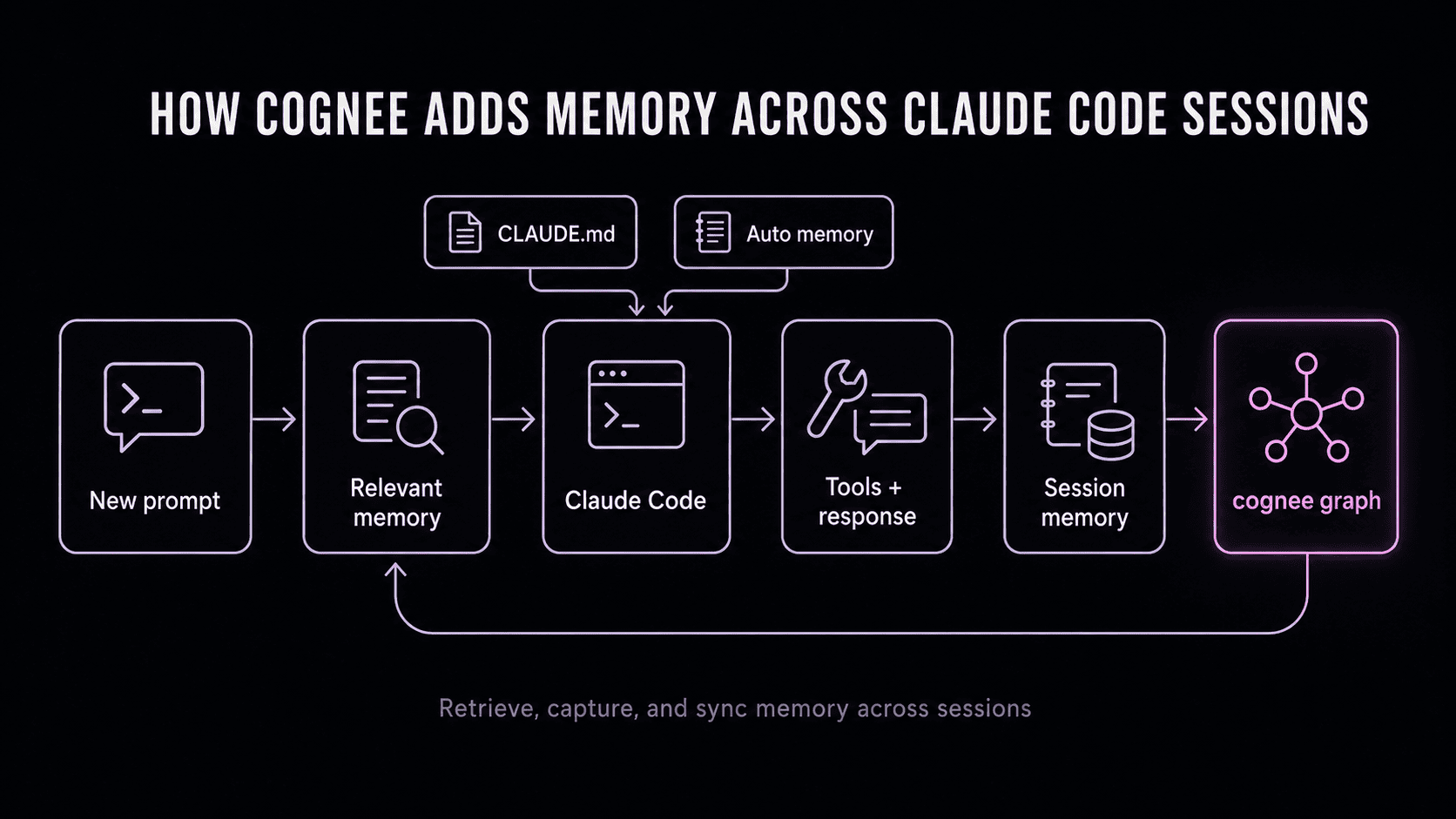
The plugin hooks into Claude Code's session lifecycle directly, so there's no separate server to run and nothing to remember to call. It registers six hooks:
SessionStartsets up identity, dataset, and modeUserPromptSubmitlooks up relevant memory before Claude respondsPostToolUselogs tool activity in the backgroundStopcaptures the assistant's answerPreCompactbuilds a memory anchor before context gets compacted awaySessionEndtriggers the final sync into the persistent graph, with a fallback watcher that catches the sync if the process exits before the hook fires
None of this is something you need to interact with — you work in Claude Code as usual, and the plugin just captures what happens, syncs it into cognee's knowledge graph, and pulls relevant pieces back in on later prompts.
Setting Up cognee for Claude Code
| You'll need | Why |
|---|---|
| Claude Code installed | This is where the plugin runs |
| An LLM API key | Required for local mode, which is the default |
| A cognee Cloud (or self-hosted) URL and API key | Only needed if you want remote instead of local storage |
| A repo you already know | Makes the two-session test meaningful — you'll notice immediately if the recall is wrong |
1. Install the plugin
The same install can be run as slash commands from inside a Claude Code session instead, if you'd rather not leave the terminal.
2. Choose local or remote storage
Local mode is the default whenever COGNEE_BASE_URL isn't set — the plugin bootstraps a local cognee API at http://localhost:8011 and just needs an LLM key. If COGNEE_API_KEY isn't set in local mode, it gets minted automatically:
To point at cognee Cloud or a remote instance instead:
Remote makes sense once memory needs to be reachable from more than one machine, or you want it centrally managed rather than sitting on a single laptop.
3. Confirm it connected
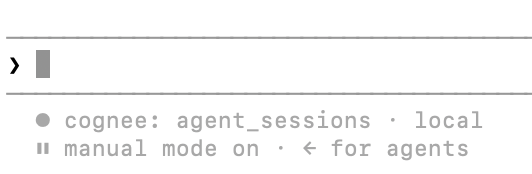
A new session should show the active dataset and mode in the status line (in this case, the dataset is agent_sessions and the mode is local). If you don't see it, that's the first thing to check before anything else.
4. Store something worth remembering
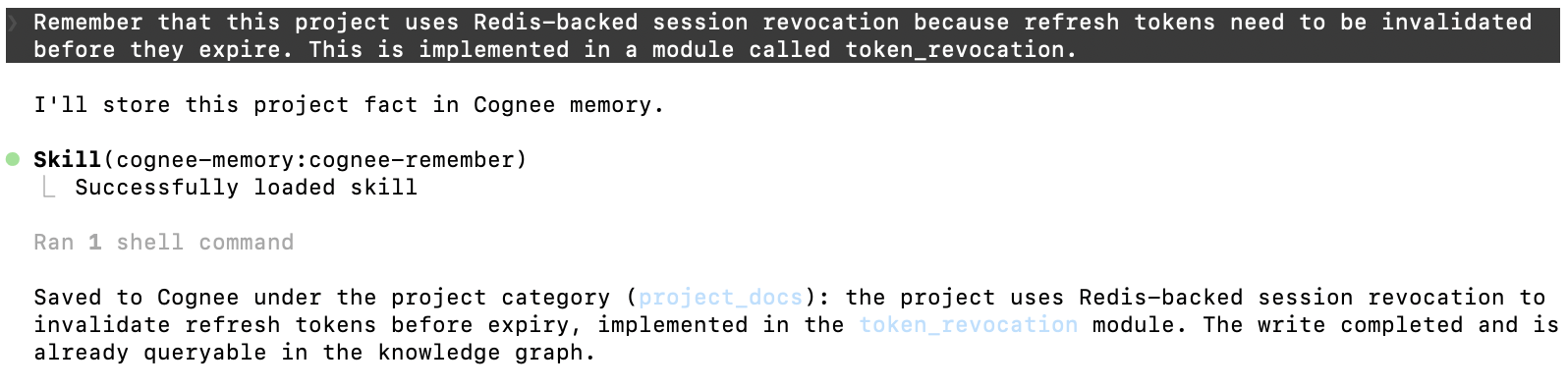
Here is an example prompt:
Note: With longer prompts, graph ingestion may be slower to complete. It runs in the background, so simply wait and query later. If you are unsure whether your context has been saved to the graph, ask Claude to query it.
The plugin also exposes this directly as a skill if you want to be explicit about it rather than relying on automatic capture:
Here is Claude using the skill:
5. Close the session → Open a new one → Ask for it back
Start a new session (not a resumed one) and ask something that requires both the fact and the reasoning behind it:
A good answer states the decision, the reasoning, and the relevant file or module, and reads like it came from memory, not like Claude is guessing from the code alone. For example, this query returned:

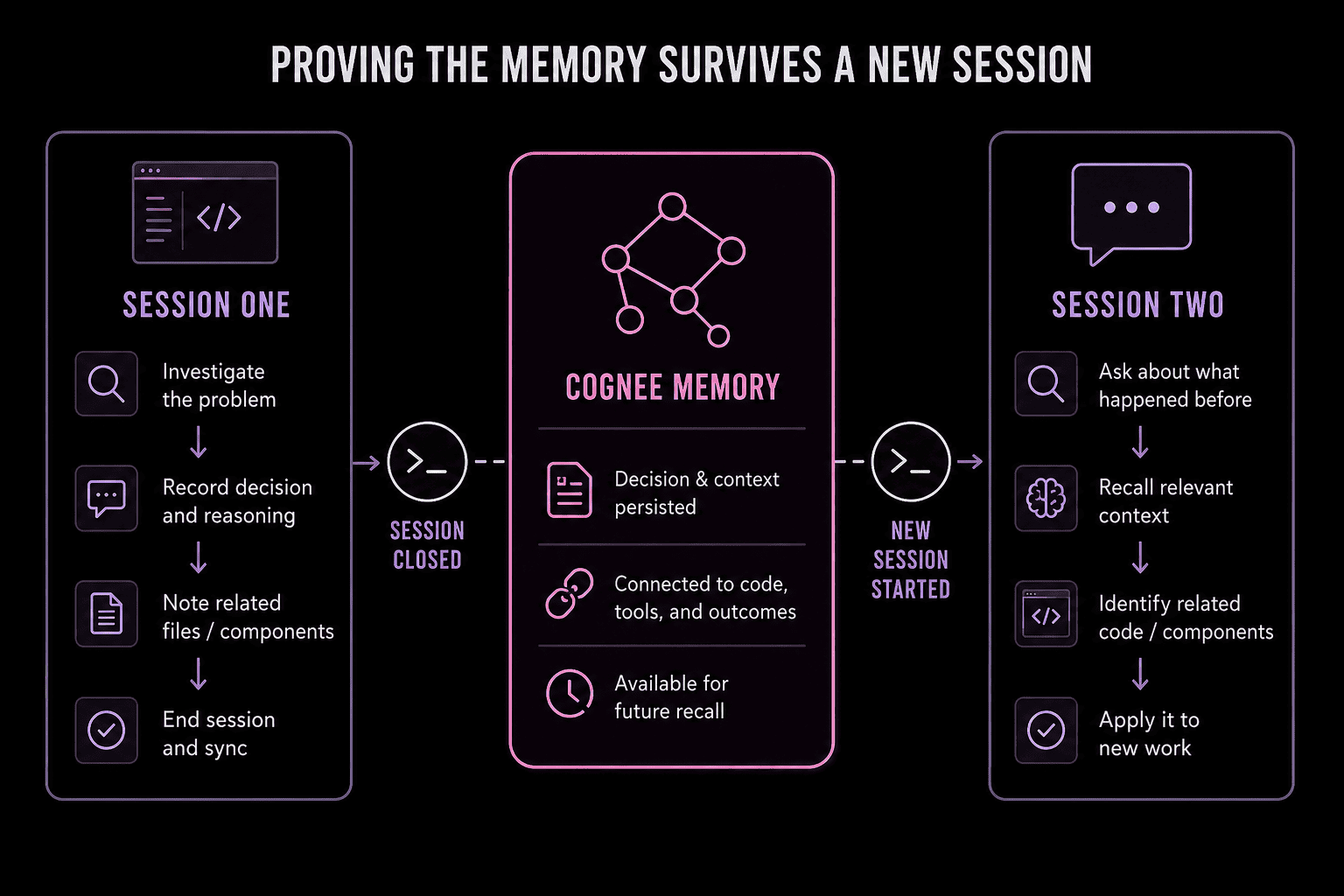
To test more than simple recall, give Claude a related task and check whether it applies the retrieved context or just recites it back.
| Check | What passing looks like |
|---|---|
| Persistence | The information survives into the new session |
| Relevance | Only related memories are retrieved |
| Relationship | Claude connects the decision to the correct file or component |
| Application | Claude uses the memory in a new task |
| Scope | Memories from unrelated projects do not appear |
Any of these checks failing gives a more useful debugging signal than "the install didn't work."
CLAUDE.md, Auto Memory, or cognee?
These three aren't competing for the same job, so the question isn't really which one to pick.
| You want to say... | Put it in |
|---|---|
"Run tests with pnpm test" | CLAUDE.md |
| "Use two-space indentation" | CLAUDE.md |
| "This test fails unless Redis is running locally" | Auto memory (or CLAUDE.md, if it's permanent) |
| "We rejected library X because it broke streaming" | cognee |
| "Bug 418 started in the token-refresh path, fixed in these files" | cognee |
| "Always get approval before touching migrations" | CLAUDE.md, or better, a hook |
| A conversation you need to pick back up exactly where it left off | Resume the saved session |
cognee doesn't take over auto memory. The plugin steers Claude toward cognee as the preferred memory source, but it doesn't disable MEMORY.md — they run alongside each other.
Since Anthropic treats CLAUDE.md and auto memory as context rather than enforced rules, anything that must happen regardless of what Claude decides — blocking an action, requiring a step — belongs in a hook, not any of these three.
Maintaining Memory Hygiene
cognee doesn't decide what belongs in memory — you do, every time something gets stored. A few habits keep that memory useful instead of turning into another pile of outdated, untrustworthy notes. Keep credentials, raw logs, half-formed thoughts mid-debug, and anything you know will be stale within a week out of memory entirely.
Treat what comes back on recall the way you'd treat any other context an agent hands you: useful, not automatically correct. Memory can pick up bad information the same way any other input to an agent can — a wrong assumption stored once resurfaces every time it's relevant.
When something outdated keeps showing up, store the correction explicitly so the old version gets superseded. An occasional look at what's actually stored costs a few minutes and saves you from an agent confidently repeating something that stopped being true months ago.
Troubleshooting
| Symptom | Likely cause | Check |
|---|---|---|
| Local mode won't start | Missing LLM key | LLM_API_KEY in the shell that launched Claude |
| Remote mode fails | Wrong endpoint or key | COGNEE_BASE_URL, COGNEE_API_KEY, network access |
| Recall comes back empty | Wrong dataset, or the query doesn't match how it was stored | Dataset name, try rephrasing the search |
| Memory from another project shows up | Session or dataset scoping too broad | Dataset name, session scoping |
| Old, outdated info keeps surfacing | Nothing's updated it | Store a correction explicitly |
One behavior worth knowing before troubleshooting a dataset issue: the active dataset is fixed for the life of the shell you're in. Changing a dataset-related environment variable won't take effect until you fully close the shell running Claude Code and relaunch — re-exporting the variable mid-session won't do anything.
Finally, to upgrade the plugin, you'll need to uninstall and reinstall it. It's as easy as:
FAQ
Plugin or MCP?
For Claude Code specifically, the plugin is the more direct route — it's built around the session lifecycle and doesn't need a separately managed server. cognee's MCP server and CLI are still there if you want a wider toolbox, or if you're cooking up an agent framework beyond Claude Code that doesn't have a dedicated plugin.
Does the cognee plugin send my code to a third party?
In local mode, everything stays on your machine except the calls your LLM provider needs to process requests — cognee itself doesn't ship your code anywhere. Remote mode sends data to whichever endpoint you configure, whether that's Cognee Cloud or a self-hosted instance you control.
If I uninstall the plugin, do I lose the memory?
No. The knowledge graph lives in cognee's storage — local instance or remote endpoint — independently of the plugin. Reinstalling and pointing at the same dataset picks up exactly where you left off.
Is this the same as Anthropic's memory tool for the Claude API?
No. Anthropic's memory tool is a separate feature for developers building directly against the Messages API. Claude Code's native memory and the cognee plugin are a different layer, specific to the Claude Code environment.
Does adding memory slow Claude Code down?
Writes happen in the background rather than blocking your prompt, so day-to-day use shouldn't feel different. The one exception worth knowing about is that large sync operations can occasionally time out, which is more of an edge case than a normal-use concern.