< BlogTutorialsJuly 29, 2026Updated September 3, 202631 minutes read
July 29, 2026Updated September 3, 202631 minutes read
Why AI Agents Forget and How to Fix Their Memory
Xavier FrancuskiAI Researcher
An AI coding agent spends an afternoon finding the cause of an authentication bug, testing several fixes, and updating the right files. Bug solved — excellent. But two days later, starting a new session voids the whole process and sends the agent back to the beginning.
The same failure appears when a support agent repeats a question the customer answered in an earlier session or an operations agent loses track of a task after several tool calls.
A larger context window can postpone some of these problems, but it won't preserve state across sessions or guarantee that the right information returns when the agent needs it. Reliable continuity depends on the surrounding system: what it saves, how it scopes memory, what it retrieves, and what reaches the model.
This guide shows how to locate the failure and apply the simplest fix that solves it, from better thread state and context management to long-term memory for AI agents with cognee.
What Is the AI Agent Forgetfulness Problem?
The AI agent forgetfulness problem occurs when information the agent previously encountered can't be used when it becomes relevant again.
An agent can forget something even when nothing was ever deleted, with the fact still stored somewhere in a log file, a database row, or a closed conversation.
The failure usually occurs during capture, scoping, retrieval, context assembly, or later updates. Fixing the wrong link in that chain — for example, rewriting a prompt when the real issue is a broken retrieval query — just wastes effort without addressing the cause.
Let's pin a few terms down before we go on, since they tend to get thrown around interchangeably, and we'll be referring to them in the next sections:
Term
Meaning
Context
Information supplied to the model for the current call
State
Temporary information carried through the current workflow
Long-term memory
Information stored outside the active prompt for later use
Retrieval
Selecting stored information relevant to the current task
Forgetting
Failing to use earlier information when it's needed
Five situations account for most cases of agent forgetfulness — each is a specific point where the surrounding system either lost the information or failed to bring it back at the right moment.
State Doesn't Survive the Workflow
A base model doesn't carry application state across independent calls unless the surrounding system supplies it again. Things like conversation history, tool results, and unfinished tasks can vanish when a thread ends or work gets passed on to another agent.
Continuity depends on explicit checkpointing and clear rules for sharing state across those boundaries.
Context Window Limits and Compression
Every model call has a bounded context window. Once it fills up, the application has to remove, summarize, or selectively reload earlier information.
Even information that still fits within the context window may be used inconsistently when the prompt becomes long or noisy. Research on the "lost in the middle" effect found that models often handle information near the beginning or end of a long input more reliably than details buried between them.
Compaction can also remove useful context when a summary drops a rejected approach, file reference, or unresolved task.
The System Saves the Wrong Information
Weak write policies either miss valuable information or retain too much of it. Saving every message creates duplicates, temporary facts, and unverified claims that later compete with useful memory.
A better write policy favors future usefulness over completeness. Each memory should also carry the scope and source needed to use it safely later.
Retrieval Misses the Right Memory
Stored information only helps when the retrieval layer can find it. Common problems include:
Searching the wrong dataset or user scope
Queries that don't match the stored wording
Similar but incorrect results ranking higher
Missing links between related facts
Old information outranking newer updates
These failures often look like storage problems from the outside, even though the required memory is available in the system.
Stored Knowledge Drifts Over Time
Without proper update and deletion rules, older memories remain available beside their replacements and may surface unpredictably.
Durable memory needs a way to correct, consolidate, supersede, and remove information as facts, preferences, and project decisions change.
How to Diagnose Where the Agent Is Forgetting
Before diagnosing the cause, it helps to recognize the symptom in the system. Forgetfulness rarely announces itself explicitly — it shows up subtly, but the way the agent starts to short-circuit usually points straight to the stage that should be looked at first.
Symptom
Likely cause
Check this first
Repeats questions in a new session
The information wasn't stored or sits in the wrong scope
Write path and session ID
Loses track of an active task
Working state wasn't checkpointed
Thread state and tool history
Can't recall a known decision
Retrieval didn't return it
Query, dataset, and stored wording
Surfaces unrelated information
Retrieval scope or ranking is too broad
User, project, and dataset boundaries
Contradicts an earlier fact
Old or duplicate memories remain active
Update and consolidation logic
Misses information already in the prompt
The context is too long or poorly organized
Context size, ordering, and relevance
Repeats an unsuccessful action
The outcome was never saved
Post-task memory write
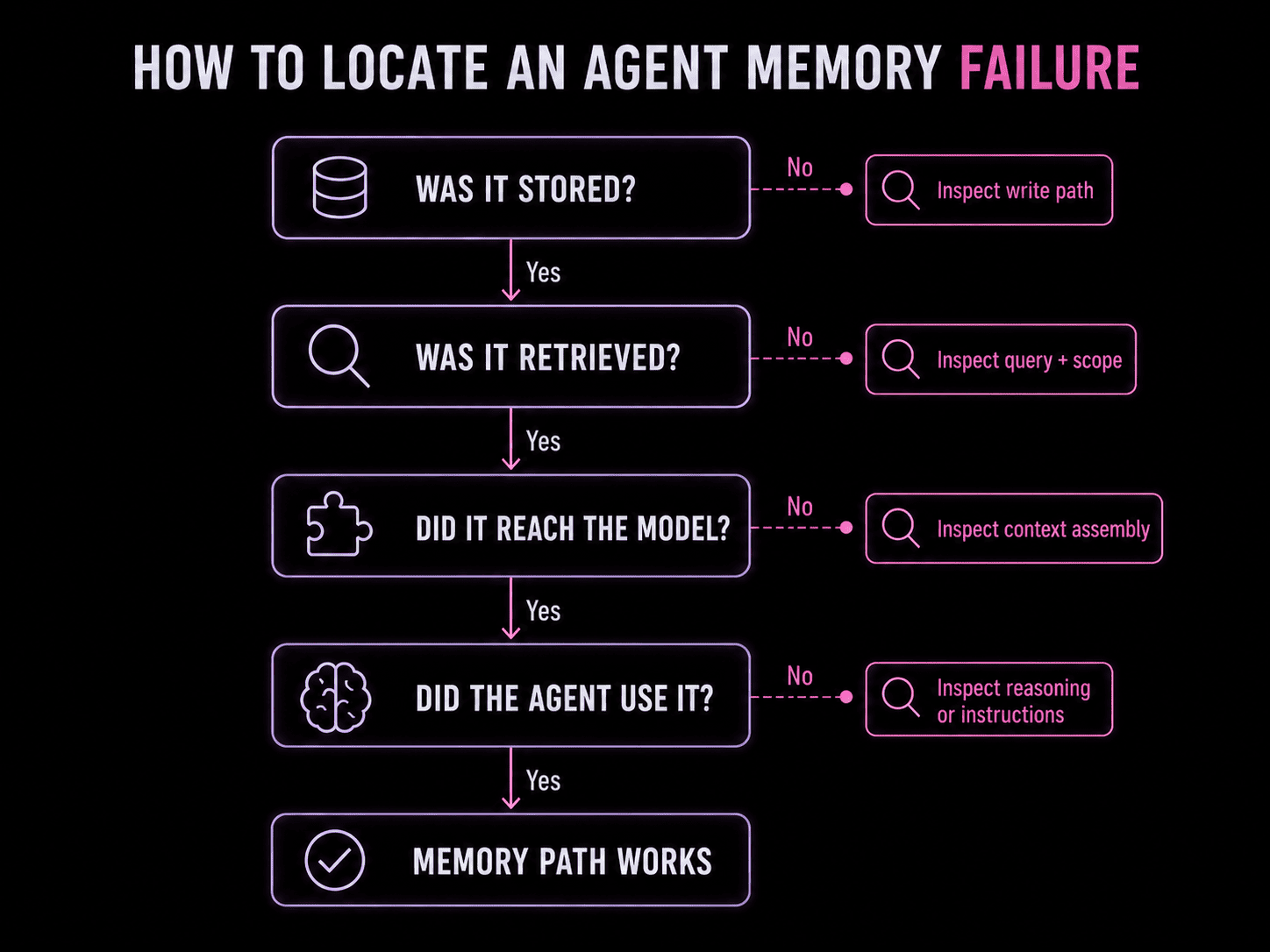
Choose a repeated failure you're observing and trace one specific fact through the system before changing the model, prompt, or memory stack. Use something concrete, like a user preference, project decision, unfinished task, or verified bug fix.
Here's how to go about diagnosing the issue:
Define what the agent should remember
Note down the exact information and when you expect it to return.
Avoid vague tests such as "remember our conversation." Instead, go for something narrow like:
The customer uses Okta and requires SCIM provisioning.
Check the intended scope
Decide where the memory should remain available:
Current tool call
Active thread
Future sessions
One user or account
One project or dataset
Several authorized agents
Many apparent memory failures come from reading or writing to the wrong scope.
Inspect the write
Confirm that the information was stored successfully and attached to the right session, user, project, or dataset.
Also check when the write occurs. If the process exits before saving the final outcome, the agent may retain the investigation but lose the conclusion.
Inspect retrieval and context assembly
Log the retrieval query and returned memories. Confirm that the required fact appears in the results and reaches the final prompt sent to the model.
The result usually identifies the failing stage:
What you find
Where the failure occurred
The memory wasn't stored
Write path
The memory exists but wasn't returned
Retrieval
The memory was returned but didn't reach the model
Context assembly
Test whether the model used it
Even correct context can produce a poor answer. Check whether the expected memory appeared in the prompt and whether the agent applied it correctly.
Here is a generic template for checking memory retrieval. Feel free to change it depending on which agent framework you are using:
Then run the same test in a fresh session to see if you've just fixed the current thread or created actual cross-session memory.
How to Fix AI Agent Memory Loss
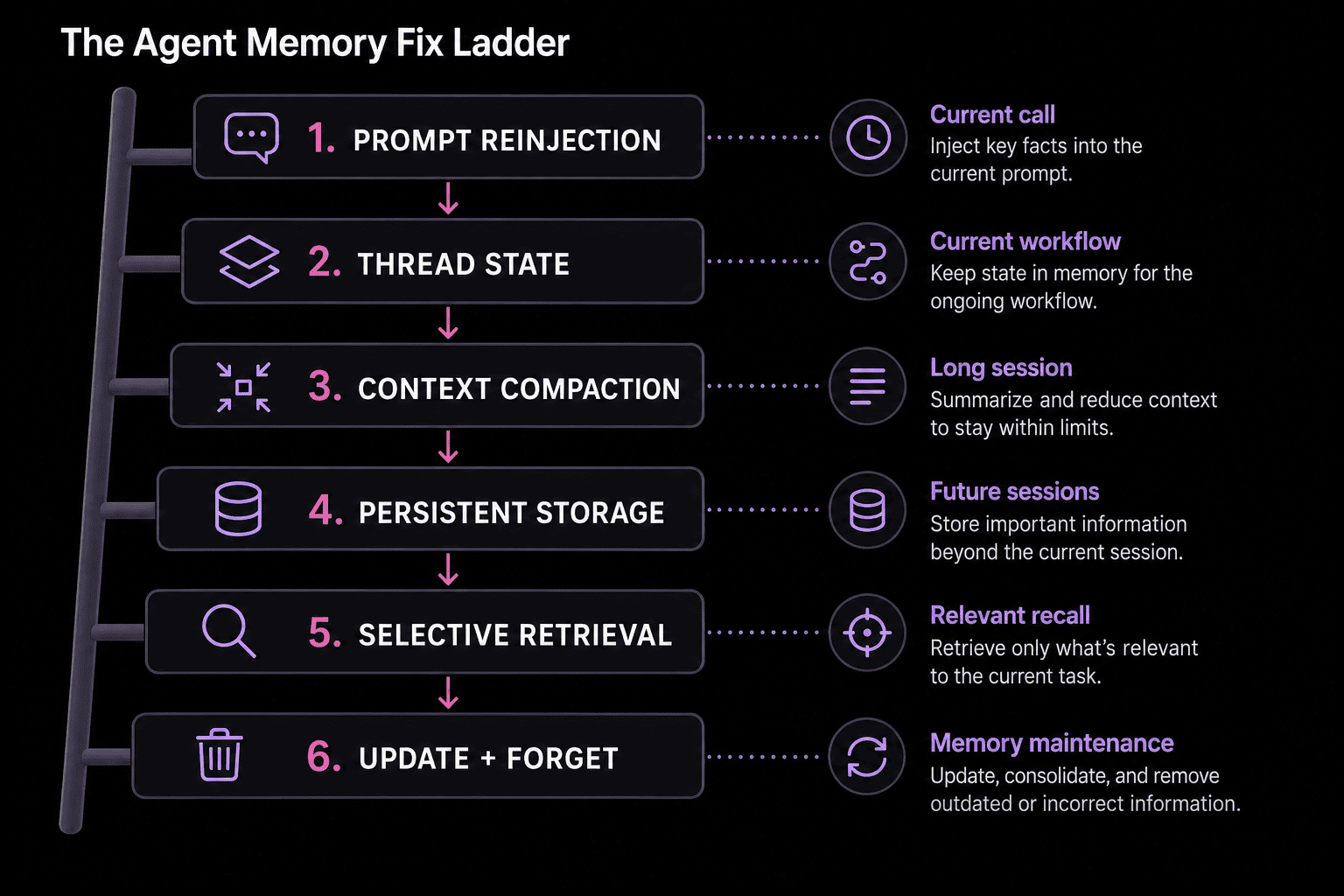
Use the smallest intervention that addresses the failure you found. Some problems only need cleaner working state, while others need persistent storage and retrieval.
Quick Fixes for Agent Context Loss
These changes reduce agent context loss during long or tool-heavy workflows:
Checkpoint the active state. Save the current objective, completed steps, tool results, and pending work so interruptions don't reset the task.
Break up long runs. Smaller tasks create clearer boundaries and keep irrelevant history from accumulating.
Reinject critical constraints. Stable instructions, permissions, and task requirements should return whenever they apply.
Compact deliberately. Preserve decisions, unresolved questions, failed approaches, and the next action when summarizing older context.
Trim noisy outputs. Large logs and raw API responses can crowd out the information the agent needs to continue.
Build Durable Memory in Layers
A durable stack usually adds these layers in order: capture the useful signal from a session, store it somewhere that survives past the session, retrieve selectively rather than replaying everything, and update or remove it once it changes.
Layer
Add it when…
Thread state
The agent loses track during the current task
Persistent storage
Information disappears after the session ends
Selective retrieval
Stored information doesn't return when needed
Structured memory
The answer depends on relationships among facts, people, files, or events
Update and deletion logic
Old information conflicts with newer facts
What Should an AI Agent Remember?
Durable memory should focus on information that's likely to improve future work.
Keep in long-term memory
Keep temporary or discard
Verified facts and corrections
Unconfirmed assumptions
Decisions and their reasoning
Every intermediate thought
Successful and failed outcomes
Raw tool output and logs
Stable preferences and constraints
Short-lived task details
Relationships among people, files, events, or accounts
Duplicate conversation summaries
Open commitments and unresolved work
Credentials or sensitive data without an approved retention policy
Each stored memory should include enough context to be used safely later:
Who or what it belongs to
Where the information came from
When it was recorded or last updated
Whether it's confirmed, temporary, or superseded
Conciseness with clear provenance will usually be more useful than completeness with noise. When facts change, update or replace the old entry instead of leaving both versions active.
How cognee Helps Fix Agent Forgetfulness
Retrieval only works as well as what was written matches what gets searched for later — memory that's verified, scoped, and connected to its source is what makes retrieval actually reliable, rather than a rerun of the "close enough" guesswork that caused the forgetting in the first place.
Semantic search alone gets partway there. It finds passages similar to a query, but it doesn't know that two mentions of the same customer, bug, or decision refer to one underlying thing, or that a newer fact should replace an older one.
When the answer depends on how people, files, events, and decisions actually connect, an AI knowledge graph can complement vector search by representing those connections explicitly.
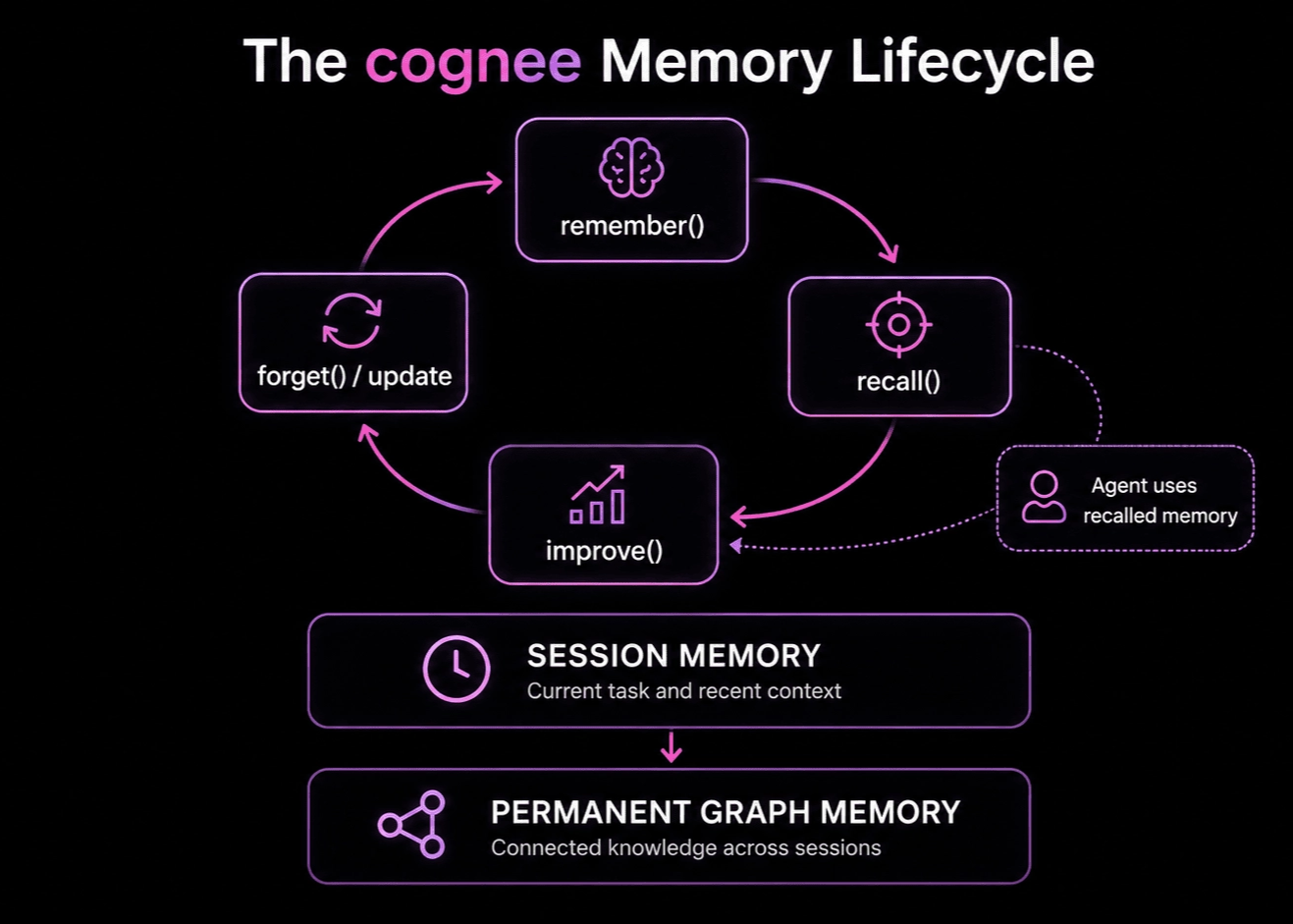
cognee combines both, and the four core operations of our engine cover much of the memory lifecycle described above:
Operation
Role
Helps with
remember()
Stores information from a session or workflow
Information that was never captured, or written to the wrong scope
recall()
Retrieves context relevant to the current request
Retrieval that misses memory which does exist
improve()
Enriches, connects, and consolidates memory
Facts sitting as isolated fragments instead of linked together
forget()
Removes information that's outdated or no longer needed
Stale or conflicting memory that keeps surfacing after it should've been replaced
Session memory stores immediate task context, while permanent graph memory preserves knowledge that should remain useful across future runs. With multi-user access control enabled, datasets and permissions keep retrieval scoped to the appropriate project, account, or knowledge base.
With cognee, the agent can carry recent context through the current workflow and retrieve connected knowledge from earlier work. Decisions can remain linked to their sources, affected files, previous outcomes, and later corrections instead of surviving only as isolated conversation fragments.
Implementation #1: A Coding Agent That Remembers Decisions
Coding agents should retain verified decisions, causes, affected files, and unresolved work that may shape a later task.
Here's what a sensible workflow looks like:
Keep the active investigation in session state.
Save the outcome only after the fix has been tested.
Attach the decision to the relevant files, services, and evidence.
Recall that context when a related task appears.
Update the memory when the implementation changes.
Evaluating memory persistence
In the first session, resolve a real bug and store the cause, fix, and affected files.
Then, start a fresh session and ask:
Why did we choose this implementation, and which files would need review before changing it?
The test passes when the agent retrieves the earlier reasoning and uses it in the new task rather than repeating the investigation.
Implementation #2: A Business Agent That Preserves Account Context
Business agents need clear boundaries around who and what a memory belongs to — account details, prior outcomes, open requests, and confirmed preferences should remain available without leaking into another customer's context.
Memory type
Suggested scope
Current conversation and pending actions
Session
Confirmed account facts and preferences
Customer or account
Policies and product constraints
Shared organizational knowledge
Case outcomes and promised follow-ups
Account with provenance
A support or sales workflow could:
Recall account context when the interaction begins.
Keep temporary conversation details in session memory.
Save verified outcomes after the interaction.
Replace outdated preferences or account facts.
Preserve the source and date of important claims.
Evaluating scope impermeability
The key test here is to run the same query under another account and confirm that none of the first customer's memory appears. Run the test code below after running the agent above to ensure data from one scope doesn't bleed into another:
Memory quality depends on whether relevant information returns at the right time and improves the agent's work.
Metric
What it shows
Cross-session recall
Whether required information survives into later sessions
Retrieval precision
How much returned context is relevant
Application success
Whether the agent uses the memory correctly
Contradiction and staleness rate
How often old or conflicting information appears
Scope leakage
Whether memory crosses user, project, or account boundaries
Provenance coverage
Whether recalled claims can be traced to a source
Retrieval latency and context cost
The operational overhead added by memory
Task improvement
Whether memory improves results over a memory-free baseline
Not every system needs all eight of these instrumented from day one. Application success and task improvement are the two that tell you whether memory is actually helping — start there, and add the rest as usage grows and specific failures start showing a pattern.
Compare the task with no external memory, session state only, and long-term retrieval enabled. Then rerun it after correcting and deleting a stored memory.
The final two tests reveal whether the system can adapt as its knowledge changes. A memory layer that recalls old information accurately but can't update or remove it will become less reliable over time.
Trace the Break, Then Fix It
AI agent forgetfulness can start anywhere along the memory path: capture, storage, retrieval, context assembly, or later updates. The fastest fix is to trace one concrete fact through that path and repair the point where it disappears.
Checkpointing and cleaner context management can stabilize the current workflow. Cross-session continuity needs persistent memory, selective retrieval, clear scope, and a way to replace information as it changes.
FAQ
Can several AI agents share the same memory?+
Yes, as long as the memory layer supports shared scope and permissions. Each entry should retain its source, owner, and access rules so agents only retrieve information they're authorized to use.
Does an AI agent need a vector database for memory?+
No. Vector search helps retrieve semantically similar information, but agent memory may also use caches, relational databases, document indexes, or knowledge graphs. Many systems combine several storage and retrieval methods.
What happens if the agent recalls something incorrect?+
Treat anything recalled the same way you'd treat any other context handed to the model: useful, not automatically correct. Provenance and timestamps help the system judge whether a recalled fact is still current, but the agent should still be able to flag uncertainty rather than treating every recalled memory as settled fact. If a wrong memory keeps resurfacing, correcting it explicitly is more reliable than assuming it'll age out on its own.
Get started
Cognee is the fastest way to start building reliable Al agent memory.
A visual walkthrough of how RAG actually works: how knowledge is prepared and indexed, what gets retrieved for a question, how that evidence augments the LLM's prompt, and why retrieval quality decides what the model can answer correctly.
AI database is an umbrella term for vector databases, graph databases, search engines, relational and document stores, and more. Learn how each type works, when to choose one over another, and where a memory layer belongs above them.
A visual walkthrough of how RAG actually works: how knowledge is prepared and indexed, what gets retrieved for a question, how that evidence augments the LLM's prompt, and why retrieval quality decides what the model can answer correctly.
AI database is an umbrella term for vector databases, graph databases, search engines, relational and document stores, and more. Learn how each type works, when to choose one over another, and where a memory layer belongs above them.