Coding Agent Memory with cognee: Hooks, Capture, and Recall

Your coding agent remembers the fix: “Switched to batched writes.” Awesome. But why was the function rewritten in the first place? It has no clue because the timeout that triggered the change, the affected files, and the earlier implementation that failed are all missing.
Kevin Liao talks about this issue in his recent article: memory plugins that inject a handful of matching snippets into each prompt can lose the context and reasoning behind past decisions, leaving agents with fragments of information they struggle to piece together.
That’s what cognee’s AI agent memory plugins for Claude Code, Codex, Cursor, and OpenCode are there for — to capture the session as it unfolds, keeping track of prompts, answers, and tool activity. The cognee server then connects that activity in a knowledge graph and distills lessons that future sessions and other connected agents can retrieve.
In this post, we’ll follow that process from capture to recall, then put it to the test across two Claude Code sessions: can the agent remember why a decision was made, or just what changed?
MCP tools and automatic hooks
An MCP memory server gives an agent explicit memory tools, such as searching for a previous decision or saving a new finding. The model decides whether and when to call them, so a deliberate lookup goes through, but a session in which the model never makes a memory call leaves nothing behind.
Hooks run at fixed points in the agent’s lifecycle, whatever the model is thinking about. Claude Code, for example, fires a hook when you submit a prompt, after each tool call, when the agent finishes an answer, and when the session ends. The cognee plugin uses those events to look up memory and record the session. The agent can still search or save on purpose, with the hooks recording the session even when it doesn’t.
Turning a coding session into persistent memory
The plugin is an HTTP client for a cognee server, which can run either on your machine or in cognee Cloud. Captured activity lands in the server’s session cache, and a sync turns it into permanent graph memory. The server does the graph processing and storage. The plugin handles the host’s hooks and keeps a small amount of local state, such as logs and writes queued while the server is unreachable.
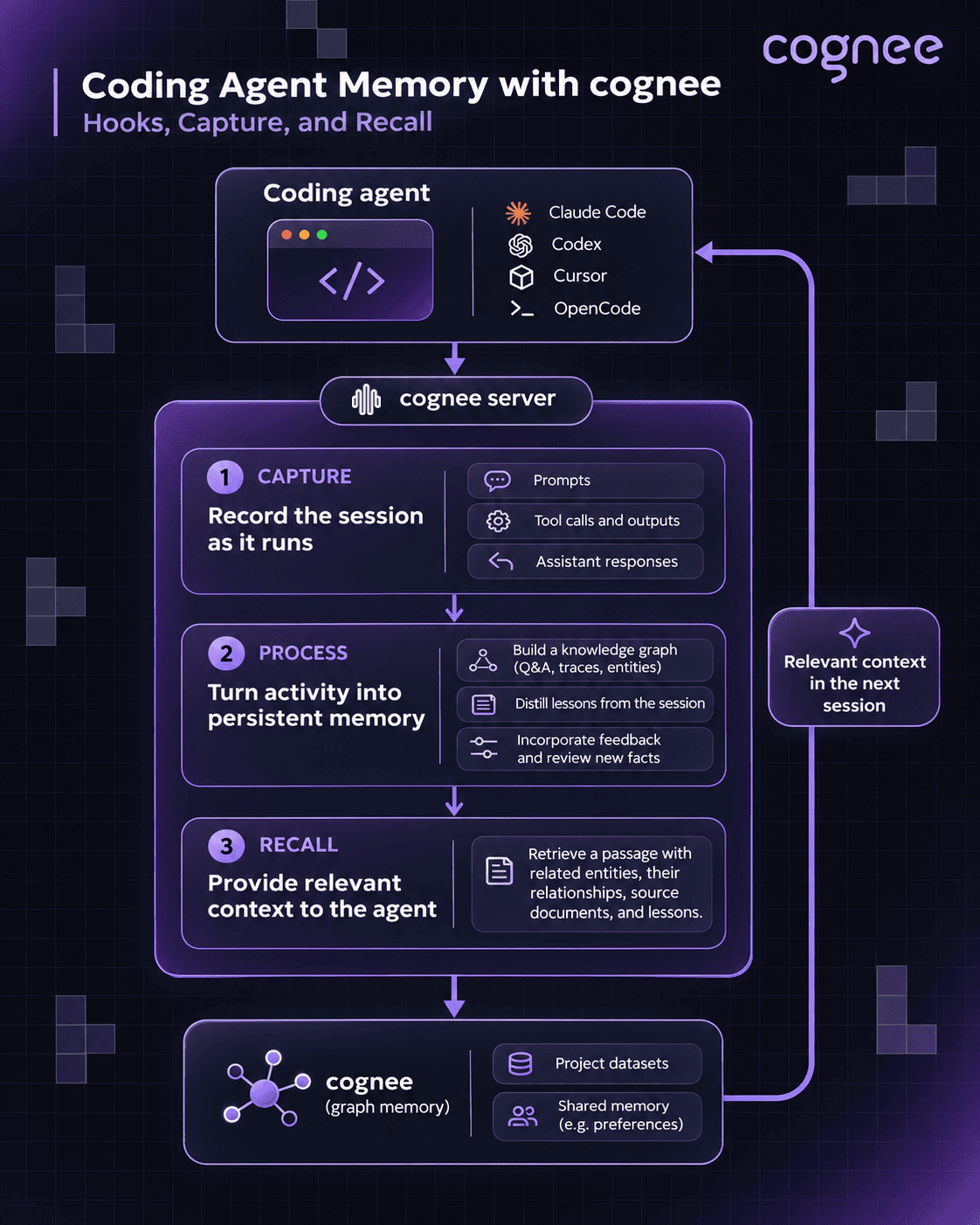
cognee captures coding-agent activity through hooks, processes it into persistent graph memory, and retrieves relevant context for future sessions across Claude Code, Codex, Cursor, and OpenCode.
1. Capture prompts, answers, and tool activity
In Claude Code, UserPromptSubmit looks up memory and stages the new prompt, PostToolUse records each permitted tool call with its arguments and output, and Stop stores the assistant’s answer as a question-and-answer pair with that prompt. Before Claude compacts the conversation, PreCompact builds a memory anchor from the session’s recent turns and the matching graph context, which the compacted conversation keeps.
Bash capture skips the plugin’s own commands and successful read-only inspections such as a grep with no matches, while failures, test and build runs, and file changes are retained.
2. Process the session into graph memory
When a Claude Code session ends, the SessionEnd hook starts a final sync. If Claude Code exits without firing that hook, an exit watcher runs the sync instead, and the two share a marker so one exit doesn’t process the same activity twice. Long sessions also sync automatically after every 150 stored tool calls and answers, at most once per 24 hours per session by default. The final sync, the /cognee-memory:cognee-sync command, and a dataset switch ignore that cooldown.
Each sync calls the server’s session-aware improve operation, which reads from the server’s own session cache, so the plugin never re-uploads the transcript. It persists the session’s question-and-answer turns into the graph, adds compact per-step feedback from the tool traces (not the raw tool output), applies any feedback scores to graph weights, and distills lessons anchored to entities in the graph. Watermarks record what earlier syncs already processed, so a later sync handles only new entries.
The graph can only hold reasons that were recorded somewhere in the session. When the reason for a change came up in a prompt or an answer, the Q&A turn carries it into the graph, and a failed test run stays visible in the trace feedback. Distilled lessons are model-written summaries of what the session established, so it’s highly advised to review those underlying records before acting on one in a high-stakes change.
3. Retrieve it when another session needs it
In Claude Code, UserPromptSubmit searches the active dataset for memory related to the prompt and adds what it finds to the context before the agent responds. Recalled items can include earlier Q&A turns from Claude Code or Codex sessions, graph entities and facts, documents, and distilled lessons. Inside an indexed git repository, a PreToolUse hook also gives Claude what cognee’s code graph knows about a source file before Claude reads it. The agent still decides which recalled evidence applies to the current task.
The other integrations do what their hosts allow. The Codex plugin recalls on UserPromptSubmit, the same way Claude Code does. OpenCode adds recalled memory to the system context on every user turn. The Cursor plugin runs its lookup in beforeSubmitPrompt, but Cursor gives that hook no way to add context, so the memory block arrives with the turn’s first tool call other than a file read. A Cursor turn without such a call gets only the context injected at session start.
Our integrations repository documents each client’s hooks and install steps.
Keeping project memory in the intended dataset
Every write and recall goes to one active dataset. All four plugins default to agent_sessions, so every project you open shares one memory, and the Claude Code and Codex plugins share it with each other. Moving between clients on one codebase keeps the same history, but a decision from one repository can also come back while you work in another.
To separate projects, set COGNEE_PLUGIN_DATASET before launching, or move the running session with /cognee-memory:cognee-switch-datasets. Recall reads only the active dataset. When that dataset has no answer, Claude can offer to search another dataset you can read, once, without switching. Permissions on the cognee server decide which datasets each agent can read or write.
Try it yourself with Claude Code
To give Claude Code persistent memory with cognee, install the plugin from your shell before launching a fresh session (the hooks need Python ≥3.9):
Local mode, the default, also needs a Python 3.10–3.14 interpreter on the machine: the plugin builds its own virtual environment from it and starts a cognee server on localhost:8011. That server needs an LLM and embeddings to build the graph, so add an LLM_API_KEY to ~/.cognee/.env to use your own provider.
With no key set and the claude CLI on your PATH, the plugin’s Claude observer runs those LLM calls through claude -p against your Claude subscription and switches embeddings to a local model. Graph building uses a lot of tokens, so read the observer details before relying on it.
For cognee Cloud, add your instance URL and API key from cognee Cloud to ~/.cognee/.env instead:
Run chmod 600 ~/.cognee/.env to keep the file private. The Codex and Cursor plugins read the same file. Start a new Claude Code session and look for the “Cognee Memory Connected” message.
Test recall across two sessions
- In the first session, state a distinct, non-sensitive decision and its reason, for example: “For this demo, we chose two checkout retries because a third attempt overloaded the test gateway.” Let Claude reply normally so both the prompt and the answer are recorded.
- Run
/cognee-memory:cognee-syncto send the session to long-term memory, and check that it reports success before you continue. - Start a new Claude Code session using the same server and dataset. Ask: “Why did we set the checkout retry limit to two?”
- Check the answer for the earlier decision and its reason. When an answer uses recalled memory, the plugin asks Claude to end it with a one-line credit naming the memory, such as
Cognee: …. If the reason is missing, run/cognee-memory:cognee-searchwith the same question. If that also comes back empty, check the status line, the sync result, and the active dataset, then the troubleshooting section of the plugin README.
A correct answer shows that one decision’s reason made it through capture, sync, and recall. In a larger project, repeat the check with a few real decisions whose reasons you already know.
Control what gets captured
Automatic capture records prompts, answers, tool arguments, and tool output, so read the plugin’s data policy before connecting a private repository or a Cloud account. The plugin reads the payloads Claude Code sends to its hooks and never opens your transcript files. Before anything is stored or uploaded, it redacts common credentials, authorization values, database URLs, and private-key blocks, and it never captures .env, credential, or key files.
Note: Redaction is best effort, so an unusual secret format can slip through;
COGNEE_CAPTURE_REDACT_PATTERNSadds your own regular expressions.
COGNEE_CAPTURE_TOOLS and COGNEE_CAPTURE_DENY_TOOLS limit which tool calls are recorded, and COGNEE_CAPTURE_DENY_PATHS excludes more file patterns. For a repository where no automatic capture is acceptable, set COGNEE_CAPTURE=false; recall and explicit saves keep working. Turning capture off doesn’t delete what’s already stored.
FAQ
Answers to the most common questions from this guide.
Does the plugin replace CLAUDE.md and Claude Code’s auto memory?
No. Claude Code still loads CLAUDE.md, so project instructions keep working. At session start, the plugin does tell Claude to prefer cognee over its built-in MEMORY.md files, and in Cloud mode it turns off Claude Code’s auto memory unless you enabled it explicitly. Existing memory files are kept, and COGNEE_DISABLE_AUTO_MEMORY=false restores your previous setting at the next session start.
What happens when the cognee server is unreachable?
The session keeps running without recalled memory, and the status line shows the failure. Captured writes that fail to send are queued locally and replayed once the server is back. If the final sync fails when you leave a chat, the next exit retries it, and resuming that chat tells you whether it was sent to long-term memory.
Does local mode keep my code on my machine?
Memory is stored on your machine, but the local server sends captured text to the LLM and embedding provider you configured to build the graph, or to Claude when the observer is on. Code-graph indexing makes no LLM or embedding calls. Keeping memory fully offline also requires local models for extraction and embeddings.
How do I delete something the plugin captured?
Ask Claude to forget it, for example “forget what we said about the staging password.” The cognee-forget skill syncs the session first, finds the matching documents, confirms with you, and deletes them along with the graph knowledge built from them. Deletion can’t be undone.
Related reading