Local AI Memory: Keeping Agent Memory Off the Cloud

You can move an agent from a hosted API to Ollama, LM Studio, llama.cpp, or another local runtime and still have its memory leave the machine. Even when the model runs entirely on your hardware, every new fact it learns can trigger a separate chain of model calls elsewhere.
Persistent memory often needs its own extraction, embedding, reconciliation, and ranking steps between sessions. If even one of those relies on a hosted API, the agent’s memory still depends on the cloud despite local primary inference.
In this guide, local AI memory refers to persistent memory that an agent can create, update, and retrieve using hardware under your control. In a fully local configuration, the models used for extraction, embeddings, ranking, and consolidation run inside that environment as well.
One terminology note before we get into the architecture: by memory we mean persistent information available to an AI agent across tasks or sessions, not the RAM or VRAM used to load a local model.
What has to stay local for AI memory to stay local?
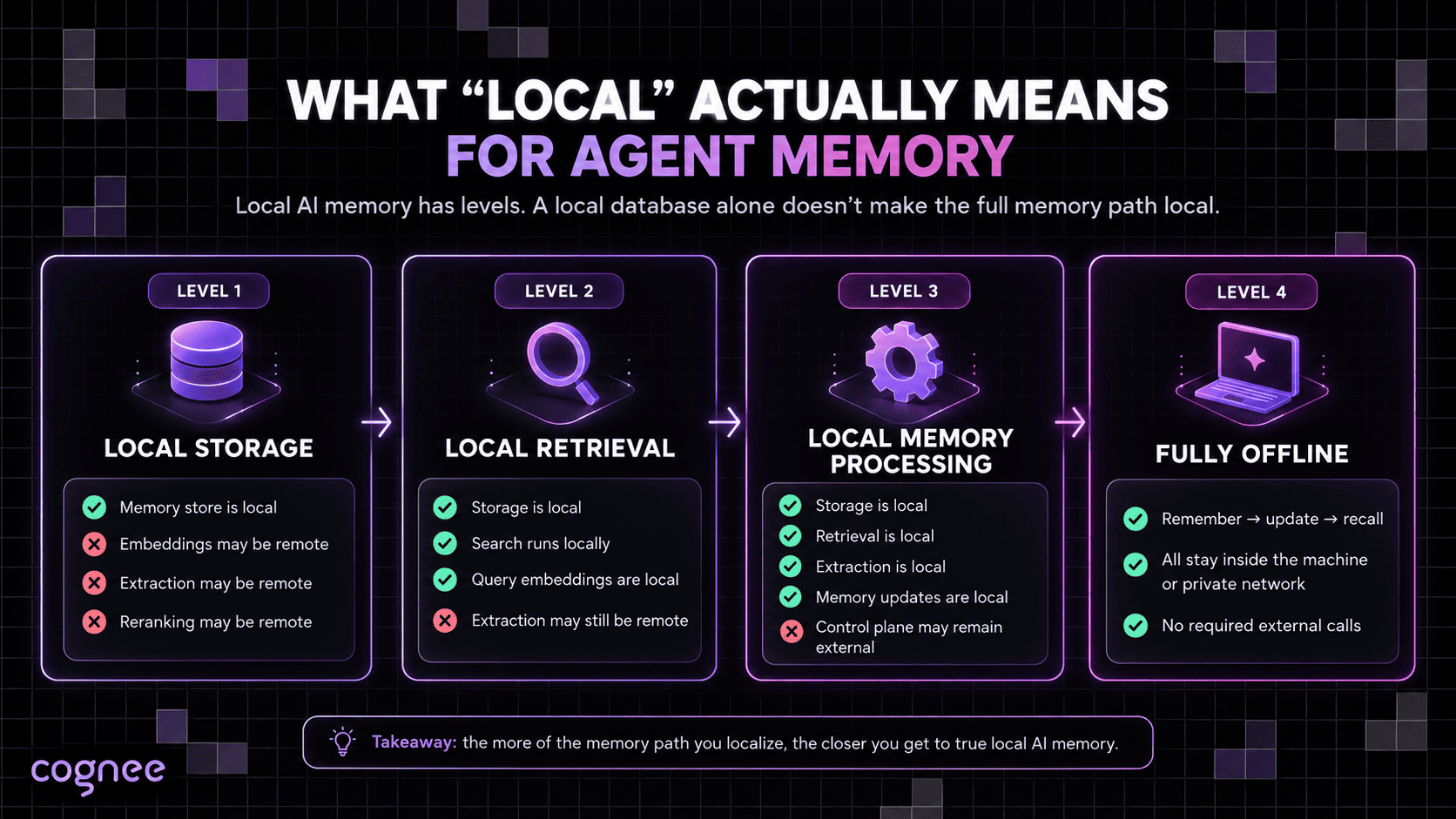
A single system component running on the device is often enough for it to be called "local." So, for clarity’s sake, let’s first break the concept of locality up into four levels and trace which parts of the memory path actually run on the machine:
| Level | What stays local | What may still require an external service |
|---|---|---|
| Local storage | Saved memories, vectors, documents, graph data | Extraction, embeddings, reranking, consolidation |
| Local retrieval | Storage plus search, including query embeddings | Extraction and consolidation models |
| Local memory processing | Storage, retrieval, extraction, and memory updates | License checks, authentication, model downloads, required telemetry |
| Fully offline memory | Every component required to create, update, and recall memory | Nothing required for normal memory operation |
We’ll be using these four levels as working labels for this guide; no industry standard defines them.
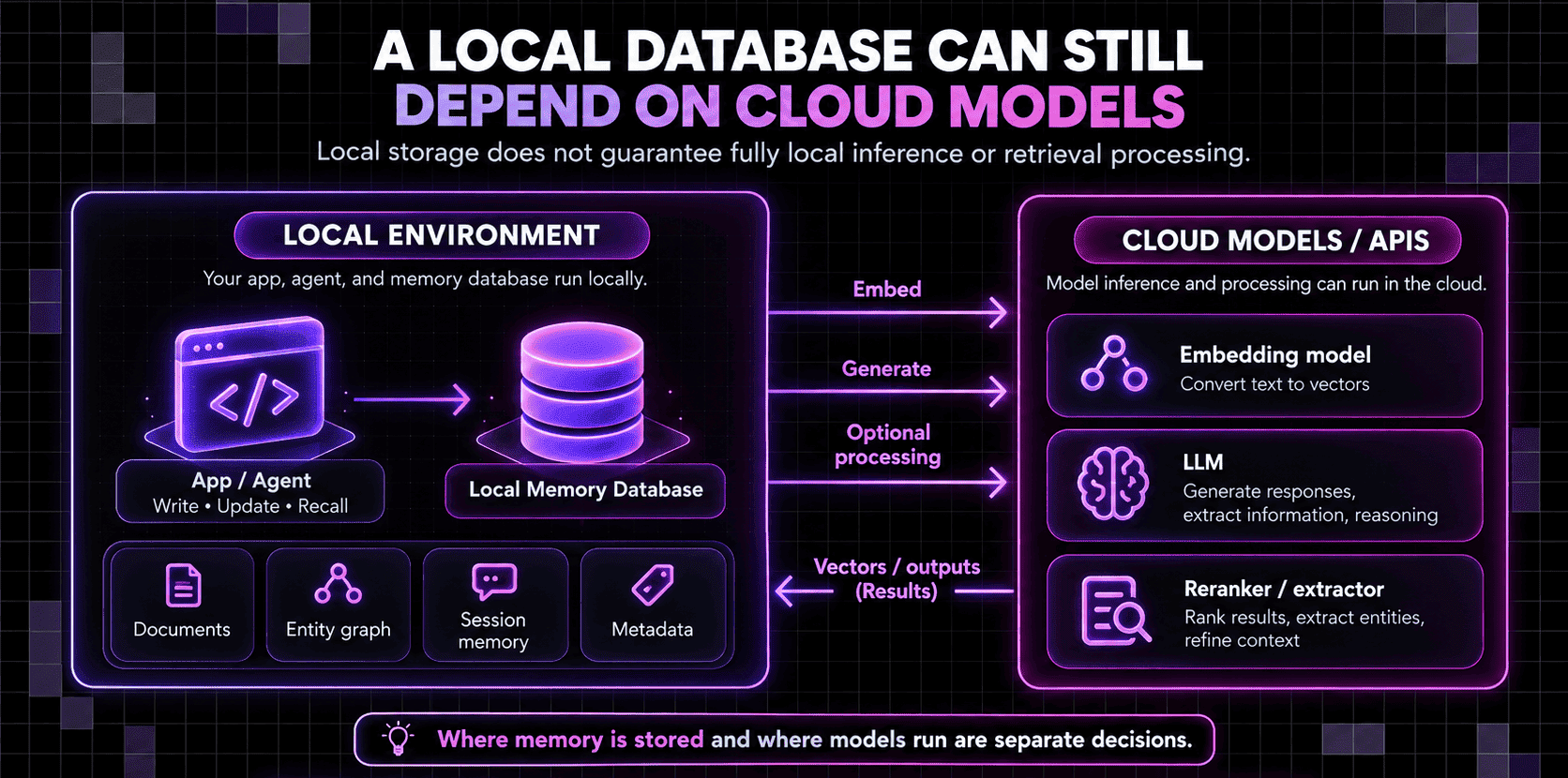
A local SQLite database or embedded vector index, for example, can keep every stored memory on the device while a hosted LLM decides what gets written. Query embeddings are why vector search belongs to the second level: each query has to be embedded with the same model as the stored records, so a hosted embedding API gets called on every search as well as every write.
A memory service can be self-hosted on your own server or private cloud, with the infrastructure under your control while not necessarily on the same machine as the agent. On-device memory keeps the memory path on the agent’s own hardware, while an air-gapped memory deployment adds a network boundary that prevents the pipeline from reaching external services at all.
What happens when a local agent remembers something?
Let’s look at an example in which a coding agent with persistent context has stored the fact that a project runs Postgres 15. In a later session, it learns that the project has moved to Postgres 16. A memory system might process that update in five stages:
- Select what merits retention. The system decides that the version change could affect future work. Rules, a specialist extraction model, a general-purpose LLM, or a combination of them can make that call.
- Reconcile it with existing memory. The new fact updates something the agent already knows. The Postgres 15 record may need to be replaced, marked as historical, or linked to the newer state, so the agent doesn't end up holding two unrelated records that contradict each other.
- Prepare it for retrieval. Semantic search needs an embedding of the new fact. Graph-backed memory might record the project and the database as entities with a relationship between them, and structured memory may attach fields such as project, source, timestamp, or status.
- Find it when a later task needs it. When the agent is asked to write a migration the following week, retrieval can use vector similarity, exact search, metadata filters, graph traversal, reranking, or a mix of them to find the current version.
- Send a bounded amount of memory back to the agent. Retrieved records take up context. Returning the Postgres 16 fact and the few records around it keeps the agent from reading a growing archive every time it runs.
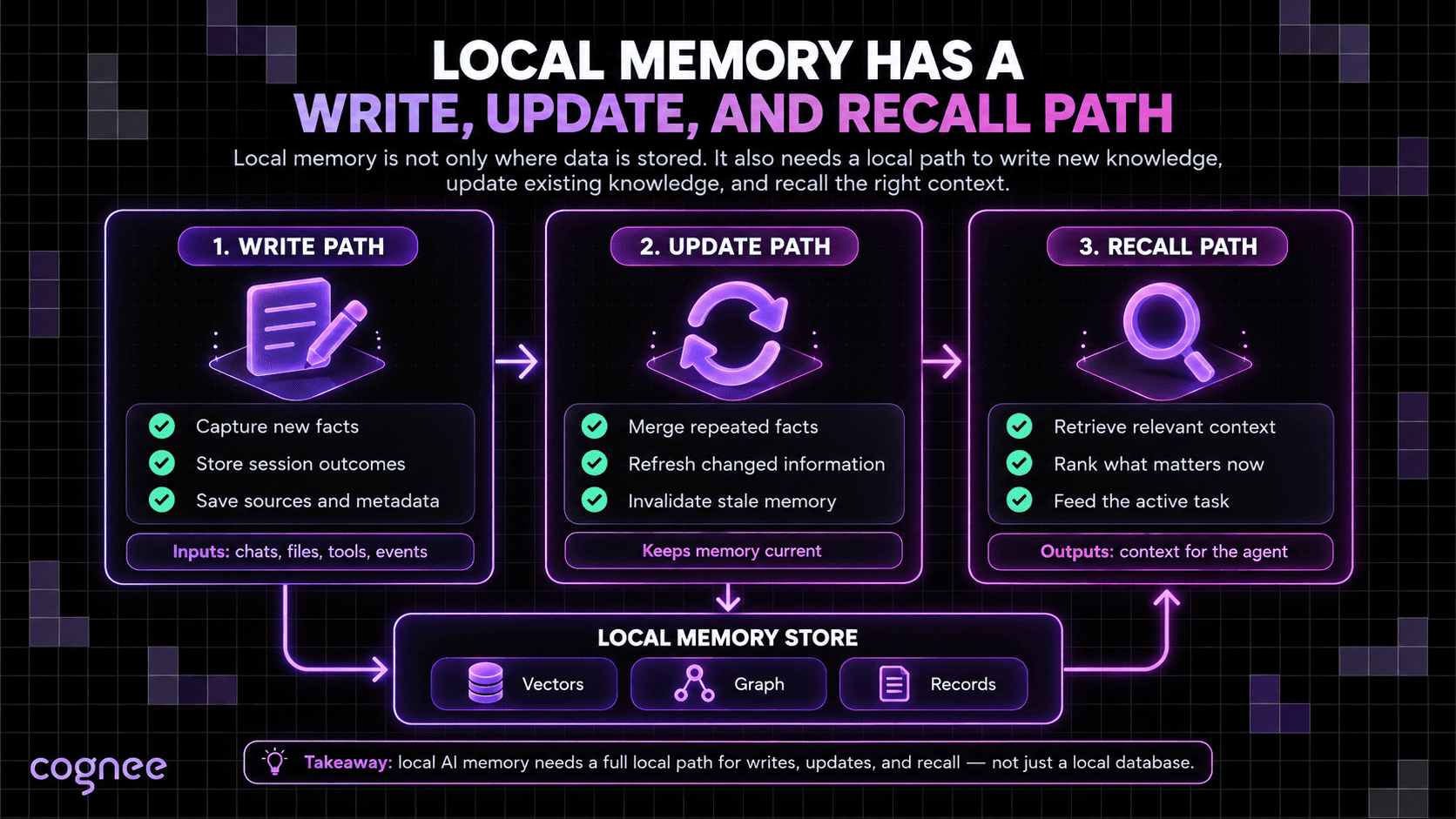
Some frameworks merge these stages, and a simple application can skip reconciliation or reranking. For a local deployment, the first four stages are the ones to watch: each can call a model, which is how a pipeline keeps making hosted API calls after the agent's own model has moved onto the device.
Without reconciliation, the project runs Postgres 15 record persists beside the new fact and can keep coming back in retrieval. Long-term AI memory needs a way to be revised as the project, user, or environment moves on, and old memories competing with their replacements are a common cause of LLM hallucinations.
Local AI memory vs chat history, RAG, and a local database
Chat history, a local RAG pipeline, and a local database can all keep information on your hardware, but none of them will perform all of the five stages outlined above on its own.
Chat history preserves earlier messages
Saving a transcript lets the application reload previous turns, but the transcript doesn't decide which details deserve long-term retention or how an earlier statement should change after a correction. An assistant can reopen yesterday's conversation and still have no way to carry a durable preference into a new thread except by replaying the old messages.
RAG retrieves an indexed knowledge source
Classic retrieval-augmented generation indexes a knowledge source and retrieves relevant material at query time, and a fully local RAG pipeline can run all of it on your hardware, generation included. Agent memory borrows many of the same retrieval techniques and adds a write path: it records what the agent learned during an interaction, which user or project that information belongs to, and how a correction changes an earlier record.
The two often intertwine, too — a memory system can use vector RAG internally, and an agent can retrieve indexed documents alongside what it learned in earlier sessions.
A local database provides storage and query primitives
SQLite, Postgres, a vector database, or an embedded graph engine can all provide the storage layer for local memory, and features such as TTLs, transactions, temporal records, and graph traversal can implement parts of the memory lifecycle.
The decisions about which experiences to retain, how to resolve identities, and which records supersede older ones come from application logic, which, in an AI database stack, belongs to the memory layer above storage and retrieval.
Cloud dependencies of a local memory pipeline
Auditing a deployment one memory operation at a time reveals where outbound calls can hide:
| Memory operation | Common external dependency | Local alternative |
|---|---|---|
| Extraction | Hosted LLM | Local LLM, specialist extractor, deterministic rules |
| Embeddings | Embedding API | Local embedding model |
| Reranking | Hosted reranker or LLM | Local cross-encoder or local LLM |
| Consolidation | Remote model used to merge or revise memory | Local model or deterministic update logic |
| Storage | Managed vector, graph, or relational database | Embedded or self-hosted database |
| Control plane | Remote authentication, configuration, licensing, or required telemetry | Components that function inside the local environment |
- Extraction is often the easiest dependency to miss, since the finished memory ends up in a local database either way. If the raw conversation goes to a hosted model first, the write path isn't local.
- Embeddings can stay sneaky in the same way: an on-device vector database can hold vectors that were all generated by a remote API.
- Consolidation can be one of the harder stages to move off a hosted LLM — it often needs a generative model, because merging duplicates or resolving contradictory statements takes semantic judgment.
- Control-plane calls come from the framework or runtime, so they won't appear in the memory code, and the disconnect test described below is the simplest way to catch them.
Keeping memory on your own hardware limits data egress. Protecting the data on that hardware takes disk encryption, access controls, and secured backups, and application logs are worth checking because they can copy memory contents outside the store.
How much hardware does local AI memory need?
Storage itself doesn’t require a GPU, although large indexes can consume substantial RAM, disk space, and CPU time. Some graph-memory architectures also create more vectors than flat RAG does: cognee, for example, embeds chunks alongside extracted entities, relationships, and summaries, which often yields ~5× as many. For many local deployments, though, a large share of the additional compute comes from the models used around storage for extraction, embeddings, reranking, and consolidation.
Local embedding models are far smaller than the generative model driving the agent. BAAI/bge-small-en-v1.5, which runs on CPU in cognee's no-API-key setup, has 33.4 million parameters, about 1% the size of a 3B generative model. Its 384-dimension vectors take about 1.5 GB per million at full precision, before index overhead.
Extraction costs depend on what does the extracting. A general-purpose LLM can decide what merits retention and produce structured facts, while narrower jobs such as entity extraction and classification can go to small language models built for them, some with fewer than 100 million parameters.
Consolidation can usually run outside the response path, as a batch job while the machine is idle, so a slow local model delays that job instead of the agent's reply.
Each stage has its own resource driver:
| Component | Main resource driver |
|---|---|
| Storage and indexes | Number of records, index type, vector dimensions, graph density |
| Embeddings | Encoder size, ingestion volume, query rate |
| Extraction | Model size, input length, amount of information written |
| Retrieval | Index size, query method, graph depth, candidate count |
| Reranking | Number of candidates and reranker size |
| Consolidation | Volume of stored memory and complexity of revision |
| Context returned to the agent | Number and length of retrieved records |
As a result, two agents running the same 3B primary model can have very different hardware requirements. An agent that writes structured records straight to SQLite needs little beyond the model, while an agent that runs extraction, graph enrichment, embeddings, hybrid retrieval, reranking, and periodic consolidation around every session loads several more models and indexes.
Local inference has no per-token bill, but every token still costs model time. Persistent memory moves tokens out of repeated prompts and into ingestion, so the token cost of persistent memory has to include the extraction and summarization calls on the write path as well as the context returned at query time.
Putting the whole memory path on-device
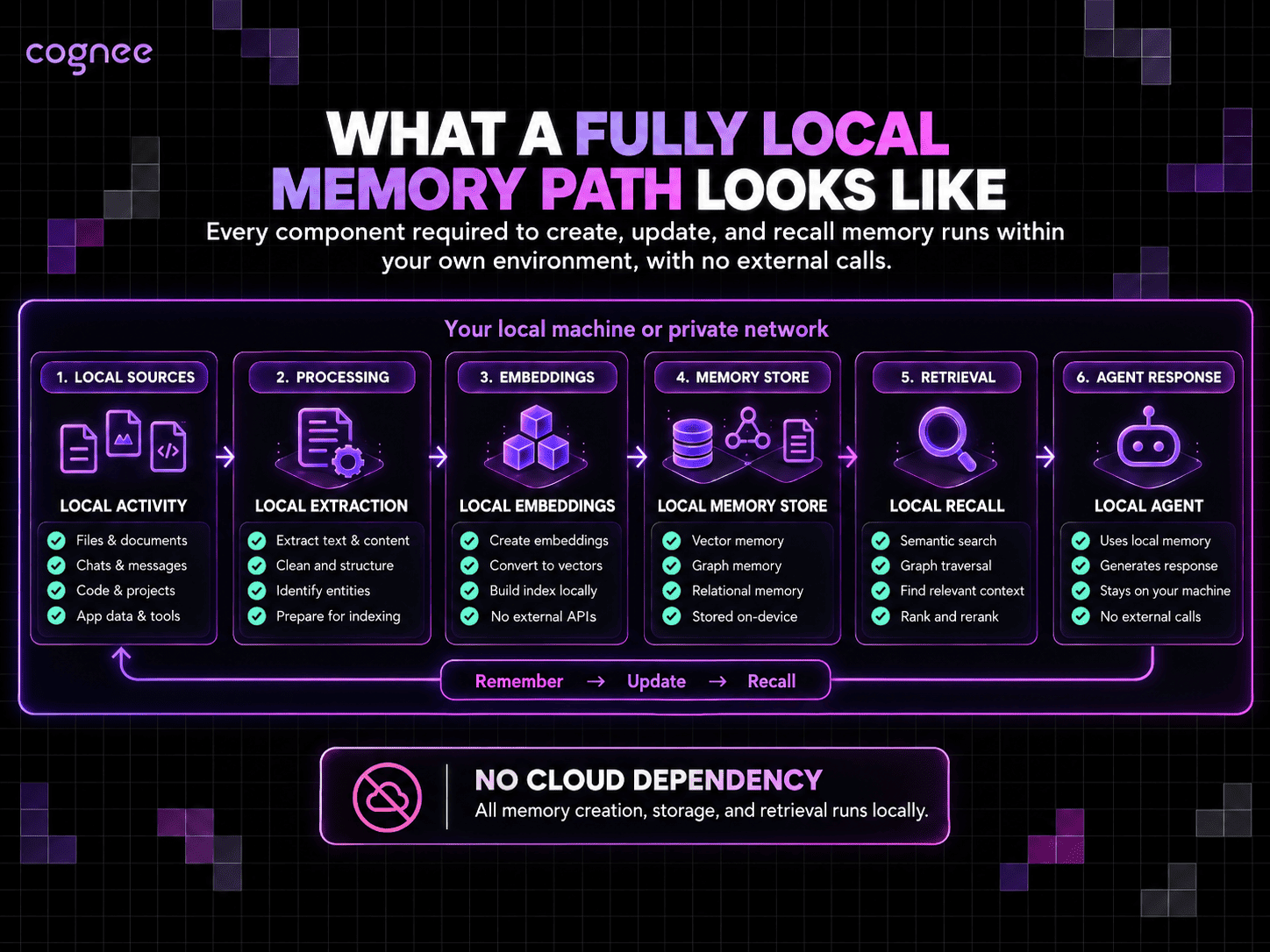
Once each part of the memory pipeline has a clear job, keeping it local doesn’t require a sprawling stack. The core path can remain fairly compact, with extraction, embeddings, storage, and retrieval all handled on the same machine or inside the same private environment:
local agent → local extraction → local embeddings → local memory store → local retrieval → agent context
The agent's model runs on a local inference server, and extraction can use the same model or a smaller specialist. Embeddings come from a local encoder, and persistent state can go into SQLite, Postgres, an embedded vector index, a graph store, or several retrieval structures behind one memory layer.
Those boxes don't have to be separate services: a laptop deployment might keep several of them inside one process, whereas a private server deployment could run inference on a GPU machine and keep graph, vectors, and metadata in a single Postgres instance elsewhere on the internal network.
Whatever the layout, every component on the normal write-and-recall path has to be available inside the deployment boundary. Cloud backup or synchronization can run alongside local operation, provided that losing that connection doesn't stop the agent from maintaining its memory.
Offline operation needs model weights, runtime dependencies, and license or authentication files on the machine before it goes offline, and many libraries download model files the first time they're used. For models pulled from Hugging Face, setting HF_HUB_OFFLINE=1 makes the libraries read only cached files and raise an error when a file is missing, which turns a silent download into a visible failure.
With everything preloaded, disconnect the machine and start a fresh agent session. The agent should recall an earlier memory, revise it, and retrieve the new version without network access. If any of those steps fails, something on that path still depends on an external service.
A cloud-backed memory stack can be localized gradually
An existing cloud-backed stack can move to local hardware one dependency at a time, without rebuilding the agent.
One migration path starts by moving the canonical memory state onto local storage, then replaces remote embedding calls with a local encoder. Extraction can move next, to a local LLM or specialist model, followed by any reranking and consolidation still running on hosted inference. Rerunning the disconnect test after each step will reveal which dependencies are left.
Because vectors produced by different models can't be compared with each other, swapping the embedding model means re-embedding every stored record; keeping the source text of each memory makes that rebuild possible. A smaller local extractor may also pull out different entities and relationships than the hosted LLM did, so comparing a sample of memories written both ways before switching catches quality losses early.
Running local memory with cognee
cognee, our open-source memory engine, can run locally in two ways. In the Python SDK, a GLiNER extractor pulls entities and relationships out of text and fastembed embeds them on CPU, so memory can be built and searched with no LLM API key. Storage defaults to embedded SQLite, LanceDB, and Ladybug databases on the same machine.
Both models download on first run, about 750 MB in GLiNER's case, so the pipeline needs one connected run before the machine goes offline. The open-source GLiNER integration is a demo of our enterprise extractor, and steps that generate text, such as LLM-written answers and session distillation, still need a generative model. cognee can call one through Ollama, LM Studio, or llama.cpp, which keeps those steps on the machine too.
For devices where a Python stack is too heavy, the Rust engine, cognee-rs, runs ingestion, graph construction, embeddings, indexing, and retrieval on the device with embedded graph and vector stores. In our on-device test, a Samsung Galaxy S24 Ultra processed Alice in Wonderland in 139.12 seconds, most of it spent building memory, after which chunk and summary search returned in about a second. Timings on other hardware and corpora will differ, but the run completed the full memory path on a consumer device with no server-side memory service.
FAQ
Answers to the most common questions from this guide.
How do you back up local AI memory?
The backup plan depends on which data is canonical and which can be regenerated. Raw memories, structured records, provenance, revisions, and other state that can't be recreated need regular backups. Derived vector and search indexes can often be rebuilt, provided the original records, model configuration, and processing pipeline are preserved.
How does a local AI agent forget information?
Forgetting can mean deleting a record, letting temporary information expire, marking an old fact as superseded, or lowering its retrieval priority so it no longer influences normal tasks. Running locally puts those policies under the operator's control, though the memory layer still needs rules for deciding when information should stop affecting future behavior. In cognee, forget() deletes a specific memory along with its graph links, or clears a whole dataset.