Dataset Routing in cognee: How recall() Picks Which Datasets to Search

An AI agent's memory can accumulate engineering runbooks, support history, product plans, and documentation from several projects. If it’s queried about something like rotating a production API credential, it needs the engineering instructions, while a question about a customer's renewal terms will need to look elsewhere.
The user doing the querying shouldn’t need to know which dataset holds the answer, but searching every readable dataset means opening several database contexts and running retrieval against content unrelated to the question. Some retrieval strategies also make model calls per dataset, so each unrelated dataset adds calls that contribute nothing to the answer.
Dataset routing is what lets cognee decide which datasets to search before it runs the more expensive retrieval. In this post, we’ll explain how that works, what exactly it can save, and when an application should still choose its search scope explicitly.
When recall() routes a search
As an application accumulates more projects, departments, and connected sources, deciding where to search becomes harder. Hardcoded rules can direct queries to specific datasets, but they require maintenance and can miss questions that need evidence from several datasets. Searching every accessible dataset avoids those rules but can trigger retrieval across multiple stores, sometimes with additional model calls.
Automatic dataset routing kicks in in cognee when a graph-memory search is unscoped, the caller has access to multiple datasets, and backend access control is enabled. Access control is enabled by default. It requires graph and vector stores that support per-dataset storage, which the default local stack does. The permission layer determines which datasets are eligible, and routing ranks only within that set. Passing datasets or dataset_ids skips automatic routing for that query.
Apart from disabling access control, there’s no separate switch to turn off routing for eligible unscoped graph-memory searches.
The recall API also searches session memory. When a request carries only a session_id, a session hit returns before graph search starts, so routing never runs.
recall() also picks a search type, using five regex rules and no LLM call. Dataset routing selects the relevant dataset, while the search-type router independently determines which retrieval strategy, such as HYBRID_COMPLETION, to use within it.
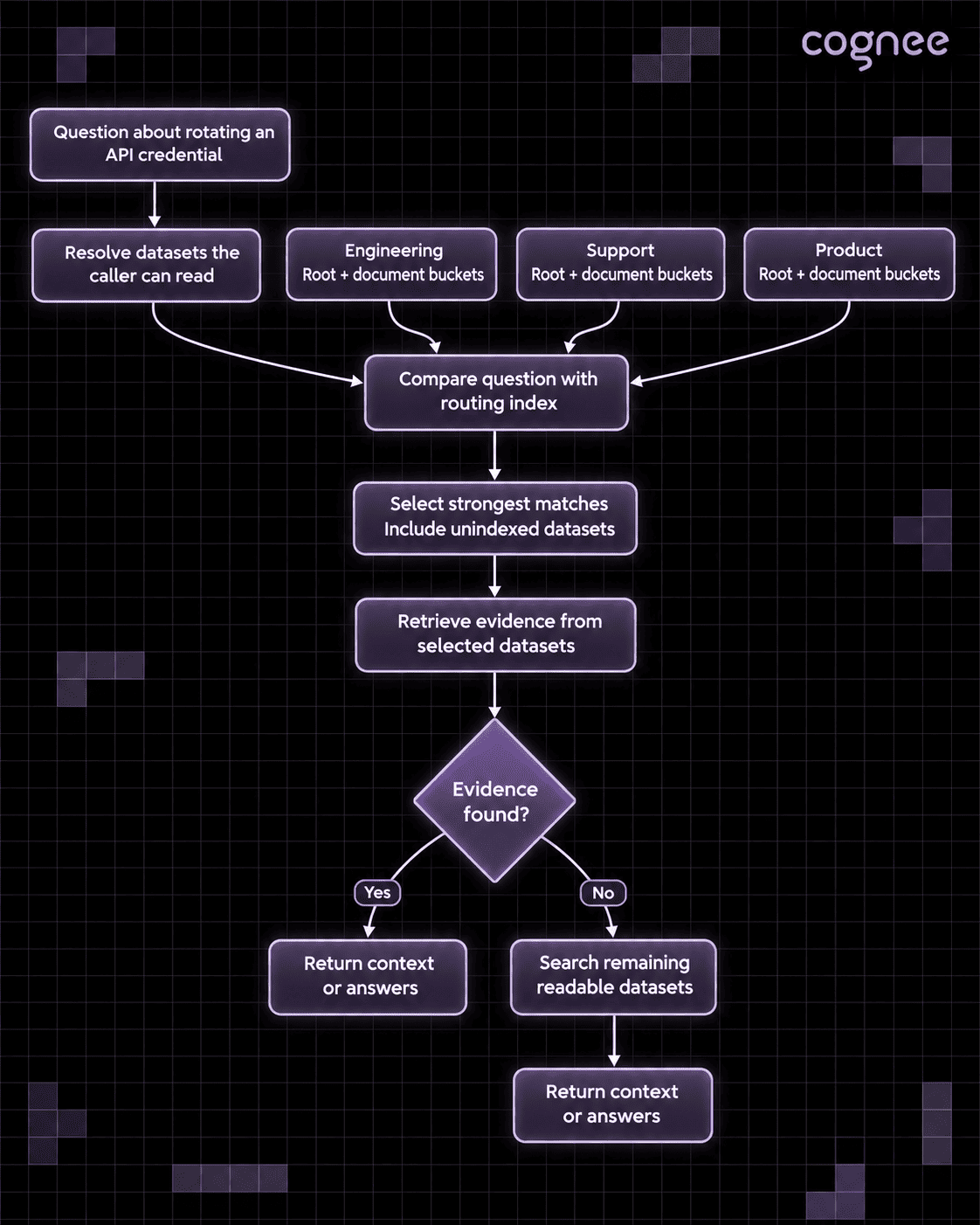
A simplified routing flow. cognee selects among readable datasets, includes datasets without routing entries, and searches additional readable datasets if routed retrieval returns no evidence.
How cognee represents each dataset
Routing never looks at dataset names. An engineering dataset could contain hundreds of documents about different services, and a question about a specific credential-rotation error may match only one of them.
The global context index gives routing two levels of information: a root summary for the dataset and one summary per document, called a bucket.
The root summary: broad subjects
The root records what recurs across a dataset: its entity types, its most widespread entity names, and its documents. Broad questions about the dataset's subject matter match against it.
Document buckets: specific facts
Each bucket represents one document through its characteristic entities and the relations among them. The default index ranks those entities by term frequency–inverse document frequency (TF-IDF), so a bucket keeps the entities that set its document apart from the others.
A root summary of engineering documentation might capture broader topics such as deployments, services, and credentials, while a document bucket retains a specific API credential rotation procedure that appears in only one runbook. Routing can select the engineering dataset when either representation matches the question.
This applies to the default entity-based index. With the LLM-generated variant (method="llm"), only the root summary is available for routing.
Building the default index makes no LLM call, because it reads entities already stored in the memory graph. The extraction step that built the graph may use an LLM, depending on the configuration.
The shared routing collection
The root and bucket summaries are mirrored into one routing collection in the deployment's default vector store. The vectors are copied from the global context index, so nothing gets embedded twice. Because the collection is shared, cognee can compare every eligible dataset before it enters any dataset's own graph or vector store.
Each index build writes changed summaries and removes rows that no longer match the index. Deletion is handled right away, without waiting for a build: deleting a document removes its bucket row and the dataset's root row, and cognee immediately writes a fresh root from the documents that remain, so broad questions keep routing to the dataset. The remaining bucket rows refresh on the next improve. Deleting a dataset, or dropping its memory, removes all of its routing rows. A dataset with no routing rows is still searched, routing just can't narrow it out until its index exists.
How a question becomes a routing decision
First, cognee resolves the datasets the caller is authorized to read and derives their root and bucket row IDs from relational metadata. Only those rows are scored, so another tenant's routing rows are never read.
Next, cognee embeds the question with the deployment's configured embedding model and compares it with those rows by cosine distance, where a smaller distance means greater similarity. Each dataset takes the score of its nearest row, whether that's the root or one bucket.
Three settings decide how many datasets are searched, which scores qualify, and how near-ties are handled. These are the defaults from cognee's .env.template:
TOP_K is the number of best-scoring datasets searched among those within the cutoff. Datasets within the tie margin of the last selected one are searched too, and so is every dataset without routing rows, so the number searched can exceed TOP_K. This setting is separate from recall(top_k=...), which sets how many results come back from each dataset.
The 0.8 cutoff is a raw cosine distance, set for OpenAI embedding models. With another model, related and unrelated text land at different distances. Every unscoped search logs each dataset's distance and the selection at info level, so the cutoff can be checked against real queries.
When routing widens the search
A routed search can extend past the selected datasets in three ways:
- No dataset is within the cutoff. cognee searches every readable dataset, so a question no dataset knows about isn't answered from whichever one happens to be nearest.
- Routing can't produce scores. If the routing collection is missing or unreachable, scoring fails, or the vector adapter can't score rows by ID, every readable dataset is searched.
- The selected datasets retrieve nothing. cognee searches the remaining readable datasets. The check runs on the retrieved context, since completion types write an answer even over empty context.
None of these catch a partial miss. If the selected dataset returns some relevant evidence while another dataset holds a fact the question also needs, the search stops there.
Routing also assumes one embedding model for the whole deployment. If EMBEDDING_MODEL changes to a model with a different vector width, cognee logs a warning and searches every readable dataset. A replacement model with the same width isn't detected, and distances from two different models can't be meaningfully compared. After any model change, prune the vector stores and rebuild the indexes before relying on routing again.
Try dataset routing with the Python SDK
The example below creates three datasets, builds their global context indexes explicitly, and asks an unscoped question. It needs cognee 1.6.7 or later, configured extraction and embedding providers, and backend access control on (the default on supported stores). The caller must have read access to all three datasets.
By default, remember() runs improve() afterward, and improve() builds the global context index unless IMPROVE_GLOBAL_CONTEXT_INDEX=false, so the routing index normally builds without an extra call. The example turns that off with self_improvement=False to show the indexing step on its own.
The engineering dataset is the expected match for this question. The actual selection depends on the extracted representations, the embedding model, the cutoff, and any other datasets the caller can read. Each graph result's dataset_name shows where its evidence came from, and the routing log records every dataset that was scored, with its distance.
Pinning the datasets yourself
For a question that needs both the engineering instructions and the support guidance that explains them, name both datasets inside the same main():
An explicit scope is never routed — cognee searches the named datasets, subject to the caller's permissions.
Dataset names resolve only among the caller's own datasets, so naming a dataset shared by another owner raises DatasetNotFoundError. Use dataset_ids=[...] for shared datasets.
When to pin the scope yourself
Routing is the most economical path when datasets have distinguishable subjects and most questions need evidence from one or two of them. An assistant over separate engineering, finance, and support datasets, or a coding agent with one dataset per project, is the typical case. Two projects may both have deployment documentation, but a document bucket can pick out the one whose incident report mentions the Atlas credential.
On the other hand, routing saves little when only one dataset is readable, when many datasets have no index yet, or when most queries need synthesis across datasets. Audits, exhaustive questions, cross-department comparisons, and research syntheses that must include specific collections are more predictable with an explicit scope. Raising DATASET_ROUTING_TOP_K widens automatic selection, but a dataset past the cutoff is still skipped.
To check routing on your own data, run the same questions unscoped and with an explicit scope that names every readable dataset. Record the number of datasets searched, total retrieval latency, model usage, and whether the necessary evidence came back. Include both focused questions and questions whose answers need several datasets. Routing adds a query embedding and a scoring step, so it lowers total cost only when it skips dataset searches. If multi-dataset questions lose evidence, raise DATASET_ROUTING_TOP_K or pin the scope for those queries.
FAQ
Answers to the most common questions from this guide.
Can I turn dataset routing off?
There's no setting for it. Pass datasets or dataset_ids to skip routing for a query. Setting ENABLE_BACKEND_ACCESS_CONTROL=false also disables routing, because every dataset then shares one store, but it switches cognee to single-user mode as well.
Does dataset routing call an LLM?
No. Routing embeds the question once and compares it with stored vectors. The default global context index it reads is also built without an LLM call; only the earlier graph extraction may need one.
What happens to datasets that haven't been indexed yet?
They're always searched. Routing can't rank a dataset it has no rows for, so every dataset without routing rows is searched alongside the best matches.
Related reading