Agent Workflow Memory: How AI Agents Plan, Act, and Remember

TL;DR:
- An agent workflow is the structure that coordinates the models, tools, decisions, retries, handoffs, and approvals needed to complete a task across multiple steps.
- Workflow state keeps the current run moving, but it disappears when the run ends — so anything that could improve a later decision needs memory.
- Agent workflow memory is the layer that preserves and retrieves useful facts, outcomes, preferences, and procedures across steps, sessions, agents, and repeated runs.
- Memory should be built into the workflow at explicit points: retrieve before planning, preserve verified observations, record decisions, consolidate completed runs, and forget outdated information.
- cognee is an open-source memory framework that turns confirmed facts, outcomes, and procedures into structured memory your agents can retrieve and reuse in future workflow runs.
Any AI agent can be designed to pick a tool, generate an answer, or decide what to do next. But a production agent system needs a solid structure that coordinates models, tools, state, retries, approvals, and stopping conditions across a task.
That structure is the agent workflow.
Some workflows follow a predefined sequence, while others let an agent plan, branch, call tools, delegate work, or revise its own output. Most production systems combine the two: deterministic code for the predictable steps, and agentic decision-making where flexibility is called for.
As workflows get longer and touch more tools, agents, and sessions, the need for AI agent memory — an intentional way to decide what information should survive without forcing every detail into the active context window — increases.
In this post, we'll go over how agent workflows work, how they differ from chains and single-agent calls, where state actually resides in common workflow patterns, and how to design memory as an explicit part of the workflow.
What Is an Agent Workflow?
An agent workflow is the architecture that defines how an agent's work begins, what context is available at each step, how the next action gets picked, how results are checked, and when the process should stop.
Anthropic distinguishes workflows, where models and tools follow predefined code paths, from agents, where the model dynamically directs its own process and tool use. However, a 2025 survey of agent workflow systems found that workflow is often used to refer more broadly to the full orchestration layer, including systems that plan, coordinate tools, and manage multiple agents.
That's what we'll mean by agent workflow in this article: the complete execution structure around a task, whether its transitions are predefined, chosen dynamically by an agent, or some combination of both.
Before we go on, let's do some more semantic housekeeping:
| Architecture | How it works | What controls the next step? | Typical use |
|---|---|---|---|
| Single model call | The application sends one prompt and gets one response | Application code | Classification, extraction, summarization, or generation |
| Chain | Several predefined steps pass outputs forward in sequence | Fixed application logic | Repeatable tasks with a known order |
| Agent loop | The model repeatedly reasons, acts, observes the result, and decides what to do next | The agent | Open-ended tasks and tool use |
| Agent workflow | A larger system coordinates model calls, agents, tools, branches, approvals, retries, and state | Code, agents, or both | Multi-stage, long-running, or adaptive processes |
So:
- A chain knows its route before execution begins.
- An agent loop chooses its next action while it's running.
- An agent workflow can contain either one, plus routing logic, parallel workers, human approval steps, checkpoints, and whatever else the task needs to complete reliably.
A workflow doesn't have to be multi-agent, either — one agent can operate inside a sophisticated workflow, just as several agents can share one process.
The Anatomy of an Agent Workflow
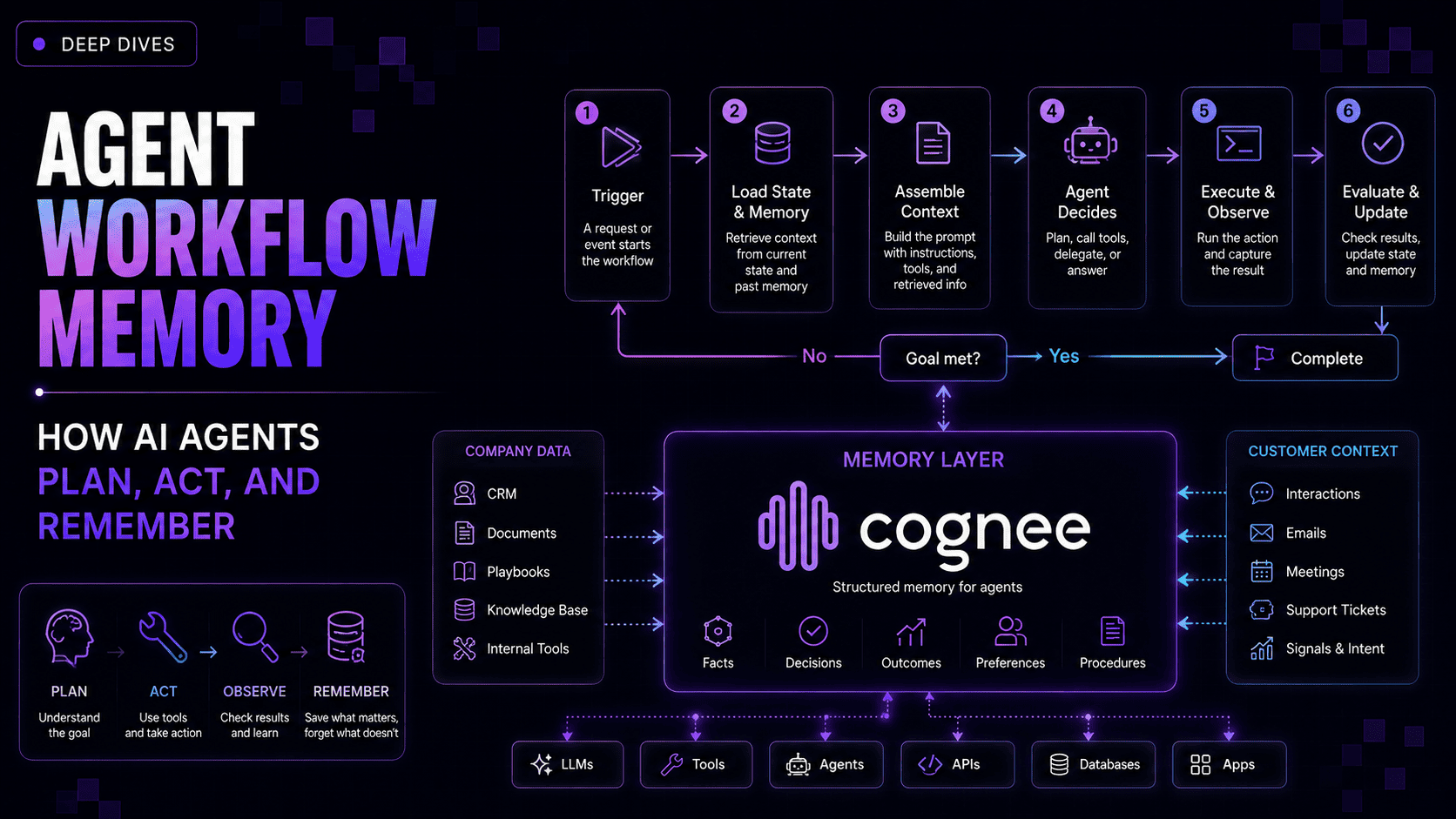
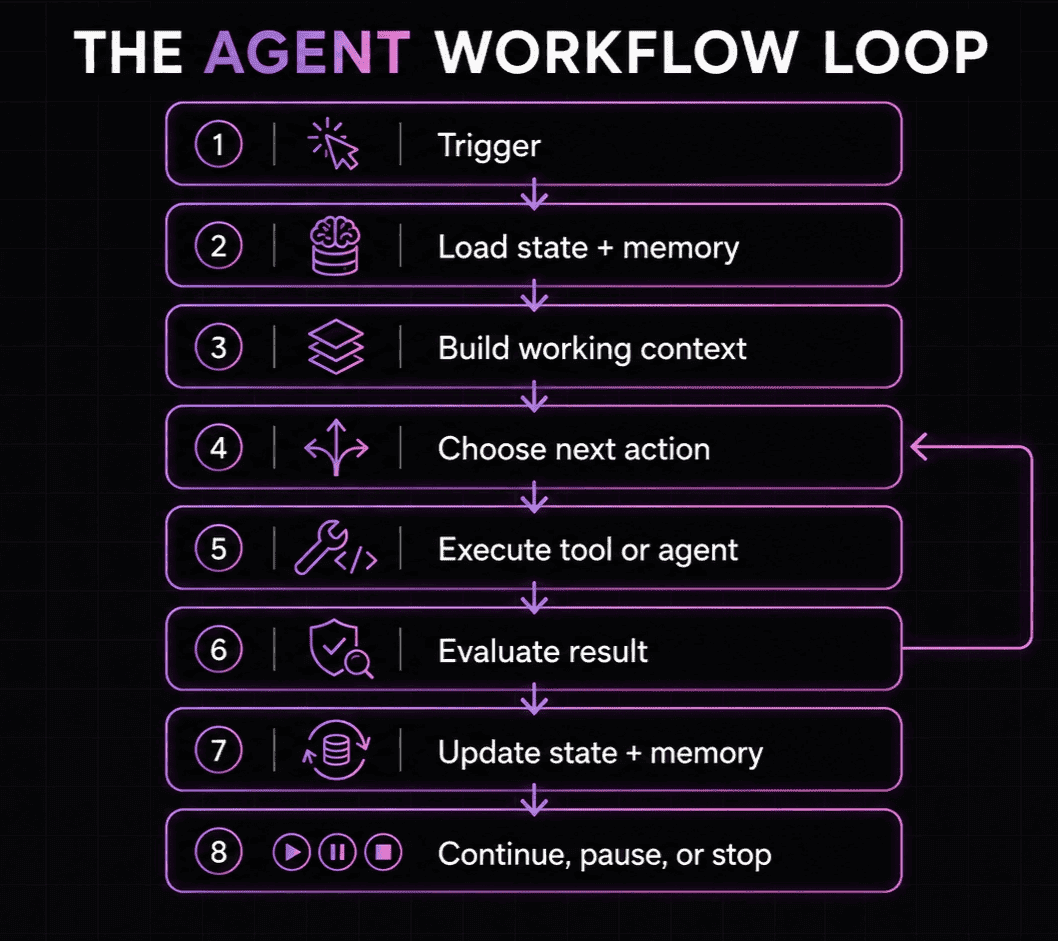
Most agent workflows run through these same general stages, even when the surrounding architecture looks completely different:
-
A trigger starts the workflow
The process begins with a user request, an incoming message, a scheduled event, an API call, or a change in another system. The workflow turns that input into a goal the agent can act on.
-
The system loads state and relevant memory
Before the agent decides what to do, the workflow restores what it needs to continue — the current task state, recent messages, earlier tool results, user preferences, or knowledge retrieved from previous runs.
Not all of this belongs in the model's prompt. The workflow still has to select what's relevant for the next decision — that's the central challenge of context engineering.
-
The agent receives its working context
While step 2 surveys what's available, step 3 decides what actually makes it into the prompt. The workflow assembles the instructions, available tools, task state, and retrieved information into the context for the next model call.
That context is the agent's working view of the task, which might be only a small slice of everything the wider system knows.
-
The agent chooses the next action
Depending on the workflow, the next step might be fixed by code or selected by the model. The agent might answer directly, call a tool, split the task into smaller pieces, delegate work, ask for clarification, or request approval.
-
The workflow executes and observes
The chosen action runs, and its result comes back to the workflow. A database query might return a record, a browser tool might return a page, or another agent might finish a delegated task.
The result becomes a new observation that can change what happens next.
-
The result is evaluated
Before moving on, the workflow might validate the output, apply guardrails, compare it against acceptance criteria, or send it to another model for review.
If the result is incomplete or wrong, the workflow can retry, revise the plan, switch tools, or reroute the task.
-
State and memory are updated
The workflow records what it needs to continue the current run. It might also preserve information that could matter later — a confirmed fact, a user correction, a completed decision, a successful procedure, or a tool outcome.
This is where workflow state and memory start to diverge: state keeps the current execution moving, and memory holds on to selected information for later steps, sessions, or runs.
-
The workflow continues, pauses, or stops
The loop repeats until the task hits a stopping condition. The workflow might produce a final answer, hand control to another agent, pause for human approval, save a checkpoint, or terminate after hitting a limit.
The model can make the decisions inside this loop, but the workflow controls how those decisions become a reliable process. It also decides what information reaches the agent at each step, and what persists after the step is over.
What Is Agent Workflow Memory?
Agent workflow memory is the layer that preserves and retrieves useful information across the steps, agents, sessions, and repeated runs of an AI workflow. It gives the workflow continuity beyond its current state, allowing the system to draw on relevant facts, prior outcomes, user preferences, and successful procedures whenever they can improve the next decision.
The term also refers to a specific technique (Wang et al., 2024), where agents induce reusable workflows from past trajectories and reuse them on similar tasks — that's essentially a concrete implementation of what we call procedural memory below.
Effective workflow memory is selective — it needs a write policy that decides:
- What's worth preserving
- Whether to create or update a memory
- How long memory should stay valid
- Who or what the memory belongs to
- What evidence or source stays attached to it
- When the information should be removed
Without those rules, the memory store grows without necessarily becoming more useful.
Workflow State ≠ Memory
Both state and memory preserve information outside a single model call, so it can be easy to mix them up. However:
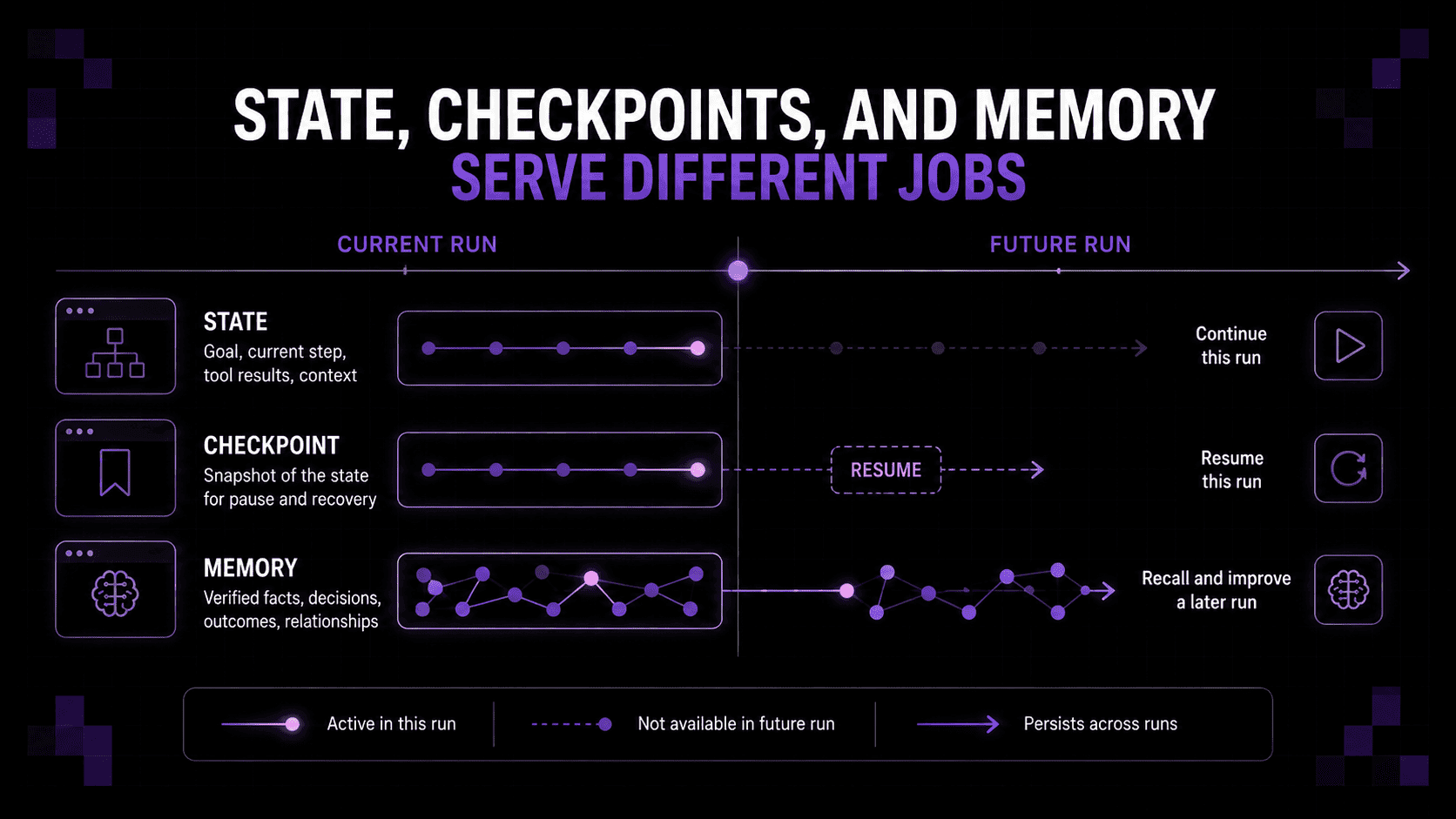
- Workflow state is what keeps the current execution moving — it records where the process is, what's already happened, and what still needs to happen before the run can finish.
- Memory preserves selected information because it might improve a later decision, whether it happens in the next step, another session, or a future workflow run.
A support workflow, for example, might keep the ticket ID, current route, completed tool calls, and approval status in its state. Those values help the workflow continue from the right step, but most of them don't need to — and shouldn't — become permanent memory, as saving everything just makes retrieval slower and less reliable.
Checkpoints preserve a durable snapshot of the state needed to pause, recover, or resume the workflow.
The confirmed cause of the issue, the resolution that worked, and a correction to the customer's account details are examples of information that should be committed to memory as they could improve another decision after the particular workflow ends.
Common Agent Workflow Patterns
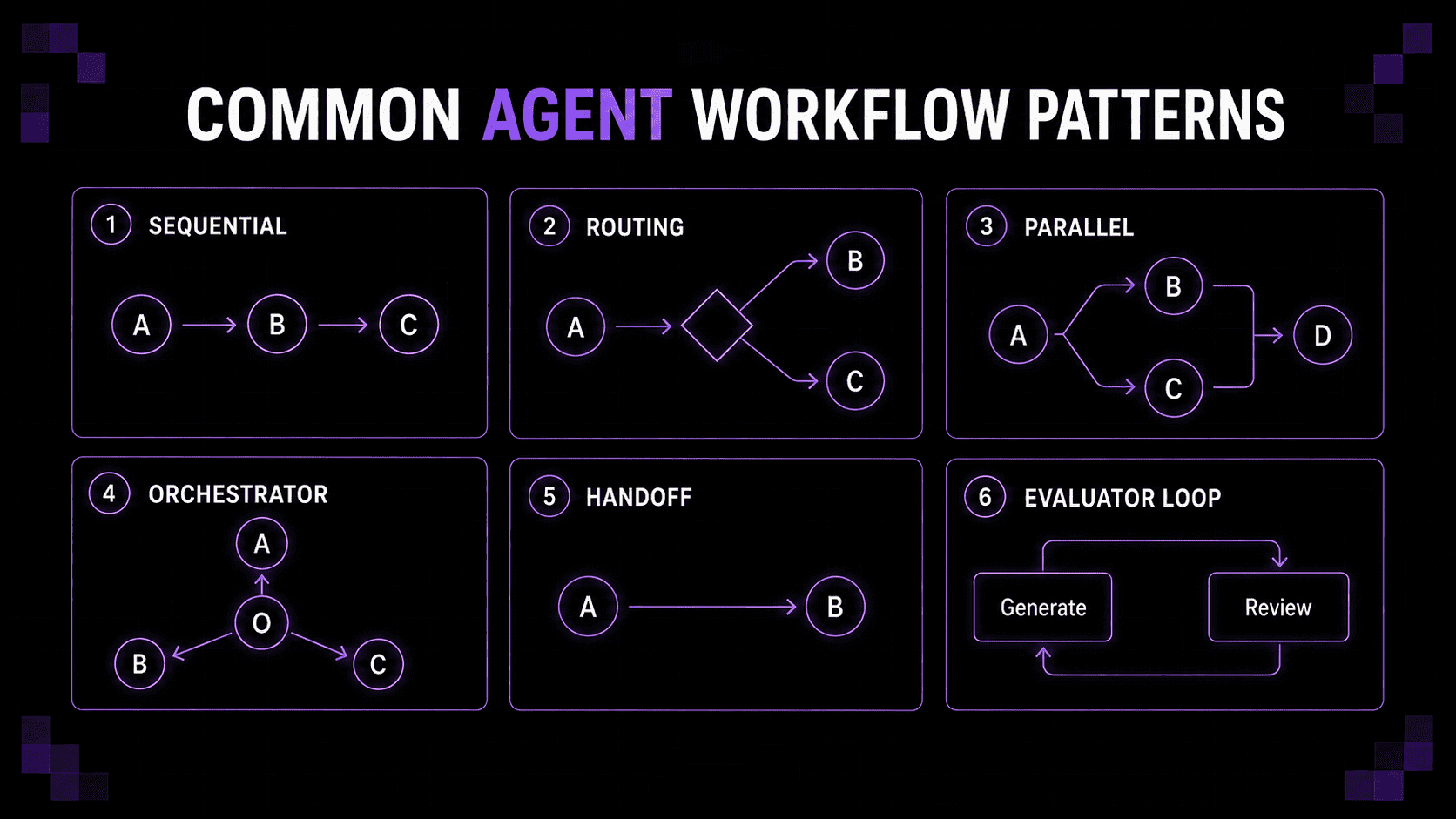
The right structure for an agent workflow depends on how predictable the task is, whether work can happen concurrently, and how much freedom the agent needs to choose its next step.
Most production systems combine several of the below patterns. Each one moves control differently, but they all share the same architectural question: where does the information created during execution live, and how will later steps find it?
Sequential workflows
A sequential workflow passes work through a predefined series of steps. One agent might extract information, another might check it, and a final step formats the result.
This is the simplest pattern to reason about, since the order is known in advance. State usually travels forward inside each step's output: the extracted data, current status, previous tool results, and whatever instructions the next stage needs.
The pattern gets less reliable as that payload grows. Early mistakes carry forward, intermediate outputs drift into inconsistent formats, and each step can end up receiving more history than it actually needs. Without durable state or checkpoints, a failure near the end can leave the system unable to determine which steps already completed.
When later steps need more than just the previous output, or information from one run should be used to improve another, a memory layer can retrieve the specific facts, decisions, or results relevant for the current stage instead of passing the entire history forward.
Routing workflows
A routing workflow classifies an input and sends it to the most appropriate branch, model, tool, or specialist agent. A support request, for example, might get routed to billing, account access, or technical troubleshooting.
State usually consists of the original request, the routing decision, and any metadata the selected branch needs. Once the task enters that branch, though, the information it produces can become isolated from the rest of the system.
Problems emerge when the initial classification is wrong, when several branches need the same background, or when an insight discovered in one branch should change the route. Without shared memory, the workflow might repeat the same lookup or make a new decision without seeing what another branch already learned.
A memory layer can supply common factual context before routing and retain validated findings afterward — giving each branch access to the same underlying knowledge without forcing every agent to receive the entire workflow history.
Parallel workflows
Parallel workflows split a task into parts that run simultaneously. Several agents might research different sources, analyze separate documents, or generate independent candidate answers before an aggregation step combines the results.
Each worker typically gets a private task context, while the aggregator sees all the completed outputs. While this can cut latency, it also creates duplication and coordination problems — workers might call the same tools, rediscover the same facts, contradict each other, or return outputs that are hard to compare.
The aggregator then becomes a context bottleneck. Feeding every raw result into a final model call can burn through large amounts of context while obscuring which source actually supports which conclusion.
Shared memory gives parallel workers a controlled way to reuse confirmed information while keeping private task state where it's needed. The aggregation step can retrieve consolidated findings and their provenance instead of rereading every intermediate trace.
Orchestrator-worker workflows
In an orchestrator-worker pattern, one agent breaks a task into smaller pieces, delegates them, monitors progress, and combines the results. Anthropic calls this an orchestrator-workers workflow, and OpenAI supports a similar manager pattern in which a coordinating agent calls specialists as tools while retaining responsibility for the result.
The orchestrator usually owns the plan and the global state, while each worker gets a narrower assignment and reports its findings back.
This works well when a task can't be fully decomposed in advance, but — it places growing pressure on the orchestrator, which has to track dependencies, completed tasks, failures, revisions, and evidence returned by each worker, with useful detail potentially disappearing when their findings are compressed into short summaries.
Memory can move part of that burden outside the orchestrator's active context. Workers can write verified findings to a shared knowledge layer, and the orchestrator can retrieve them when revising the plan or producing the final result. That also cuts the odds of a worker repeating research that already happened earlier in the workflow or in a previous run.
Handoff workflows
A handoff transfers control from one agent to another. Unlike the manager pattern, where the orchestrator stays responsible for the final result, a handoff makes the receiving agent responsible for continuing the interaction.
This is handy when different stages need different tools, instructions, or permissions. A triage agent might identify the request, then hand it to an agent responsible for refunds or technical support.
The hard part is deciding what crosses the boundary. Sending the full conversation can overwhelm the receiving agent, while a brief summary might not capture a constraint, a correction, or an earlier decision. Ownership can also get murky if the original agent keeps acting after control has moved.
A structured handoff should include the task, current status, relevant evidence, unresolved questions, and any constraints the receiving agent needs to preserve. Persistent memory can supply background knowledge separately, enabling the handoff itself to stay focused on the task.
Evaluator-optimizer workflows
An evaluator-optimizer workflow separates generation from review. One agent produces an answer or plan, another assesses it against defined criteria, and the first revises the output until it passes or hits a stopping condition.
The current draft, evaluation feedback, revision count, and acceptance criteria make up the workflow state. Without a record of earlier attempts, though, the loop can repeat the same correction, undo a previous improvement, or bounce between two unsatisfactory versions.
Memory helps the workflow hold onto things like rejected approaches, recurring feedback, successful corrections, and examples of outputs that already met the bar. Procedural memory can eventually help the generator avoid mistakes before they ever reach the evaluator.
Memory can improve iteration, but the workflow still needs a clear stopping rule, as memory can't decide when further revision stops being worth the cost.
Human-in-the-loop workflows
Some workflows pause before a sensitive action, a committed change, or continuing with incomplete information. A person might approve a refund, review generated code, supply a missing detail, or choose between several options.
Because a pause can last anywhere from a few milliseconds to forever, the workflow needs a durable checkpoint containing the proposed action, the reason approval is needed, the evidence behind it, and the exact point execution should resume from.
Saving just the model conversation is rarely enough — information can change while the workflow is waiting, and an approved action must not get executed twice after a retry or restart.
Workflow state lets the process resume. Memory supplies the broader context needed to check whether the approved action is still valid, record the resulting decision, and make that outcome available to future runs.
These patterns solve different coordination problems, but none of them solves memory automatically. Passing outputs between steps might be enough for a short run, but complex workflows need a clear separation between the state required to continue right now and the information worth retrieving later.
Types of Agent Workflow Memory
This 2025 agent memory research review examined memory through its forms, functions, and dynamics and argued that simple short-term and long-term labels no longer suffice to capture the variety of modern agent memory systems.
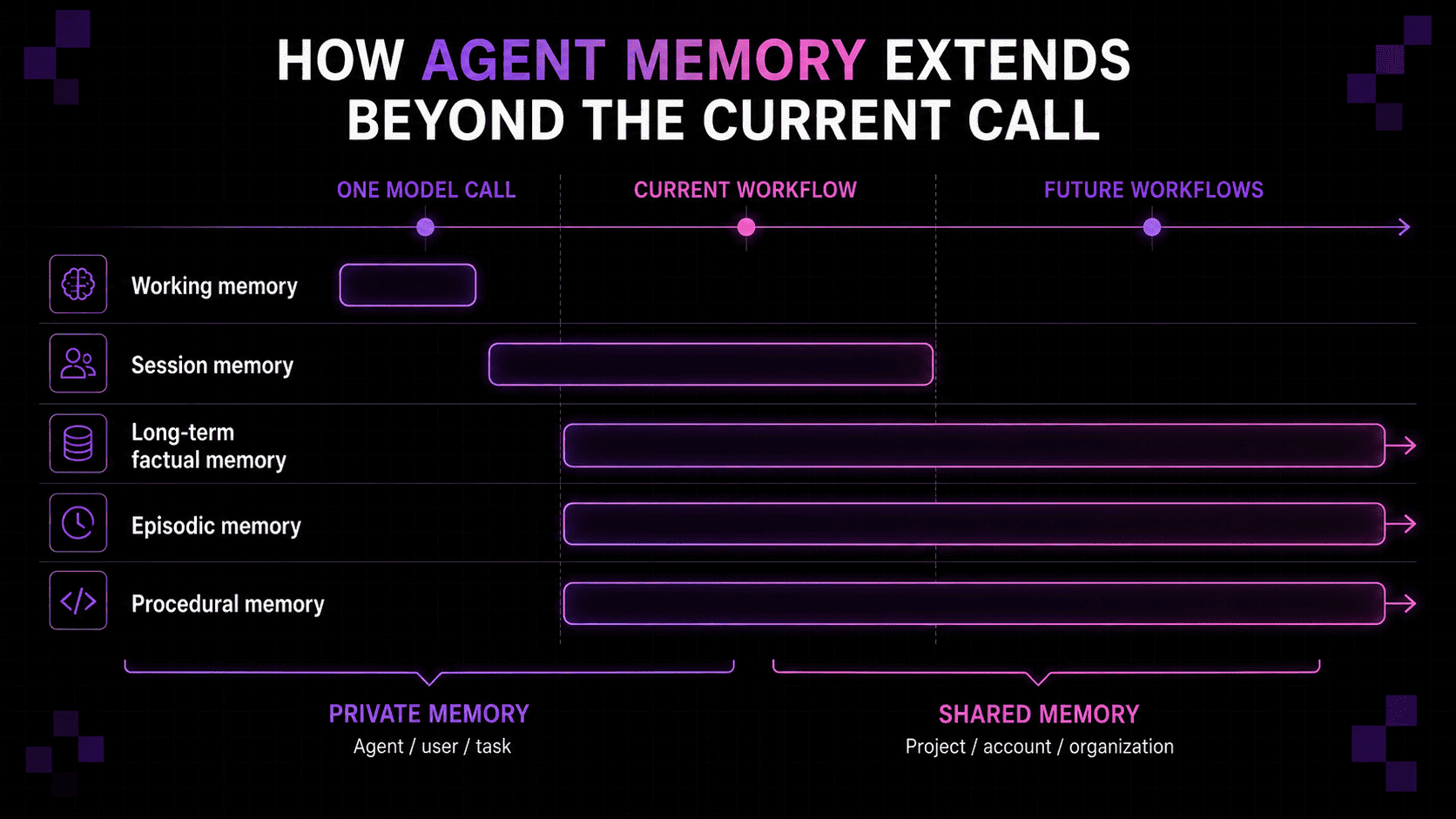
For workflow design, those ideas can be translated into the following memory silos:
-
Working memory: What does the agent need to think about right now?
Working memory is the information available to the model during its current call. It can include task instructions, recent messages, retrieved context, active tool results, and the immediate plan.
Its capacity is limited by the context window. When the next model call starts, the workflow has to decide which parts of the previous context to keep, summarize, retrieve again, or leave behind.
Working memory helps the agent reason in the moment, but it doesn't provide continuity.
-
Session memory: What should stay available during this interaction?
Session memory preserves information across multiple calls within the same interaction or workflow run. It might include recent decisions, unresolved questions, user corrections, and important results from earlier steps.
Unlike a full checkpoint, session memory doesn't need every variable required to resume execution — its job is just to keep the interaction coherent as the agent moves through the task.
A support workflow, for example, might remember that the user already restarted a device, even while the troubleshooting route and retry count stay in workflow state.
-
Long-term factual memory: What does the system know?
Long-term factual memory stores information that stays useful across sessions or future runs — like account details, user preferences, product information, policies, previous decisions, and known relationships between records.
This memory shouldn't be treated as permanently true, though. With timestamps, provenance, ownership, and a correction mechanism, facts can get updated or retired in light of new information — this is the difference between AI memory and maintained AI knowledge systems.
-
Episodic memory: What happened before?
Episodic memory records what happened during previous interactions or workflow runs — the problem encountered, actions taken, tools used, outcome reached, and evidence behind the result.
This helps an agent recognize recurring situations. Instead of starting the same investigation from scratch, the workflow can retrieve a relevant prior episode, check whether its conclusions still apply, and continue from a more efficient starting point.
-
Procedural or workflow memory: What's worked before?
Procedural memory captures reusable knowledge about how to complete a task — a successful sequence of actions, required prerequisites, common failure modes, or conditions that determine which path to take.
An agent might learn, for example, that resolving a particular integration error usually means checking permissions before inspecting the API response. That procedure can guide future runs without fixing every action in advance.
Procedural memory is especially useful when workflows repeat with small variations, as it lets the system reuse what worked while still adapting the procedure to the current task.
Shared vs. private memory
Multi-agent workflows also need rules governing who can access each memory. Make everything global, and agents drown in irrelevant context (or see things they shouldn't); keep it all private, and you get duplicated work plus findings that never reach the agent that needs them.
Where Memory Belongs in the Agent Workflow
The next architectural question is where each memory should get read, written, updated, or removed as the workflow runs.
Some memories should be retrieved before the agent plans; others should only get written after a tool confirms the information is accurate. The right moment depends on the decision being made.
The common thread for all of the points below is selectivity: retrieve memory because it can improve the decision in front of the agent, write it because it might improve one later, and update or remove it once keeping it around would make things worse.
Before planning: retrieve what could change the decision
Memory is most useful before the agent commits to a plan. Retrieval should stay scoped to the current task, user, account, project, or workflow and deliver only the information that could change the next decision.
For a support workflow, that might mean pulling recent incidents involving the same account before picking a troubleshooting route. For a coding agent, it might mean recalling project conventions and earlier implementation decisions before touching a file.
Loading too much memory can inflate token use, bury relevant details, and let obsolete information distort the plan.
After a tool call: preserve verified observations
Tool results are often more reliable than model-generated assumptions, but only the ones that confirm something worth acting on later, like a root cause, a status change, or a user correction, belong in long-term memory.
A database lookup confirming that an account moved to a new plan, for example, is probably worth preserving. Unless it becomes a recurring pattern, a temporary timeout message from that same lookup probably belongs only in workflow state.
At a handoff: transfer task state, retrieve background separately
A handoff should carry what the receiving agent needs to keep going — the current goal, what's done, and any open questions or constraints.
The receiving agent can pull account history, preferences, or earlier cases from shared memory only when it actually needs them, which is what prevents the handoff itself from becoming bloated.
After an important decision: record what was decided and why
After the workflow ends, a future run might need to know what was chosen, what evidence supported it, and whether it's still valid.
A useful decision memory keeps the choice tied to its evidence, its owner, and a rule for when it should be revisited — enough to tell a deliberate choice apart from an accidental state some earlier run left behind.
After completion: consolidate the run into an episode
A completed run can generate hundreds of messages and tool calls — if these contain information worth reusing, consolidate it into a structured episode: what triggered the run, what the agent was trying to do, what happened, and what might be relevant the next time a similar task comes up.
The raw trace can still stick around for debugging, but future workflows retrieve the episode, meaning repeated work becomes experience instead of an infinitely expanding archive.
After feedback or correction: update the existing memory
If a user corrects a preference or a tool or earlier conclusion turns out to be wrong, the workflow should update or invalidate the existing memory.
That means replacing outdated facts, marking superseded memories, and keeping enough of a trail to know which version to trust. Without it, persistent memory just accumulates contradictions.
During evaluation: remember useful feedback
Evaluator-optimizer workflows can learn from repeated feedback, but only relevant comments that reveal something like a recurring failure pattern, stable quality standards, or domain-specific preferences should be preserved.
For example, "always cite the source of financial figures" deserves to make it to procedural memory, whereas simple stylistic feedback probably doesn't.
When information expires: forget it
Information can go stale, lose its value, or need removing because a user asked or a retention period ended. Forgetting needs to be an intentional part of workflow design — it cuts the odds that an agent acts on something that's no longer true.
When Does an Agent Workflow Need Memory?
Adding memory to every workflow creates cost and complexity without always improving the result. A short, self-contained task, a deterministic transformation with complete input, and even an agentic task can work without persistent memory if every run is independent and the full context is available at the start.
Memory becomes necessary once one of a few things is true:
- Information has to survive the current run. A customer-support agent needs to remember a troubleshooting step the user already tried; a coding agent needs to recall an architectural decision from a previous session.
- Prior outcomes can improve repeated work. An incident-resolution workflow retrieves similar failures and the fixes that worked instead of rediscovering them from scratch each time.
- Several agents or sessions need controlled access to shared context. Confirmed facts and outcomes need to reach the right agent without every worker replaying the full execution history.
| Workflow requirement | What the system needs |
|---|---|
| One model call with all required input | Model context only |
| Several steps completed in one run | Workflow state |
| A process that can pause, fail, or resume | Durable checkpoints |
| Continued interaction with the same user | Session and preference memory |
| Knowledge reused across future runs | Long-term factual memory |
| Learning from earlier outcomes | Episodic memory |
| Repeating similar procedures | Procedural memory |
| Several agents working on one task | Scoped shared and private memory |
| Auditable or high-stakes decisions | Provenance, permissions, and decision history |
How to Add Memory to an Agent Workflow With cognee
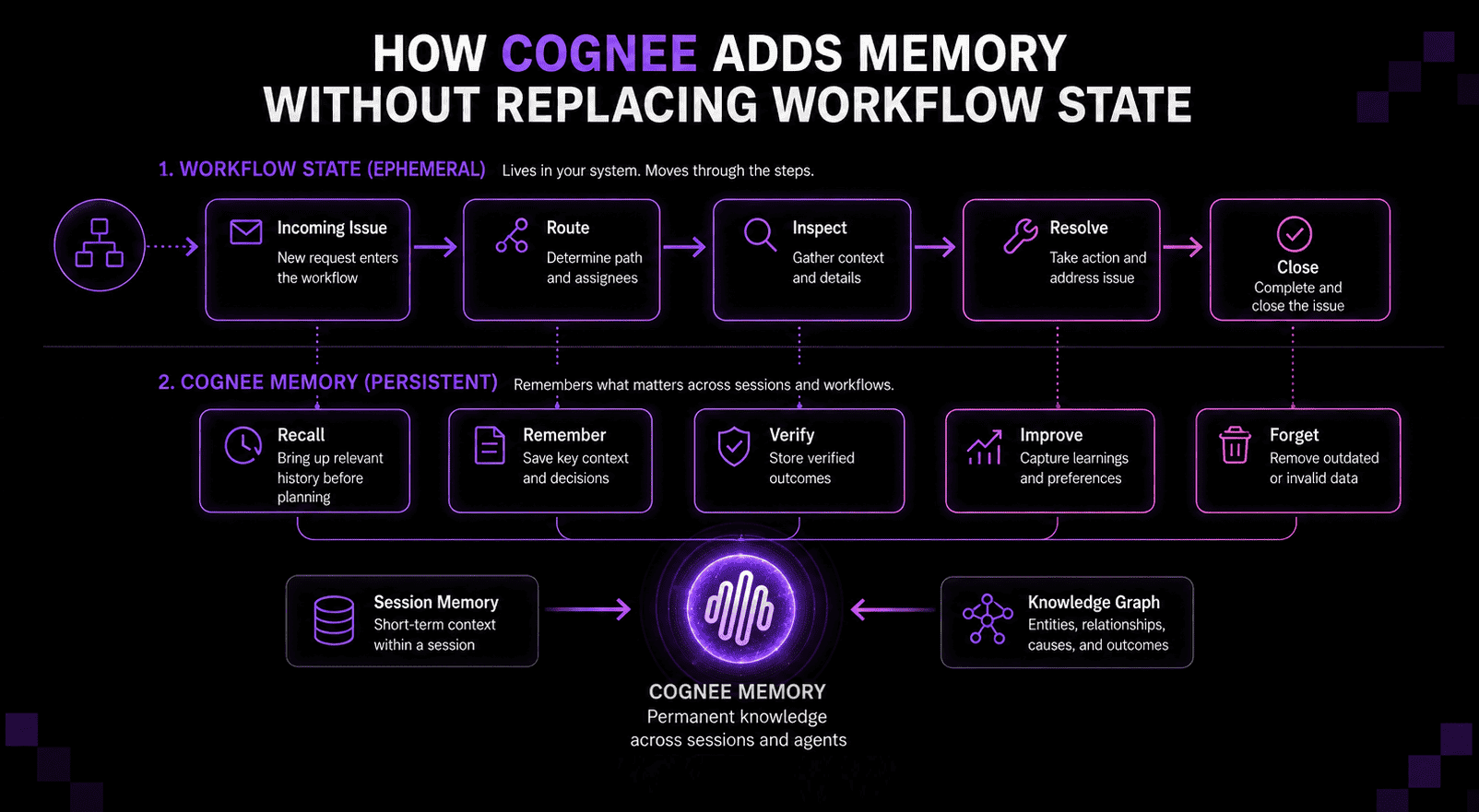
Below is an example of a technical support agent that follows this path:
To add memory, you need two things: an external store that outlives the run, and the logic that decides what gets written to it, when it's retrieved, and how it's updated or removed. Building that from scratch means solving storage, retrieval, scoping, and provenance yourself.
cognee is an open-source memory framework that handles both layers — it stores confirmed facts, outcomes, and procedures as structured memory, and gives the workflow explicit operations to recall, remember, improve, and forget them.
If you want memory capture without changing the surrounding architecture, cognee can also be added through a framework-independent memory decorator.
Now let's walk through wiring it into the support workflow above.
1. Define the workflow state
Start by defining your own state object. It holds the incoming issue, account ID, product, route, tool results, approval status, and final resolution: everything the run needs to keep going, not all of which deserves to become memory.
2. Recall relevant memory before planning
This is cognee.recall(query, session_id=...), called before the workflow picks a route or troubleshooting plan.
Keep the query narrow — closer to "what previously caused this account's authentication failures" than "everything about this account" — since a scoped query is what keeps the retrieved memory useful instead of just padding the prompt.
3. Keep the current interaction in session memory
This is cognee.remember(text, session_id=...). Passing session_id (with self_improvement=False) is what keeps this a session-scoped write instead of a permanent one — it holds the user's answers, tool observations, and open questions for this interaction without promoting any of it to long-term memory yet.
4. Remember confirmed facts and outcomes
This is cognee.remember(text) without a session_id — a durable, permanent write, so gate it behind real verification (a confirmed root cause, a correction, or a resolution that worked), not every message.
A record like this — the account hit an authentication failure caused by an outdated permission, fixed by refreshing credentials — is worth far more to a later workflow than the entire transcript.
5. Improve memory after the workflow completes
This is cognee.improve(), run against the permanent dataset and the completed session_id — it bridges verified session details into the graph and connects this incident to related accounts, products, and past resolutions, which is what makes "what previously fixed this?" answerable later.
It isn't required after every remember() call, since permanent writes already run enrichment by default; use it for the heavier, graph-wide connecting work.
6. Forget invalid or expired memory
This is cognee.forget(data_id=..., dataset=...) — scoped deletion, not a full wipe. Decide upfront whether the boundary is a single record, a dataset, or the whole user, since that's what forget() actually operates on.
What changes on the next run?
Here's what happens if the same account reports a similar error a few weeks later:
| Without memory | With memory |
|---|---|
| Starts cold with the new message and whatever the application loads manually | Retrieves the earlier incident before selecting a plan, and checks whether the old cause still applies |
| Repeats the same questions | Recognizes the relationship between the new error and the previous one |
| Runs the same searches and tries the same steps that didn't work last time | Reuses the resolution if it's still valid, and skips diagnostics that already failed once |
| No record of whether this is a new problem or a repeat | Records whether the new outcome confirms or changes what was already known |
That's a better starting point, and enough context to decide whether the earlier experience still applies. If it does, the agent can retrieve it at the right step, preserve new evidence once it's reliable, and improve the memory available to future runs.
Design Rules for Agent Workflow Memory
Adding a memory store is the easy part. The harder work is setting up clear rules on what the workflow should preserve, who can retrieve it, and how it changes over time — what to write and when is already covered above, so here are the four important rules for once memory is actually running.
-
Give every memory an owner and scope
A preference might belong to one user, a technical decision to a project, a procedure to a particular workflow, and a product fact might be shared across the whole organization — a workflow needs to know this, as scope affects both retrieval quality and access control.
-
Preserve provenance and track when it stops being true
An agent should have verified system records to be able to tell if a memory came from a user statement, a verified database record, a tool result, another agent, or a model-generated inference, since those sources don't carry equal weight.
Persistent doesn't mean permanent, either — memory records need timestamps, expiration dates, version history, confidence levels, and a superseded-or-invalidated label so that the workflow retrieving memory can determine whether the information is current as well as relevant.
Provenance and freshness together enable a system to resolve contradictions instead of hiding them. When a user revises a preference, two tools disagree, or new evidence disproves an old conclusion, these signals help the system determine which information is newer and which source is more authoritative.
-
Treat learned procedures as suggestions
Procedural memory can help an agent reuse successful action patterns, but it shouldn't turn every previous success into a fixed rule, as it might contain unnecessary steps, depend on an outdated interface, or only apply under specific conditions.
Before reusing one, check whether the environment or prerequisites have changed, whether the earlier outcome was actually successful, and whether a simpler path is now available.
-
Bake forgetting in from the start
Deletion is easier to support when memory has clear ownership, identifiers, and relationships from day one. Builders should decide early how the system will handle user-requested deletion, expired information, incorrect memories, revoked permissions, completed retention periods, and procedures or records that no longer apply.
Forgetting also improves retrieval quality — a smaller collection of current, useful memories usually beats a complete archive of everything the workflow's ever encountered. To reiterate, the goal is to make the right information available when it can actually improve the next action.
How to Evaluate an Agent Workflow With Memory
Final-answer accuracy tests only tell you whether the workflow reached the right result once. They don't show whether the agent retrieved the right memory, chose an efficient route, recovered from interruptions, or acted on outdated information along the way.
A useful evaluation should measure both workflow performance and memory performance.
Workflow performance
These metrics show whether the process completed the task reliably:
- Task completion rate: Did the workflow reach the intended outcome?
- Route and tool selection: Did the agent choose the right branch, tool, or specialist?
- Recovery rate: Could the workflow resume after a failure, pause, or restart?
- Repeated-work rate: Did agents repeat searches, tool calls, or completed steps?
- Human intervention rate: How often did the workflow need help?
- Time, token, and tool cost: Did memory reduce work, or just add more retrieval steps?
A workflow can produce a correct answer while still taking an unnecessarily expensive or fragile path. Even if the final response looks fine, that inefficiency compounds at production scale.
Memory performance
These metrics show whether memory actually improved the decisions inside the workflow:
- Retrieval precision: How much of the retrieved memory was relevant to the current step?
- Retrieval coverage: Did the workflow find the facts or prior outcomes it needed?
- Stale-memory usage: Did outdated information influence the result?
- Contradiction handling: Could the system tell corrected facts apart from earlier versions?
- Provenance coverage: Could the workflow trace important memories back to their sources?
- Persistence: Was useful information still available in a later session or run?
- Forgetting accuracy: Was invalid or deleted memory kept from resurfacing?
The most important question is whether retrieving memory actually changes the workflow for the better. If the agent reaches the same plan, repeats the same work, or gets less accurate after retrieval, the memory layer isn't helping.
Test the boundaries where workflows usually fail
A realistic evaluation should include more than a corpus of isolated questions. It should press on the points where state and memory are most likely to break:
- A task repeated with small variations
- A fact that changes between runs
- Two memories that contradict each other
- A workflow resumed after an interruption
- An approval delayed long enough for the underlying information to change
- Similar incidents with different root causes
- Information available to one agent but not another
- A procedure that worked before but is now outdated
- A memory that should've expired or been deleted
These cases test whether the workflow can use memory selectively, recognize when earlier knowledge no longer applies, and keep going safely as conditions change.
Evaluate the complete system
Memory benchmarks are useful, but an agent workflow should also get tested inside the architecture where it'll actually run.
A benchmark like BEAM can test whether a memory system preserves and retrieves information across long conversations. Application-level evaluations should then test how that memory affects routing, tool use, recovery, cost, and task completion in the real workflow to show whether remembering helps the workflow make better decisions with less repeated work.
Design Memory Into the Workflow, Not Around It
Memory belongs inside workflow architecture because useful information is created throughout execution. Explicit retrieval, write, update, and deletion points let the system preserve what remains valuable without carrying its full history into every prompt.
Short, self-contained tasks may need only local state, but workflows that span sessions, agents, interruptions, or repeated tasks need a structured way to reuse prior knowledge — a way to transform an agglomeration of agent calls into a system that can build on earlier outcomes.
FAQ
How do you stop an agent workflow from looping indefinitely?
Define explicit stopping conditions before deployment — task completion, evaluator approval, a maximum number of iterations, a time or cost limit, or escalation to a person. The workflow should also detect repeated actions or unchanged results rather than relying only on the agent to decide when it's done.
How should an agent workflow handle failed tool calls?
Classify failures before retrying. Temporary errors might justify another attempt, while invalid inputs, missing permissions, or unavailable data usually need a different route. Store retry counts and pending actions in workflow state, and make side-effecting operations idempotent so a resumed workflow doesn't execute them twice.
Should an agent workflow write to memory during the run or after it finishes?
Usually both, for different reasons. Confirmed facts or user corrections might need to be written immediately, while the overall result can get consolidated after completion. Temporary observations and unverified conclusions should stay in workflow state until the system knows they're worth preserving.
Can one agent workflow call another workflow?
Yes. A larger workflow can treat a smaller one as a reusable component, much like a tool or a subroutine. The parent should pass a clear input contract and get back a structured result, rather than seeing the child's entire state. That's what makes complex systems easier to test, reuse, and update.
What happens when a stored workflow or procedure becomes outdated?
Procedural memory should be versioned and tied to its tools, environment, and success criteria. If interfaces or requirements change, the workflow should revalidate the procedure before following it. Failed or superseded procedures should get updated, downgraded, or retired — not left equally retrievable alongside the ones that still work.