What Is a Knowledge Base? (and Why Most of Them Stop Working)

TL;DR:
- A knowledge base is an organized system for storing reusable information — the answers, policies, guides, and reference material people or systems need to find again and again.
- The difference between a useful knowledge base and a glorified file dump comes down to structure, ownership, and maintenance — not the software.
- Content belongs in a knowledge base if someone will need it more than once. Everything else is noise.
- Every important article needs a named owner, a review date, and enough connected context to stay useful when the surrounding product, policy, or process changes.
- As AI systems pull from the same sources as people, the quality bar goes up: accuracy, source context, and clear ownership matter more than ever.
The knowledge base definition is simple: it's a centralized collection of structured information built for repeated use. It stores the answers, processes, policies, and reference material that people or systems need to find again and again, and it organizes that content so it can be searched, trusted, updated, and reused.
That last bit, however, is what separates a knowledge base from a regular folder or a shared drive — the ability to give shape to information: what it covers, who it's for, when it was last reviewed, and how it connects to related content.
The original idea and benefits of a knowledge base haven't changed much over the years: reduce repeated work, improve answer access and quality, and make knowledge reusable instead of dependent on whoever happens to remember the details.
In this guide, we'll cover how exactly a knowledge base differs from regular storage, what one should (and shouldn't) contain, the main types of knowledge bases, and how to build and maintain one that customers and employees actually use. We'll also address something most standard explainers miss: why the quality bar has risen now that AI systems retrieve from the same sources as people.
How Is a Knowledge Base Different from a Document Dump?
Most organizations don't have an information problem. They have a findable, trustworthy, current information problem.
The information is there, but scattered across documents, tickets, Slack threads, onboarding notes, policy PDFs, spreadsheets, product updates, and meeting notes. The issue for many businesses becomes that people can't reliably find the information they need, or tell which version is the right one when they do find it.
While a folder stores data, a knowledge base organizes information around repeated use, with someone having decided what the system is for, whom it serves, what belongs in it, and who's responsible for keeping it reliable.
That's the key difference — a static repository may contain the answer, but knowledge base systems help the user understand whether that answer is current, authoritative, complete, and relevant to their situation.
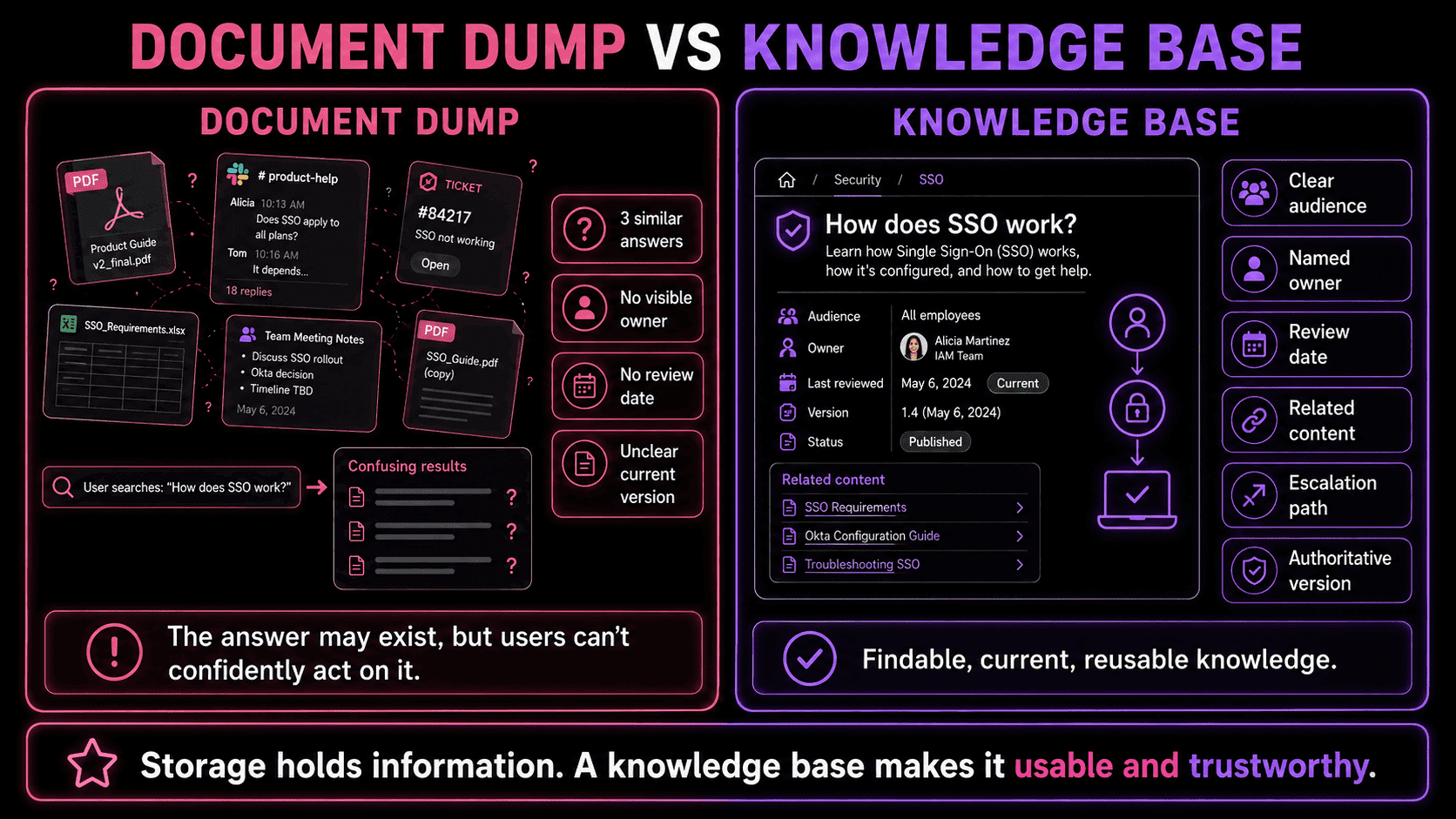
Specifically, a strong knowledge base system makes clear:
- What the content covers and who it is for
- Who owns it and when it was last reviewed
- Which related articles, policies, or records connect to it
- What to do when the answer does not fully resolve the issue
Without those signals, a knowledge base is just a folder with a search bar. It may look organized at launch, but over time, with duplicated pages, outdated instructions, unclear ownership, it inevitably starts returning three versions of the same answer.
A knowledge base is meant to be a single source of truth that repeatedly helps users find what they need without having to ask around.
What Belongs in a Knowledge Base?
The best knowledge bases aren't meant to store everything a company knows, but everything it keeps having to explain.
The simple test for whether a piece of information belongs in a knowledge base is: will someone need this again?
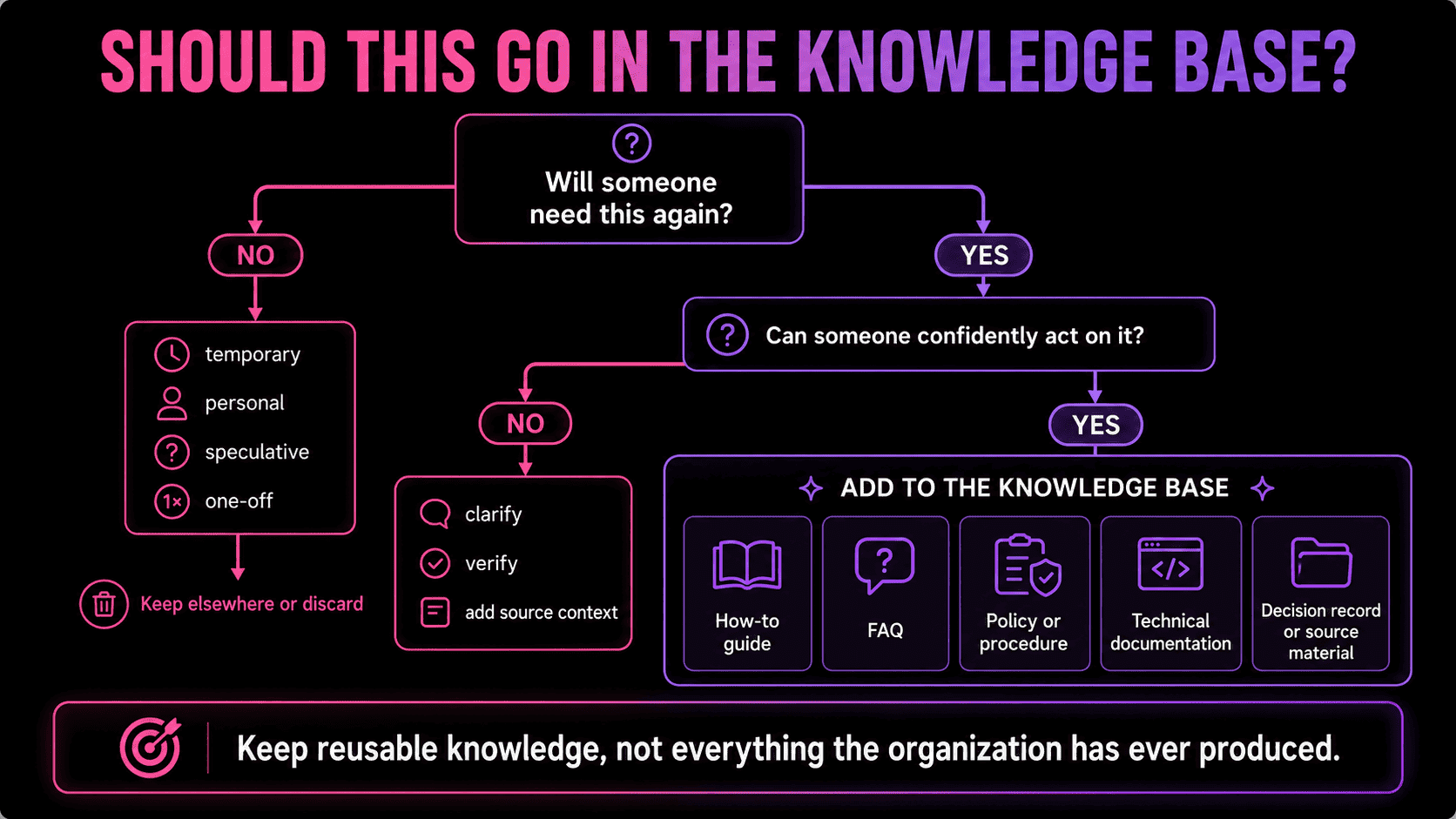
If yes, it should be documented. If the information is temporary, personal, speculative, or unlikely to be reused, adding it may only make the system harder to navigate. A knowledge base turns into an archive the moment it starts containing information that no one can confidently act on.
Content worth keeping usually falls into five types:
- How-to guides and knowledge base articles answer a specific question or walk through a specific task or process, skipping background the reader didn't ask for, and giving enough context to act without a follow-up. Usually the most-searched type of content in any customer service or internal knowledge base, their titles should match real search intent rather than the organization's internal terminology.
- FAQs work when the answer is short, stable, and doesn't need a full article, like for simple questions about accounts, billing, setup, or product behavior. The mistake is using FAQs as a catch-all for content no one has gotten around to organizing. A good FAQ entry either answers the question directly or points to a more complete guide.
- Policies and procedures explain what's allowed, required, or expected, and how processes should be followed. These need the most careful maintenance as outdated procedural guidance can cause real problems. A policy page should have a clear owner, a review date, and a record of what changed and when, especially for customer-facing rules, HR policies, security processes, and pricing.
- Technical documentation covers API references, integration guides, runbooks, troubleshooting logic, configuration details, and known-error records. Precision matters: a vague technical article sends people down the wrong path, while a specific one turns a recurring issue into a repeatable fix. A good technical doc also connects to surrounding context — the service it describes, the team that owns it, the version it applies to, and the escalation path.
- Decision records and source material are what most knowledge bases skip, and often the most valuable thing they're missing. Not every important piece of knowledge is found in an article someone meticulously labored over; some of it is scattered across meeting notes, support tickets, project updates, or decisions made under pressure. If those decisions are likely to matter again, they shouldn't disappear into old threads.
A mature knowledge base keeps enough source context to explain where an answer came from. This matters when information is disputed, updated, or audited, and especially when AI systems are retrieving from the same content, because they need to be able to distinguish between an approved policy, a working draft, and an outdated internal comment.
The more consequential the answer, the more its provenance matters.
Which Type of Knowledge Base Do You Actually Need?
Knowledge base examples include: a public help center, an internal policy library, an IT runbook system, and an AI agent's retrieval layer — but they all serve different audiences and need different structuring.
The most useful way to sort them is by who uses them and what they need to find.
Internal knowledge base
An internal knowledge base is built for people working in an organization. It typically comprises onboarding material, SOPs, company policies, templates, process notes, and decision records.
Its main value is continuity. When someone changes roles or leaves, their knowledge shouldn't leave with them. A strong internal knowledge base lets employees find answers without relying on repeated questions, private messages, or tribal memory.
A company knowledge base needs clear access rules, visible ownership, and regular review cycles. Without those controls, it will degrade quickly — old procedures stay findable, pages contradict each other, and, eventually, employees stop trusting the system.
Customer knowledge base
A customer service knowledge base helps customers solve problems without contacting the support team every time. This typically online knowledge base usually covers setup guides, account instructions, billing information, troubleshooting articles, FAQs, and escalation paths.
The best ones are written from the customer's problem outward, using plain language, outlining clear steps, and offering an obvious path to human support when the article doesn't resolve the issue. They also use search data and article feedback to catch missing answers and unclear titles before any ambiguity turns into a support ticket.
A weak customer knowledge base typically fails for predictable reasons: it puzzles the user with company language, buries key details in long pages, or keeps outdated instructions live after the product has changed.
IT support knowledge base
An IT support knowledge base stores recurring technical fixes and operational procedures — device setup, account access, authentication issues, software installation, network troubleshooting, escalation rules, and known-error documentation.
Every article should state clearly what system, device, role, or version the guidance applies to. It should also include prerequisites, expected outcomes, common failure points, and the next escalation step if the documented fix doesn't work. Vague IT articles waste time; specific ones turn recurring issues into repeatable fixes.
Product knowledge base
A product knowledge base explains how a product or service works and how it changes over time. It may serve customers, support teams, sales, product managers, and engineers simultaneously.
Because products change, this type needs active maintenance more than most. Without regular review cycles, product documentation becomes a record of how things used to work — which can be worse than no documentation at all, since users may still trust the outdated version.
Enterprise knowledge base
An enterprise knowledge base operates across departments, teams, regions, permission levels, and content types. At this scale, governance stops being optional. It needs content ownership, access control, metadata standards, review workflows, search analytics, and clear rules for archiving outdated material.
The goal isn't to centralize everything into one giant library. It's to make reliable knowledge available to the right people in the right context — without surfacing sensitive or irrelevant information to people who shouldn't see it.
AI knowledge base
A knowledge base for AI is designed for systems as well as for people. It may draw from documents, databases, tickets, conversations, policies, technical records, prior task outcomes, and feedback data.
Unlike a traditional article library, it needs more than readable pages. It needs source context, structured metadata, permissions, relationships between entities, and signals that help retrieval systems judge whether information is current, relevant, and appropriate to use. This is where a knowledge base starts to overlap with AI memory architecture and knowledge-layer infrastructure — we'll come back to this later.
The foundational rule applies across all six types: the more a system depends on your knowledge base, the more structure, ownership, and source quality matter.
Same Name, Very Different Systems
Knowledge bases get confused with databases, wikis, help centers, and knowledge management systems often enough that it's worth being direct about the differences. All of these store information, but what separates them is what each is designed to do with it.
| System | Main purpose | Common content | Best used for |
|---|---|---|---|
| Knowledge base | Organizing reusable answers and reference material | Articles, FAQs, guides, policies, technical notes, decision records | Helping people or systems find reliable information |
| Database | Storing structured records | User accounts, orders, transactions, logs, product records | Managing data that needs strict fields, queries, and updates |
| Wiki | Collaborative documentation | Team notes, project pages, meeting notes, early drafts | Fast shared writing and lightweight documentation |
| Help center | Customer-facing support portal | Product guides, account help, billing information, troubleshooting articles | Public or logged-in customer self-service |
| Knowledge management system | Managing the lifecycle of organizational knowledge | Workflows, ownership rules, review processes, analytics, governance policies | Capturing, maintaining, and improving knowledge at scale |
The same information often flows through several of these systems over time — a wiki holds early notes, a database stores product records, a knowledge base turns all of that into a reviewed article, and then a help center publishes part of it for customers.
Also, each system fails when used for the wrong job: a wiki becomes inconsistent without review, a help center can't hold internal context, and a knowledge base becomes a chaotic, ownerless archive if left unchecked.
The question isn't which system sounds more complete. It's what kind of use the information needs to support:
- Need to retrieve a reliable answer, follow a process, or reuse documented knowledge? Knowledge base.
- Need to query structured records? Database.
- Need to collaborate quickly on rough documentation? Wiki.
- Need customer-facing self-service? Help center.
- Need to govern the full lifecycle of organizational knowledge? Knowledge management system.
The strongest setups make the relationships between these systems clear, so users know which source is authoritative and where to go for more context.
How to Structure a Knowledge Base (and Keep It Scannable and Trustable)
A knowledge base becomes useful when people can scan it, trust it, and act on what they find. That requires more than a clean interface. It requires structure, ownership, review habits, and a clear sense of what the system is supposed to do.
Most knowledge bases fail in the same, predictable way: drift. Products change, policies update, teams reorganize, and old articles stay live because no one is clearly responsible for them. Eventually, users stop trusting the system and people go back to asking colleagues directly.
Here are some knowledge base best practices to help prevent that.
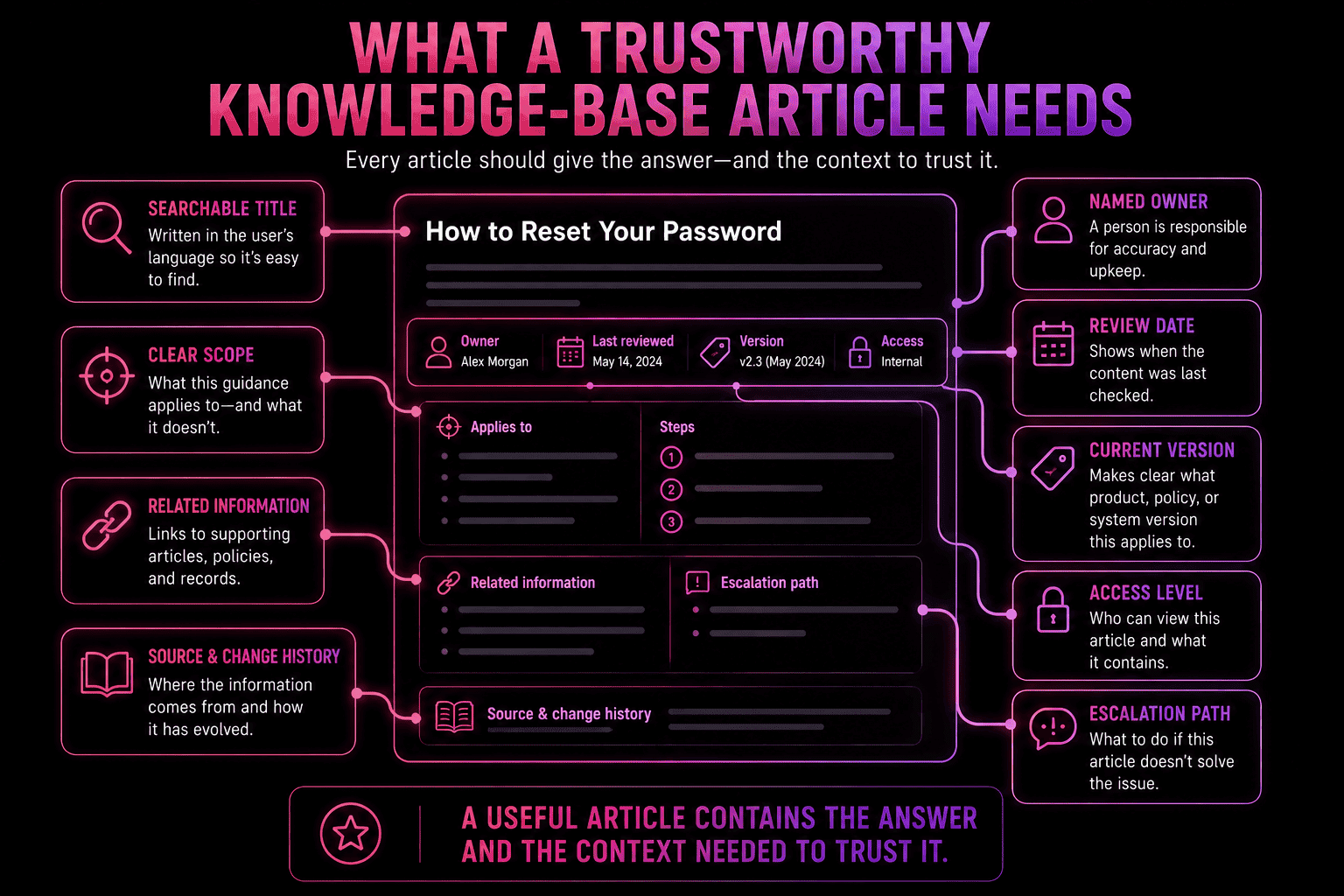
Organize around how users look for answers, not how your org is structured
A knowledge base structure should reflect the user's mental model, not your internal department hierarchy.
Customers think in terms of tasks: account setup, billing, troubleshooting, integrations, returns. Employees think in terms of workflows: onboarding, policies, tools, product knowledge, technical support. Engineers want runbooks, incident records, API references, architecture notes.
If users need to understand your org chart before they can find an answer, the structure is already working against them. Start with a small number of clear categories and expand only when the content justifies it. Over-engineering the structure too early makes a knowledge base harder to use, not easier.
Write titles in the language users actually search
Titles should match the question or problem the user has, not the terminology your organization uses internally.
"Can't log in" > "Authentication failure via identity provider." "Update your billing details" > "Payment instrument management." This applies to internal content too — a new employee searching for "request equipment" shouldn't have to guess that the answer is filed under "procurement workflow."
Clear titles improve both browsing and findability, because they reflect the users' natural search intent.
Give every important page a named owner
Ownership is one of the biggest differences between a usable knowledge base and a content graveyard.
Every article, policy, or procedure that matters needs a named owner — a single, accountable human. That owner doesn't have to be the only one who can edit the page, but they're responsible for its accuracy. When a product changes or a policy is revised, someone needs to know which pages are affected and update them. When users find a mistake, they should know who to flag it to.
Without attribution, maintenance becomes optional, and optional maintenance can mean only one thing… drift.
Add review dates and make staleness visible
Users need to know whether an answer is current enough to trust. Review dates, last-updated timestamps, version notes, and change histories all help — especially for dynamic content like product behavior, technical instructions, pricing rules, security procedures, and customer-facing policies.
Outdated pages shouldn't stay searchable just because no one has gotten around to deleting them — they should be revised, redirected, archived, or removed.
Connect related information
If an answer depends on surrounding context, an article shouldn't be in solitary confinement.
A troubleshooting guide might need links to the relevant feature page, known issue, escalation path, and release note. A policy page might connect to the approval workflow, exception process, and responsible team. A technical runbook might point to service ownership, monitoring dashboards, incident history, and architecture notes.
Good internal links let users move from the first answer to the next question without starting over.
Set access rules from the start
Not everything should be visible to everyone. Customer-facing content, internal procedures, restricted technical notes, and sensitive operational details often need different access levels.
Too restrictive, and people bypass the knowledge base entirely. Too open, and users see information that's irrelevant or not meant for them. The right call is to separate public, internal, role-specific, and restricted content clearly, before the knowledge base grows to the point where retrofitting access rules becomes painful.
Treat publishing as the start of the maintenance loop, not the end
Search logs, article feedback, support tickets, and failed searches all reveal where the knowledge base is working and where it isn't. If users keep asking the same question despite an article existing, the article may be hard to find, poorly titled, incomplete, or written from the wrong angle.
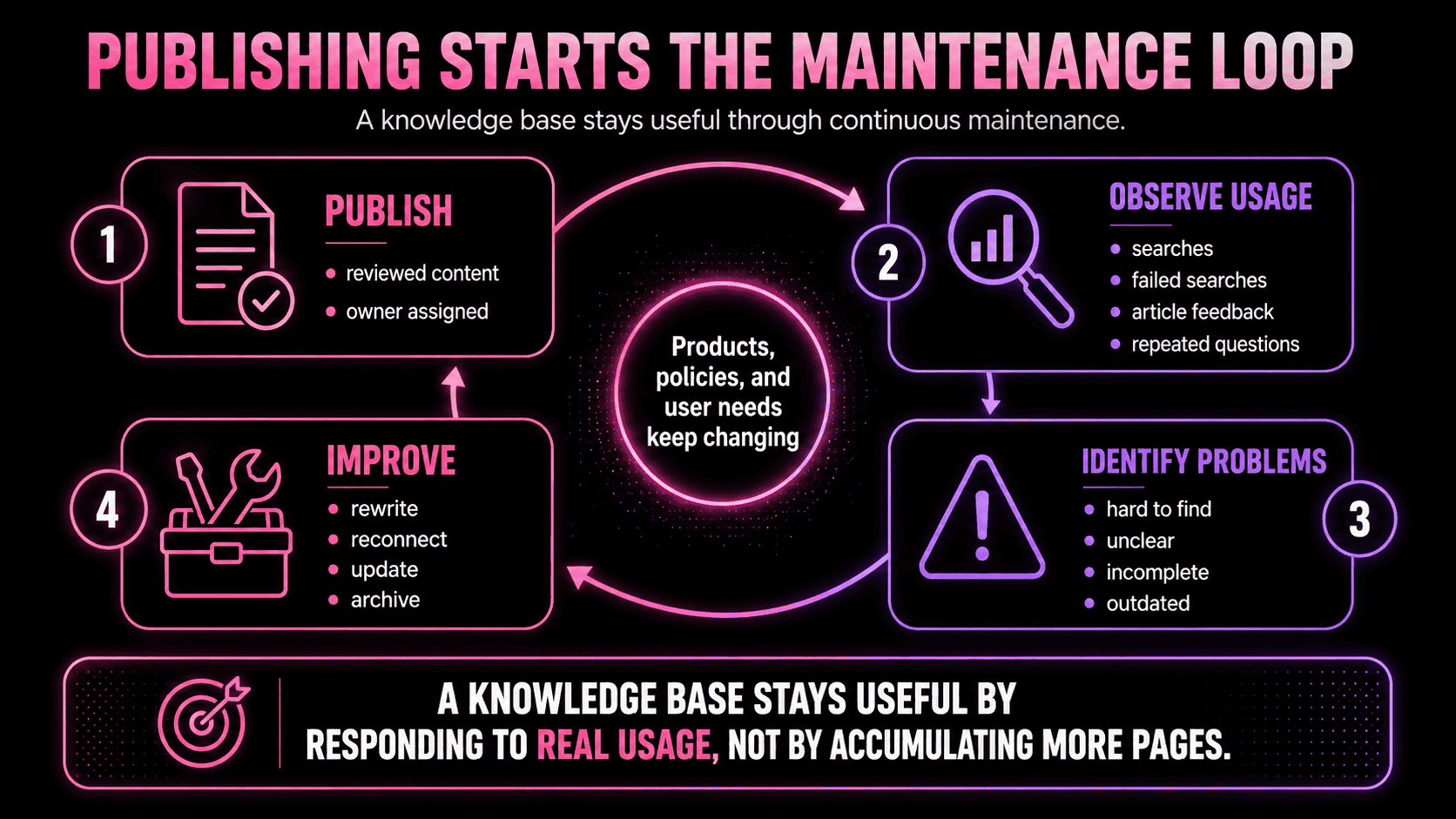
A good knowledge base needs to improve when real usage shapes the next round of content. Publishing without measuring is how good systems slowly become obsolete.
How to Create a Knowledge Base Right the First Time (or Fix It if You Didn't)
Most knowledge bases start in the wrong place. Someone picks knowledge base software, imports a pile of existing documents, and tries to organize everything post hoc.
That can look efficient on day one. Within a few months, however, it starts imploding: outdated documents are still live, unclear articles got copied over unchanged, no one owns the content, and the structure reflects where the information came from rather than how users search for it.
A smaller set of accurate, well-structured articles built from scratch will outperform a large imported archive almost every time. So, whether you're building a knowledge base from scratch or wondering how to manage a knowledge base that already exists, here's a reliable sequence to get you going:
1. Start with who it's for
Before writing or migrating anything, be specific about the audience.
A customer knowledge base needs clear, task-focused language and no internal jargon. An internal knowledge base needs process detail, policy context, and ownership notes. An IT support knowledge base needs precise troubleshooting steps, version details, and escalation paths. An enterprise knowledge base may need stricter permissions, metadata standards, and review workflows from day one.
Trying to serve every audience in one undifferentiated space usually produces content that's too technical for customers, too shallow for specialists, and too vague for anyone to fully trust.
2. Build from demand, not guesswork
The content that belongs in a knowledge base is the content people keep needing.
Look at support tickets, search logs, onboarding questions, recurring process mistakes, customer feedback, and internal requests. Start with the questions that create the most repeated work. That's where a knowledge base delivers immediate value — and those early wins make the case for maintaining the system properly.
3. Choose a user-friendly structure
Pick a clean skeleton and resist the urge to over-categorize upfront.
For a customer service knowledge base, that might mean categories like account, billing, setup, troubleshooting, integrations, and product updates. For an internal knowledge base, it might mean onboarding, policies, operations, tools, product knowledge, and technical documentation. The first structure doesn't need to be perfect — it needs to make the most important answers easy to find without guessing. Search data and user feedback will show what needs to change as the knowledge base grows.
4. Choose or audit your knowledge base software
Only choose knowledge base software after you know the audience, content types, access needs, and basic structure so you can understand the system it needs to support.
When comparing knowledge base tools, focus less on the editor and more on whether the platform helps you maintain trustworthy information over time. If you're starting from zero, first match the platform to the use case:
- A customer service knowledge base needs strong public search, clean article design, SEO controls, article feedback, and support-ticket integration.
- Common options: Zendesk Guide, Intercom Articles, Freshdesk, Help Scout Docs, Helpjuice, and Document360.
- An internal knowledge base needs permissions, collaboration, ownership tracking, review workflows, and integrations with workplace tools.
- Common options: Confluence, Notion, Guru, Slab, Tettra, Nuclino, and Zoho Learn.
- A technical or product knowledge base may need versioning, code formatting, API documentation, changelog support, and links to engineering systems.
- Common options: Confluence, GitBook, ReadMe, Document360, and Zendesk Guide.
- An enterprise knowledge base needs stronger governance: granular access control, audit trails, metadata, analytics, lifecycle management, multilingual support, and review workflows.
- Common options: Confluence, ServiceNow, Salesforce Knowledge, Zendesk, Guru, Document360, and Bloomfire.
If you already have some knowledge base software, don't assume that the answer is migration. First audit whether the existing platform can support the way the knowledge base actually needs to work: Can it separate public, internal, role-specific, and restricted content? Can it show ownership and review dates? Can it surface stale pages? Can users give feedback? Can you see failed searches? Can it integrate with the systems where knowledge is created or used?
- If the answer to the questions relevant for your use case is yes, the better fix may be restructuring, pruning, and governance rather than switching tools.
- If there are deal-breaking no's, then the software is not just inconvenient but is actively limiting the reliability of the knowledge base.
For an AI-ready knowledge base, the calculus shifts again. AI systems don't browse pages the way people do; they retrieve information and need signals that help determine whether it is current, authoritative, and appropriate to use. That means that source context, structured metadata, permissions, provenance, entity relationships, and retrieval quality become more important than a user-friendly reading experience.
5. Configure templates, ownership, and review rules before writing at scale
Templates make articles easier to create, scan, and maintain, and they prevent important context from being left out.
A how-to guide might include the task, prerequisites, steps, expected result, related articles, and escalation path. A policy page might include scope, owner, review date, exceptions, and change history. A troubleshooting article might include symptoms, likely causes, fix steps, and what to do if the fix doesn't work.
This is also the point to configure permissions, ownership fields, review reminders, article feedback, and version history in your chosen platform. These settings are easier to establish before hundreds of pages exist than to retrofit later.
When every article includes a content type, audience, owner, and review date, the knowledge base becomes much easier to govern as it scales.
6. Write with the reader in mind
The title should match what someone would search for. The first sentence should make clear what the page resolves. Steps should be specific, ordered, and complete. Related links should appear where the user needs them, not only at the bottom as an afterthought.
The best knowledge base articles close small gaps the user didn't know to ask about: what the guidance applies to, what's needed before starting, what a successful outcome looks like, and where to go if the answer doesn't solve the problem.
7. Assign ownership before publishing
Every important page needs an owner before it goes live — not after the first complaint.
Review frequency should match the content type. Stable onboarding material may not need frequent attention. Technical instructions, customer-facing policies, pricing rules, and product behavior documentation usually need a tighter review cycle. The key is that someone specific is on the hook for each piece, rather than the responsibility floating to "the team."
8. Publish, measure, and improve
Track what users search for, which pages get poor feedback, which articles reduce support requests, and which questions keep appearing despite existing documentation. These signals show whether the content is findable, useful, and complete.
A knowledge base that improves continuously based on real usage is the goal. One that grows by accumulating unreviewed pages is just a slower-moving version of the document dump it was supposed to replace.
When AI Starts Retrieving from Your Knowledge Base
Knowledge bases were built for human readers. Most still are. However, AI systems now retrieve from the same sources, and, without the right signals, they won't notice when something is off.
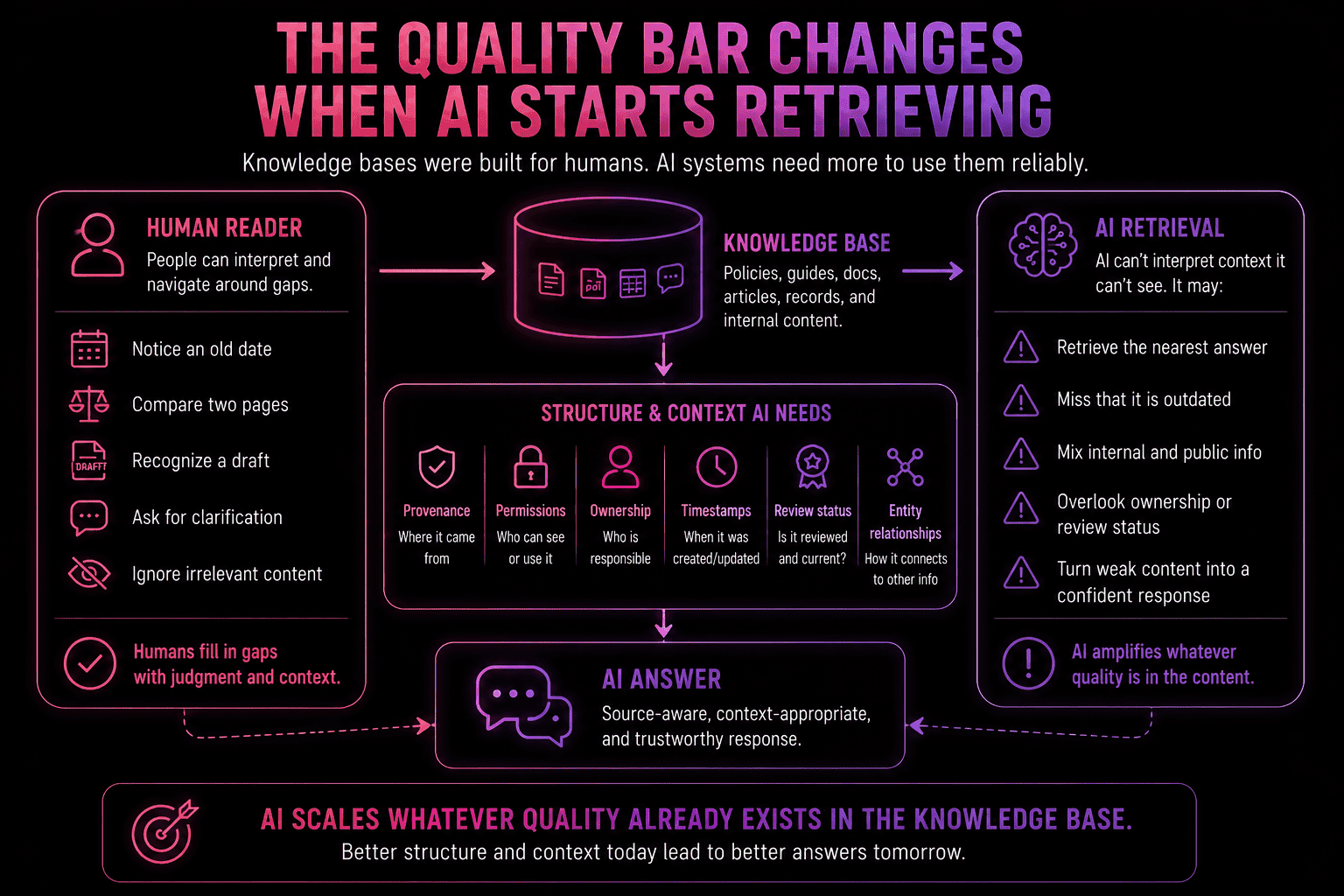
The result is that knowledge base quality becomes load-bearing infrastructure the moment AI starts retrieving from it; it uses what it finds, which means that outdated content that sat harmlessly in a shared folder is suddenly repackaged into confident answers and delivered at scale.
None of that requires new content strategy or a platform migration. It requires taking the fundamentals seriously: ownership, structure, source coverage, and provenance. A knowledge base built on those foundations works better for people and gives AI systems something reliable to retrieve from.
That's also why knowledge bases and memory systems are starting to overlap. For AI agents, useful memory is not just a larger context window or a bigger pile of stored text; it is a way to decide what should be kept, retrieved, updated, and forgotten. We cover that broader shift in our guide to long-term memory AI.
For those building an AI knowledge base, the question worth asking now is whether you'd be happy to let an AI system retrieve from the knowledge base you have today unsupervised.
If your knowledge base is becoming harder to trust, AI will only make that problem more visible. With cognee, you can turn scattered documents, decisions, and source material into a structured knowledge layer with provenance, relationships, and context built right in.
Try cognee right now with Cloud deployment (serverless or private infrastructure) or book a call to discuss on-prem solutions for enterprise use cases.
FAQ
Is "knowledgebase" one word or two?
"Knowledge base" — two words — is the standard in most professional and technical contexts. "Knowledgebase" appears in some software names and older documentation, but two words is usually the clearer choice for article copy, navigation, and search.
What's the difference between internal and external knowledge bases?
An internal knowledge base is for employees, contractors, and internal teams. An external knowledge base is customer-facing and helps users find answers without contacting support. Some organizations run both in one platform with access rules; others keep them separate.
How often should a knowledge base be reviewed?
It depends on how fast the underlying information changes. Stable onboarding or evergreen guidance may need occasional review. Product documentation, pricing, security procedures, and customer-facing policies should be reviewed whenever the underlying product, process, or rule changes.
What's the most common reason knowledge bases stop being useful?
Ownership gaps. When articles belong to "the team" instead of a named owner, no one is clearly responsible for keeping them accurate. Products change, people leave, processes move on, and the page stays live.
Can a knowledge base work as a personal tool?
Yes. Personal knowledge bases can store reading notes, research, reusable writing, recurring decisions, project notes, or life admin. The same principle applies: keep what you'll need again, structure it enough to find later, and prune what no longer matters.
What's the difference between a knowledge base and a knowledge management system?
A knowledge base is where information is stored, organized, and retrieved. A knowledge management system is the broader practice around it: ownership rules, review workflows, governance, analytics, and maintenance.
When does a knowledge base need AI-specific structure?
As soon as AI systems start retrieving from it. AI agents and support bots need more than readable articles; they need source metadata, permissions, ownership signals, review status, and connected context. Without that structure, they may retrieve the closest answer rather than the right one. See what goes into an AI agent knowledge base.